
Tuesday, February 9, 2010 17:38

LockDockBar – Cydia App to get apps on the iPhone lock screen

Posted by Piyansh on Monday, October 27, 2008, 18:35

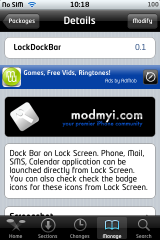
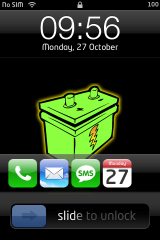
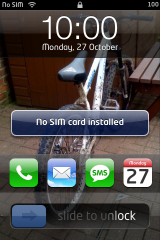
‘Lock Dock Bar’ places a set of default 4 apps on the lock screen of your iPhone, just above the slide to unlock tab. These are Phone, Mail, SMS and Calendar. Also present is the iPod control which shows on the top of the screen (not seen in the screenshot).

These apps cannot be rearranged or replaced as of now. But a good utility. Available free via Cydia.

Cydia is an Installer alternative, that Installs on Jailbroken iPhone 2.x… Info here

Image courtest iPhoneFreakz

This item was posted in News, Reviews, iPhone apps & has 4 Comments so far.
Subscribe to iPhoneHelp via RSS and Email. Follow us on Twitter

Related Posts

4 Comments

  1. Raju
    30 October, 2008, 12:36

    LockDockBar does not work well with Intelliscreen; if you open phone/sms/mail/calendar from the dock using this program Intelliscreen stays on top no matter what.

  2. Hocplyr98
    18 April, 2009, 0:53

    Hey, where did you get the slider from?

  3. thomas
    29 September, 2009, 2:13

    this does not work on my iphone 3g, when i instal it my iphone goes in to saftymode…. :/

  4. mathi
    19 November, 2009, 13:48

    @thomas: same prob her too… can’t get out of safem. before deinstalling this..

Leave a Comment