
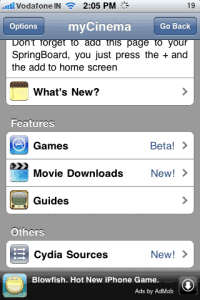
The first thought that came to my mind when I first saw this app was WOW!! Directly download your favourite movies onto your iPhone. The app opens with the home page with a welcome note, and as we scroll down we can see featured Games, Movie Downloads and Guides on iPhone/iTouch and Xbox 360. The app also has a list of a huge list of sources/repository for cydia at the bottom.
The first thing I went into was Games. I was quite disappointed as there were only two games and I couldn’t even download those games. Then I pressed the ‘Go Back’ button on the top-right and came to the home page. Then I pressed on the Movie Downloads tab and I saw a menu coming up from the bottom showing ‘Download Movies at your own risk’. It also showed two tabs To Downloads and ‘How To Download’.
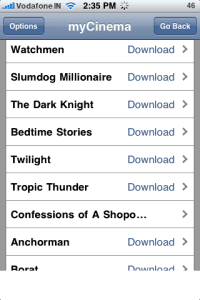
How to download tab shows you all the requirements for downloading and watching the movie directly from your iPhone. When I press the ‘To Download’ button it redirects to a new page which has a note above saying that the movies are not listed by the developer. Below that, you can see a list of all the movies (alphabetically). It also has a request a movie tab (redirects you to new mail). When you click on a movie it will redirect you to a web page where the movie has been uploaded (megaupload site).
There you can press the download file tab you will have to wait for a few seconds and then press regular download (if you have a premium account, downloads start immediately) after which you will see two tabs appearing i.e. ‘Download’ or ‘Play’. The play tab doesn’t work, but when you press the download button the movie directly gets downloaded to the path var/mobile/library/downloads. There is also an option to view the file on MegaVideo (didn’t seem to work). The movies are in .mp4 format which work perfectly fine on the iPhone with softwares like dTunes, mPlayer or iFile. However, I prefer using iFile (You also need safari download plugin).
All in all the app is good but only for movie downloads and cydia sources. The games tab is pretty bad as we cant download games from there. The app is stable but has a small list of movies. Lets hope that many more movies will be added as the app gets popular. I think its a very good app, but as the movies are really huge downloading them can be a problem/ time consuming.
To download this app search for ‘myCinema’ on Cydia
Updates: Some password issue has been reported. The password for MyCinema files is “DaNoob2” (case sensitive).
Also, the app is reporting a small downtime to add the search feature
The app has been updated, and new version only downloadsmovies.