
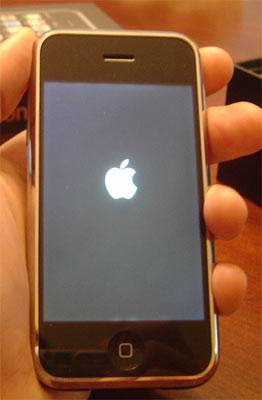
Jailbreaking can be puzzling and can give your a heart attack if something goes wrong. And more often than not, something does go our of control. One very common error seen while jailbreaking your iPhone / iPod Touch is the Apple Logo where your iPhone gets stuck after you jailbreak using QuickPwn. Though QuikcPwn shows that Jailbreak was successful, you would not be able to use the iPhone / iPod Touch. Solution? Easy!
Wondering How to recover an iPhone / iTouch stuck on Apple logo screen?
This happened to me today while updating from V2.2 to 2.2.1. To get your iPhone / iPod touch up and working all you need to do is this:
After Jailbreaking – connect your device to the PC, turn on iTunes and leave them for 10-15mins. Your iPhone will bootup just perfect.


iPhone / iPod touch downloads
{ 45 comments… read them below or add one }
thnx alot for making us aware of such an info
Here is another way to fix your jailbroken phone.
1. Restore your phone to factory setting, 2. don’t sync your apps you purchased from itune, 3. jail break it the way you did before, then and only then sync your apps again it will work
Infact the solution mentioned here is not only applicable for jailbreaking..u can use it when your phone doesnt reboot..
thanks guys it help!
There is nothing better than this to hear … that it helped! Thx
Thanks a bunch for the info. Heart attack indeed specially since it was my girls phone but you guys save the day and saved me from having to buy her a new iPhone.
When I plug the phone into the pc and turn on itunes I get the message that itunes cannot connect to the iphone because it is locked. Can anyone help me?
@Bob
I had the same problem you had. It turns out that my iTunes was signed in on my friend’s account. Make sure you are signed on to your account. And then go into DFU mode. iTunes should tell you that the iPhone needs to be restored.
Thanks a lot that really helps out. I got the apple logo, waited and lost my cool. Read your thread then it worked. Thanks a million times. Was updating iphone 2g from 2.2 to 2.2.1.
what do i do then its stuck on the apple and a spiral and keeps going off and on?
i honestly am having a heart attack i dont knowwhat to do i got my ipod touch like last week ive tried andwaited but forsome reason its still stuck on the apple
what do i do??? x
I downloaded the activateMMS on my iphone 3G when I rebooted my Iphone it got stuck on the apple logo. I tried connecting it to my computer so that itunes opens my phone but it wouldn’t recognize it. What am I going to do????????? Help!!! Please
have the same problem tat carla has. downloaded activatemms on my 2g iphone. n now i m stuck with the white apple logo on the screen…please solve my problem.
I have the same problem as carla and its pissing me off, I already jailbroke the phone 2 times and got happy as hell because I saw it was jailbreaking and the stoopid shit still stuck on the apple and the spinning wheel. Please help me!
me too.
stuck on apple and spinning wheel
i feel like am about to start crying
i jailbroke my 1g ipod touch 1st gen. and i downloaded all 3 of the options it gives you, its stuck on the pinapple with a bite screen, and i dont noe wat to do. can u plzz help me!!!!
I had the exact same problem today, My phone kept popping up this thing that said device not compatible with iphone blah blah blah do you want to switch to airplane mode. So i turned it off hoping that would fix it well then it wouldnt turn back on the apple logo reboot thing and then it would just shut off. But if you do a hard reset hold the lock screen button and home button untill it turns off.
1.Open itunes
2. Push and hold home button
3. plug phone into computer (while still holding home button)
4. and it should see it in itunes and it will ask if you want to restore it.
it worked for me, i’m just waiting for the update to finish downloading
the same thing with mine . after i was downloading an app on cydia it told me to reboot and i did it then it got stuck at the apple logo & i held the home button and connected it to my computer and it worked so i knew not to download the same app from cydia but i downloaded another app and the same thing happened and now nothing works so im waiting to see if this works wish me luck .
Like everyone else I jailbreak my iPhone and it was success! BUT when I installed an app it asked to REBOOT and I did. Then the APPLE LOGO came on; took longer than it should to load up to my homescreen. The thing was it NEVER load up, it just went blank again. Everytime I turn it on it just does the same thing; goes BLANK. I am so frustrated right now! I tried to reinstall the jailbreaking again but it just goes blank again. HOPEFULLY someone can help me…..
ALSO i tried to restore it but everytime it gets to getting done downloading the thing for my iphone it says connection failed!!! HUH>!>!>!
Like everyone else I jailbreak my iPhone and it was success! BUT when I installed an app it asked to REBOOT and I did. Then the APPLE LOGO came on; took longer than it should to load up to my homescreen. The thing was it NEVER load up, it just went blank again. Everytime I turn it on it just does the same thing; goes BLANK. I am so frustrated right now! I tried to reinstall the jailbreaking again but it just goes blank again. HOPEFULLY someone can help me….
glad to say; MY PHONE IS FIXED. i am so HAPPY.
i recently jailbraked my ipod touch but it just stays as an apple logo and it doesnt load if waited long anof for it to load and it just doesn work can anyone help?
@Alyssa: Your solution worked perfectly. Thanks for sharing!
This didn’t work for me but what I did was, I push and hold the home button until the iPhone turned off, then open itunes. push and hold the home button again, and iTunes should recognize your device.
Hi My name is sami have iphone 3gs 32gb. i jailbrek my i phone its working good. just now i erase all datas. after i boot my i phone. 4 hours already still i can see only apple logo only, Pls help ? how to solve this i am ryt now online. My name is sam,From Singapore, e-mail cholaisri@yahoo.com
I had the same problem: after jailbreaking the 2G with 3.0 (used both, redsn0wn 0.72 and 0.8 and both showed successful jailbreak) the iPhone stuck with the Apple logo and looped and looped and looped. Tried to jailbreak twice, but with no success. The phone was in a neverending loop and didn’t start. – Then I found this page. What worked for me, was the following procedure:
Turn the iPhone off – push home button and connect the phone to the PC – keep Home button pushed and start iTunes on your PC – keep pushing the home button – iTunes realized the iPhone and wants to recover – install the current release or push SHIFT (on PC) and browse your computer for the appropriate firmware. iTunes than begins to install the firmware on the iPhone.
I could start the iPhone up but – of course the SIM was locked, so I had to do the jailbreak again. I used iPhone1,1_3.0_7A341_Restore.ipsw and the iPhone was ready to go (and I lucky again). Took me some hours to find out, how to fix this damned thing. I definitely will not use any patches anymore (tried to make MMS work).
tried to to a commcenter patch. stuck at apple screen then apple screen with frozen spinning wheel..
UPDATE.
I have a Mac . Nothing was working . Roommate has a Dell Laptop. Got the phone turned off .
1. Hold Home For 20 second.
2. Plug into intunes
3. waiting seconds then hold while holding home press power ..
It will be in iTunes
thank you so much Alyssa ur advice worked perfectly i was close to throwing my phone lol
@alyssa, @dieter….. you guys saved me!! I searched on the internet for 6 hours trying to find a solution…I was ready to go to the shop and buy another phone and send out 700 emails that I had changed my phone number. no more jailbreaking… hell naw… THANK YOU.
Thank you Alyssa, your saved the day!
hi guys, basically im having the same problem thats most people are having which is the iphone is stuck at the apple logo with a frozen loading icon. Does anyone have a solution for this bc ive been without my phone for weeks now. Please help!!!! thanks
I installed blackrain and it worked fine. I downloaded winterboard and it asked to reboot. i did that and now my phone will not stay on. the apple logo comes on for 5sec then phones turns off. I tunes will not let it restore. what do i do
yesterday and today i spend countless ours of trying to jailbreak my ipod touch, restore, sync, jailbreak, restore, sync, jailbreak. i got so frustrated. now after i restored me ipod touch to 3.1.2 firmware, i skipped the sync and jailbroke it using blackra1n. then i synced my data back in using itunes. it finally finished, but on the ipod it just shows the apple logo, and the loading bar under it. it just stops 1/5 of the way but on itunes it says sync completed, ok to disconnect. the only way to fix it is to get it back in recovery mode, restore, and sync. how will i jailbreak my ipod touch?
This helped!!
GREAT THANX
Turn the iPhone off – push home button and connect the phone to the PC – keep Home button pushed and start iTunes on your PC – keep pushing the home button – iTunes realized the iPhone and wants to recover – install the current release or push SHIFT (on PC) and browse your computer for the appropriate firmware. iTunes than begins to install the firmware on the iPhone.
OMFG. Everywhere else said you had to restore it and lose all your music, etc. My PC has no HD space so practically none of my music is on my PC (stupid but i’m getting a new pc). I can’t believe that was so simple
Thansk Alyas My phone was having same issue and got fixed with your solution
I had a similar issue running a jailbroken 3Gs w/ 3.1.2. I have been using Cydia and Rock apps with very little difficulty. I had one lock up on the Apple start screen, but that was resolved by forcing the phone to reboot with the Home/Power combo. I have started playing with Cydgets and other locking screen mods. I had Cydialer installed and then tried another app called LockScreen only to have the phone get stuck in the Apple logo screen. I’m gathering there was a conflict between the two programs. Forcing the phone to reboot didn’t seem to do anything so I started searching around and came up with this and a variety of other pages. The solutions ranged from restoring the phone to factory to SSH-ing into the phone and editing files. My final solution required NO RESTORE and plenty of patience.
All I did was plug my phone into my MacBook and force a reboot. After a little while the phone was recognized by iTunes and began to backup. Mind you the phone screen remained stuck on the Apple logo. iTunes would appear to backup and then drop the connection to the phone repeatedly, until finally a backup was completed. The phone would then periodically appear to connect and backup in iTunes. I waited about an hour, hoping it would finish and resolve itself. I went to bed and when I woke in the morning the phone was running in SAFE MODE. Leaving the phone in SAFE MODE I opened Cydia and removed the applications I had installed prior to the crash. Now my phone appears to be working just fine.
Moral of the story? Don’t be hasty and do a restore, WAIT it out. Your phone may be able to resolve the lockup over time. Mine did.
i used quickpwn to kailbreak ipod touch 1G(which was already jailbroken) to get cydia and installer
now after everything went fine i ipod was still coming out of the sleep mode and now it got stuck on the pineapple logo…plz plz plz help!!!!!
it doesnt work for me, it has the logo stuck then it shows the charging screen and goes back to the logo again
Okay well, I decided to go to my settings and “erase all content and settings” on my iphone. It told me that it’ll take an hour but for the whole entire day now the apple logo is all I see. WHAT DO I DO?!?!? Ive tried everything that you guys have said, but nothing worked. It wont even recognize my iphone on Itunes
thanks man
i really thank u a lot for this solution. it really worked and m saved.
so i have the 1st gen. ipod touch and just downloaded the 3.1 update so its able to use apps. I downloaded apps, and everything was downloaded on fine and used up all the space.
the problem is that now whenever i turn it on its frozen on the apple logo
so i do the hold both buttons for 10 seconds. it works and i plug back to my mac, then everything syncs again. says its fine, BUT its still stuck on the apple logo with a load bar underneath that seams to never fully load. How come it doesn’t load? Please help and info on ipod is 8G 1st gen. itouch.
HELP PLEASE
I plugged my iphone into the computer and let it sit. nothing is happening. it just stays on the apple logo when it starts up. i even tried putting it into recovery mode and plugging it in.