
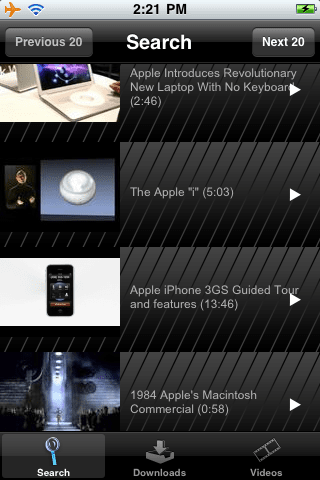
Youtube.app is certainly one of the favourite apps of quite a few on the iPhone. However, Apple has restricted the feature of downloading the videos to the app. But Cydia came up with MxTube which allows you to download and stream videos directly from the app.
However, now we have an alternative to it. aTube Video Downloader is a youtube video grabber for the iPhone via Cydia. Below is a list of features the app possesses.
Features:
- Search for youtube videos
- Choose a video for downloading or streaming
- Watch the video before downloading it
- Simultaneous downloads
- Cancellation of downloads
- Delete videos
- Watch other videos while downloading
- Manage your videos
However, the app still needs some repair. The app is sluggish in its functioning and hangs sometimes. Also, it lacks some features downloading options like high quality, low quality, flv+covert etc. which MxTube already has. But its just the first release on Cydia and I expect the app to get better with updates. To download the app search for ‘atube video downloader’ on Cydia
Via BigBoss & Planet-iPhones Repository
iPhone / iPod touch downloads
{ 17 comments… read them below or add one }
The app is cool..However too slow and sluggish..Nice interface though..
Would rate it lesser than MxTube though as it lacks some key features
I think that yourtube in cydia store is better because it is in the YouTube.app
but if you are looking for something free. Than this is a runner up to mxtube.
What directory are the videos downloaded to?
can’t find where the video are downloaded to which folder using iphonebrowser.
any clue?
Can not open atube on the iPhone tried everything please help.
where is it save to
Videos go in ~/Documents
This program rocks! so user friendly
in a future version could you implement the ability to browse a youtube users channel? That would be the best.
Hi,
I have downloaded MxTube from but could’nt download from YouTube.com.when I click on the YouTube.com it says feature not available.is it old version that I am using or something wrong with my settings. Please reply.
Thanks in advance.
Shuvro
does anyone know how to take a video downloaded from atube to make it work on a/v cables on tv? i purchased the cable, and normal youtube videos are played, but it looks like atube videos aren’t recognized..
thanks
You’ll find them under /var/mobile/Documents
I found this tips from this website http://appsindex.com/2009/08/atube-video-downloader/
@Val Thanks, I don’t know how many times I looked in the Docs folder and looked right over top the Videos!
@aTube Author, The software rocks, just needs more features!
I got a question sir
about 3wekk ago
i have download this atube from cydia
nd working no problems
i have download about 36clips
Till now
i think my atube downloader got a probelms now
i dont working right
when i search a clips that i want to download
no respont from the search
blank……..
Got nothing my search file on the atube search
What is the problems?
good thncou
eryk ive noticed myself that this happens but come to find that it only doesnt search when just using 3G connection, when on wifi it searches fine.
Hello,
I have iphone 3G and i have been using atube for a long time but now it is giving message when i want to watch any video ” The file could not be found”
and also not downloading videos,
Can anybody please help me!!
Waiting for reply in this regards,
Junaid
Got problem with atube will allow to download video, but will not appear in videos or give any options to create playlist. Anything i might be doing wrong or something else to download to fix problem?