
Since hackers have come up with a tweak called Zeppelin to replace your carrier text with a custom logo, it has open a wide range of options. Gone are those days when you used to replace the text with your own text or smiley. Now, you can replace the whole text with your personally designed logo. Here we would tell you about an Indian carrier logo pack via Cydia for Indian users.

Undoubtedly, there are many other carrier packs available for your respective country. You can search for the same under BigBoss or Modmyi repository in Cydia. Before installing the pack, make sure you have Zeppelin installed. Once done, go to Cydia and search for ‘Indian carrier logo for Zeppelin’. Install and navigate to settings>Zeppelin>theme. Choose the appropriate logo depending on the carrier.
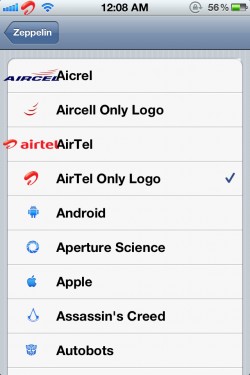
All the customized logos from majority of the carriers such as Aircel, Airtel, Cell One, Tata Docomo, Loop, Uninor and Vodafone are available in this pack. We have tested the theme by ourself and we can confirm that it is working absolutely fine. You should give it a try if you use a Jailbroken iPhone on iOS 5.0.1. Let’s know about your thoughts about it in comment section.