
Your iPhone used to last till bedtime. Now it’s begging for a charger by four, Battery Health says 81%, the shop downstairs quotes ₹2,500 and Apple wants ₹10,900. Which number do you believe, and is it even time?
Apple’s iPhone battery replacement price in India runs from ₹7,900 to ₹13,900 on most models. Check one screen before you pay: if you’re on AppleCare+ and still above 80%, wait. When you do replace it, get a genuine battery, and know that the cheapest genuine one isn’t always at the Apple Store.
iPhone battery replacement price: the quick answer
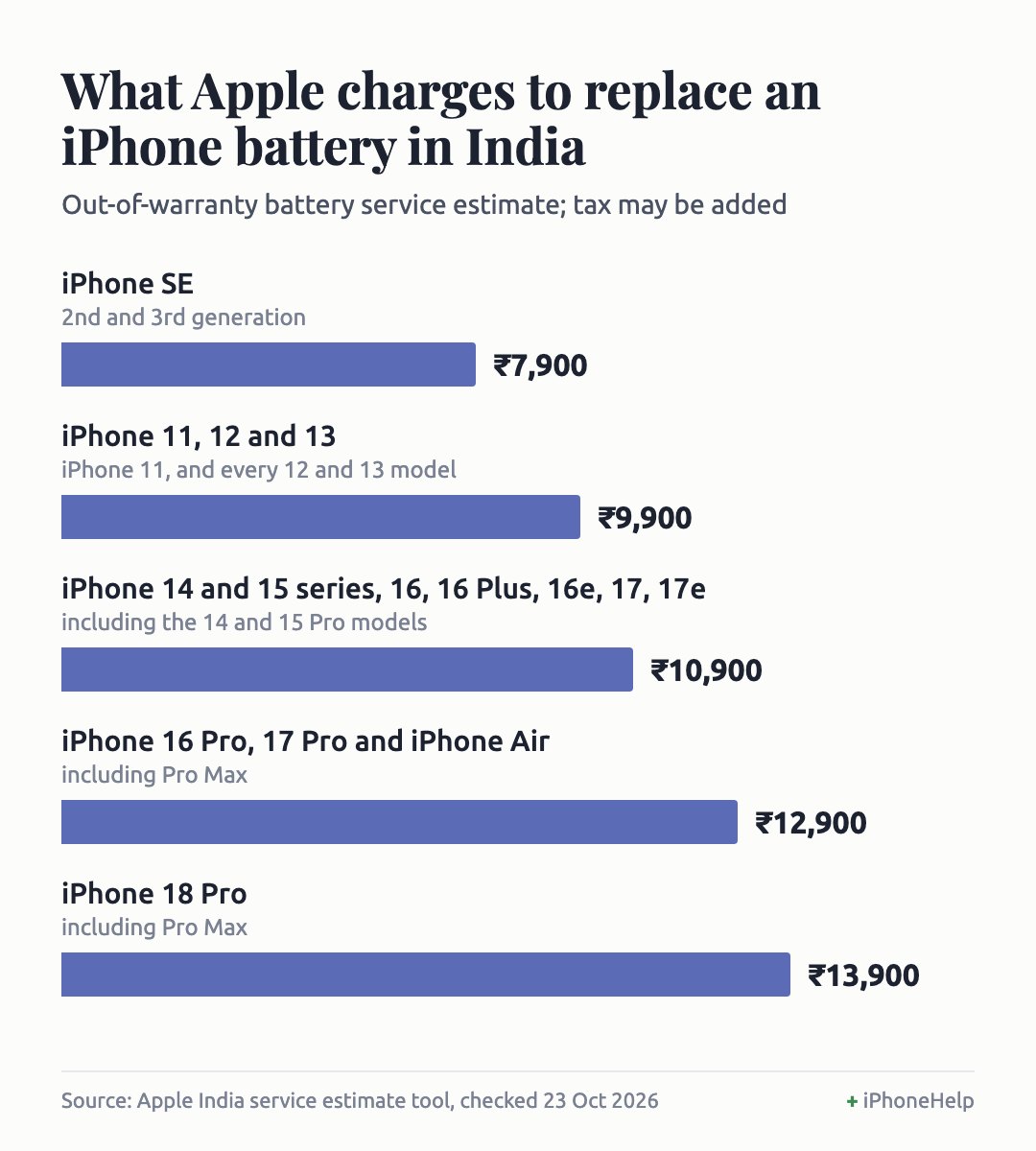
Apple’s own out-of-warranty price in India, checked on 23 October 2026, depends on your model:
- iPhone SE (2nd and 3rd generation): ₹7,900
- iPhone 11, and every iPhone 12 and 13: ₹9,900
- iPhone 14 and 15 (all models), 16, 16 Plus, 16e, 17 and 17e: ₹10,900
- iPhone 16 Pro, 17 Pro (and their Pro Max) and iPhone Air: ₹12,900
- iPhone 18 Pro and Pro Max: ₹13,900
Tax may be added. With AppleCare+ it costs nothing, but only once maximum capacity drops below 80%. Replace it when Battery Health says Service, capacity is under 80%, or the phone switches itself off at 20%. Above that, and lasting most of the day? Keep your money.
Check Battery Health first
Everything else depends on this screen, and it takes ten seconds. Open Settings > Battery > Battery Health. iPhone 14 and older models call the last row Battery Health & Charging instead.
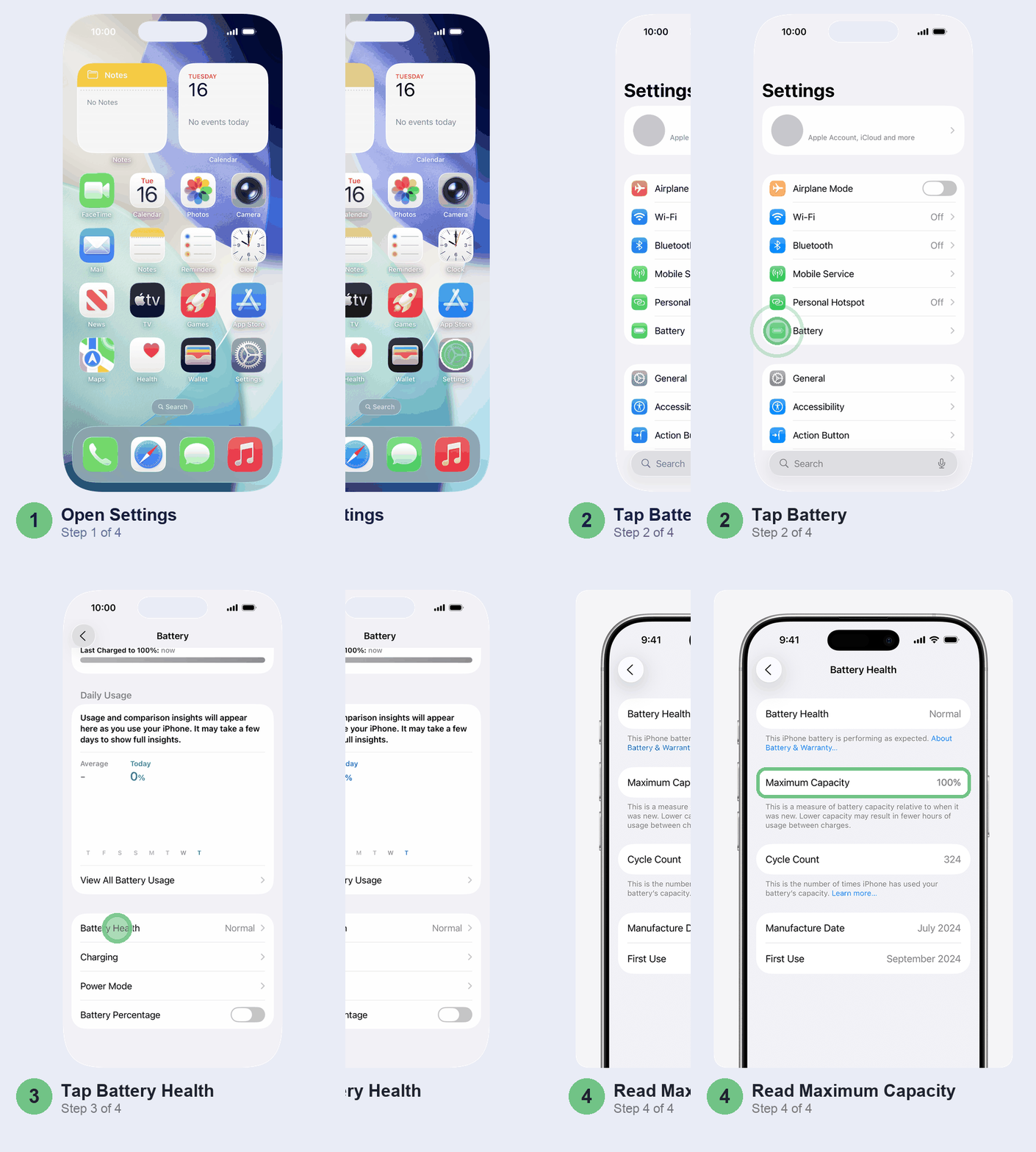
Three things on it matter:
- The status next to Battery Health. Normal means carry on. Service is Apple telling you the battery needs replacing to get back full capacity and performance.
- Maximum Capacity. How much charge the battery holds compared with new. 85% means roughly 15% less time between charges than when the phone was new.
- Cycle Count (iPhone 15 and later, along with the battery’s manufacture date and first use). Two half-days from 100% to 50% add up to one cycle. Apple designs iPhone 15 batteries to keep 80% after 1,000 cycles, and iPhone 14 and older ones after 500, in ideal conditions. Indian summers aren’t ideal conditions.
On older models, also read the Peak Performance Capability note further down. If it says the phone had an unexpected shutdown and performance management has been applied, your battery can’t keep up with demand any more. That’s a stronger reason to replace than any percentage. Leave the Disable button alone: once you switch it off you can’t turn it back on, and you’ll just get more sudden shutdowns until it comes back by itself.
When it’s actually worth replacing
Use the number and how your day goes together. A percentage alone won’t tell you.
- Above 85% and you get through the day: don’t replace it. Your problem is probably an app or a recent update, not the battery. Our iOS 27 battery drain guide covers those fixes.
- 80% to 85% with AppleCare+: wait, unless the plan ends soon. Apple replaces the battery free once it falls below 80%; pay ₹10,900 now and you’ve thrown away a free battery. Check the plan’s end date at checkcoverage.apple.com first: if it runs out before you hit 79%, the free battery goes with it.
- 80% to 85% without AppleCare+: replace it only if the phone is failing you every day. It won’t get better, but it won’t fall off a cliff tomorrow either.
- Below 80%, Service showing, or shutdowns: replace it. This is where a new battery makes the biggest difference.
One more test before you spend: is the phone itself worth ₹10,000 more to you? For an iPhone 13 or 14 you plan to keep for two more years, a battery is the cheapest upgrade going and well worth it. For an iPhone 11 with a cracked back, skip it and put the money towards the next phone.
What it costs at Apple, and how to pay less
Apple’s prices barely move between models in the same group, so the chart below is all you need. They’re Apple’s own estimates for out-of-warranty service; Apple inspects the phone and confirms the final fee, adds tax where it applies, and may add a delivery fee if it ships your phone to a repair centre. The iPhone Duo, with its two batteries, is the outlier at ₹24,900.
Still under the one-year warranty? It only covers a battery that’s actually defective, not one that has simply worn down. Check your coverage on the same site before you pay anything.
On AppleCare+? Below 80% the battery service is ₹0, and the price is the same at Apple and at every Authorised Service Provider.
Paying yourself? Don’t book Apple before getting a quote from an Apple Authorised Service Provider (AASP) too. Apple says AASPs set their own fees, and some come in well under Apple’s list. Aptronix, which says it runs Apple-authorised service centres in South India, listed ₹6,802 including tax for the battery in any iPhone 14 or 15, or a standard 16 or 17, on 23 October 2026, plus a ₹1,000 service charge. That’s about ₹7,800 against Apple’s ₹10,900 estimate, which may have tax on top. Prices change, so ask before you hand the phone over.
The ₹2,500 shop battery: what you’re really buying
Local repair shops and doorstep services typically quote ₹2,500 to ₹3,500 for an iPhone 13 battery, and loose batteries sell online for under ₹1,000 to about ₹2,500. They’re cheap because they aren’t Apple batteries, and your iPhone can tell.
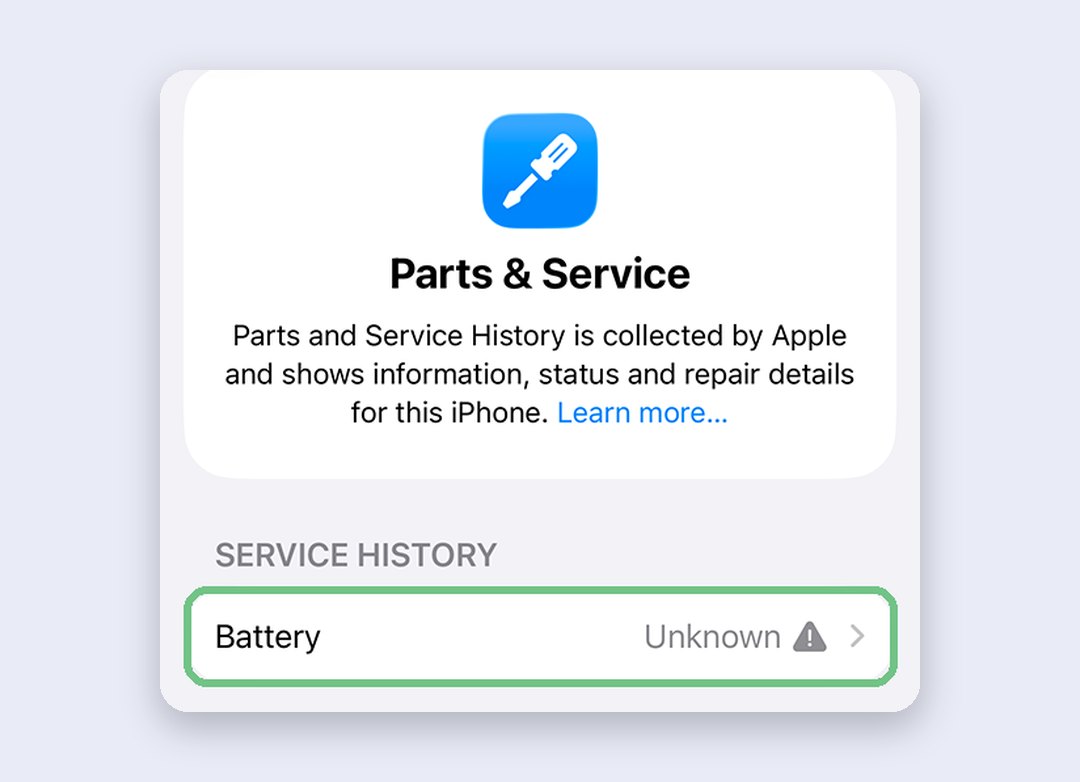
After a non-genuine fit, Parts and Service History lists the battery as Unknown, and you get a notification the first time you unlock the phone and again five days later. Battery Health may say it can’t verify a genuine Apple battery and that its readings may not be accurate. So the one screen you’d use to judge the new battery stops being trustworthy. The phone still works, but Apple says an Unknown part might affect trade-in value, and a poorly made battery can bring fit, capacity and safety problems.
We’d pay the extra for a genuine battery if you’re keeping the phone or plan to sell it. A shop battery only makes sense on an old phone you’ll use till it dies. Independent repair shops can buy genuine Apple batteries too; ask which they’re fitting, and remember Apple’s warranty and AppleCare won’t cover their work.
Check whether the battery has been changed before
Useful twice: when you buy a second-hand iPhone, and when you collect yours after the repair. Open Settings > General > About. If the phone has had a repair, a Parts and Service History section appears there.
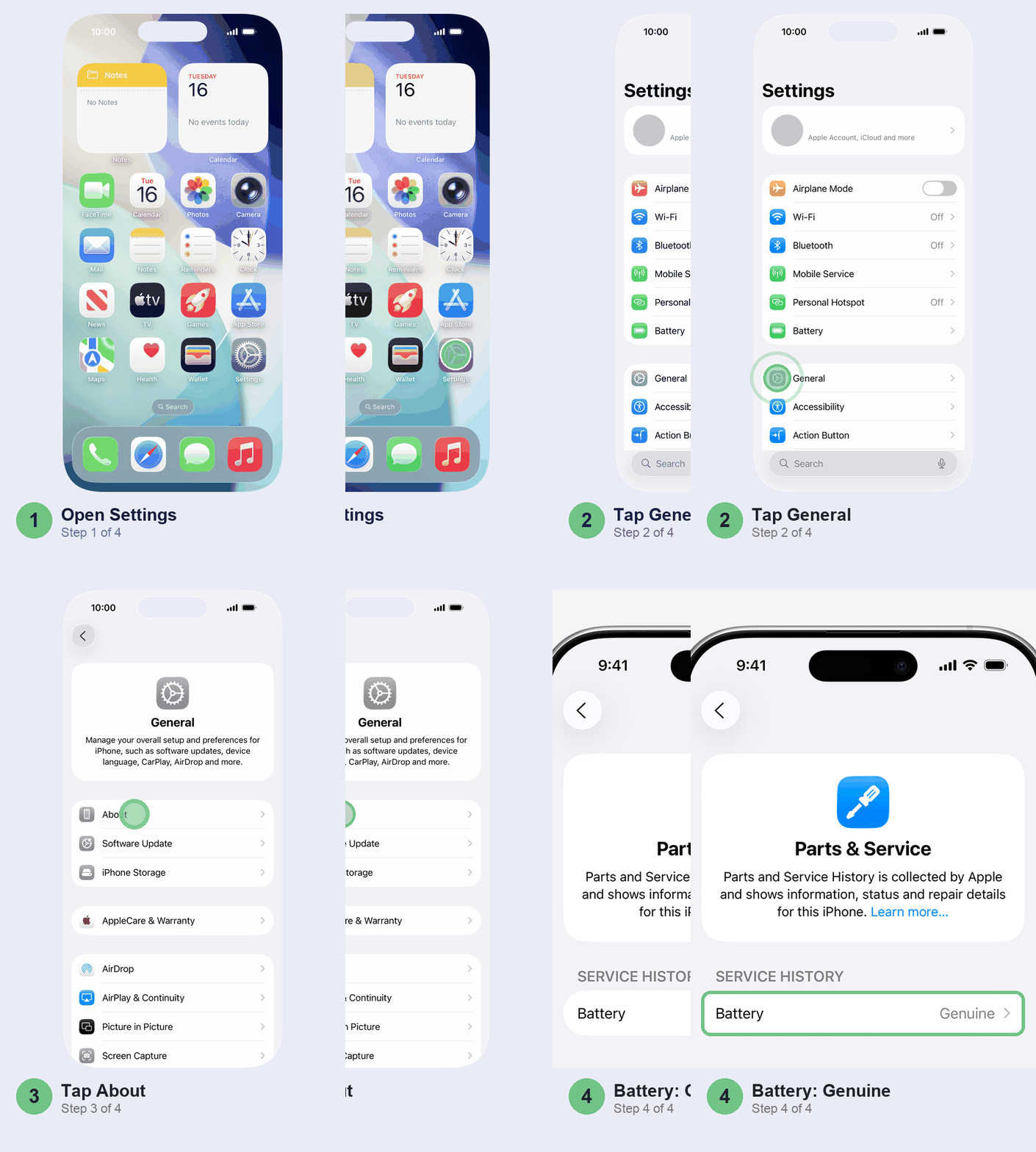
What the label next to Battery means:
- Genuine: a new Apple battery, fitted the proper way.
- Used: a genuine Apple battery that was in another iPhone first (iPhone 15 and later). Fine, but it may not be as good as new.
- Finish Repair: a genuine battery that isn’t linked to your phone yet. Open it and finish the repair with Repair Assistant.
- Unknown: not genuine, not working properly, or never linked after the repair. On a phone you’re about to buy, that’s a reason to bargain or walk away.
On an iPhone XR or later running iOS 15.2 or later, no Parts and Service History section at all usually means the phone has never been repaired.
Book the replacement
You’ve got three routes: the Genius Bar at an Apple Store, an Apple Authorised Service Provider, or Apple’s by-post service, where Apple sends you a prepaid box. Apple Stores are only in a handful of Indian cities, so for most readers the nearest AASP is the practical choice; Apple’s locator lists them. AppleCare+ customers can also book a pick-up from home or the office. Start at Apple’s battery service page, or walk into an AASP with your quote, and ask when you book how long they’ll keep the phone.
Back up to iCloud or your computer before you go, in case the phone needs more than a battery, and know your Apple Account password. If the new battery acts up, you’re covered for 90 days, or longer if your warranty has more time left.
Make the new battery last longer
A new battery starts the wear clock again, so give it an easier life. With an iPhone 15 or later, go to Settings > Battery > Charging and pick a charge limit between 80% and 100%, in 5% steps.
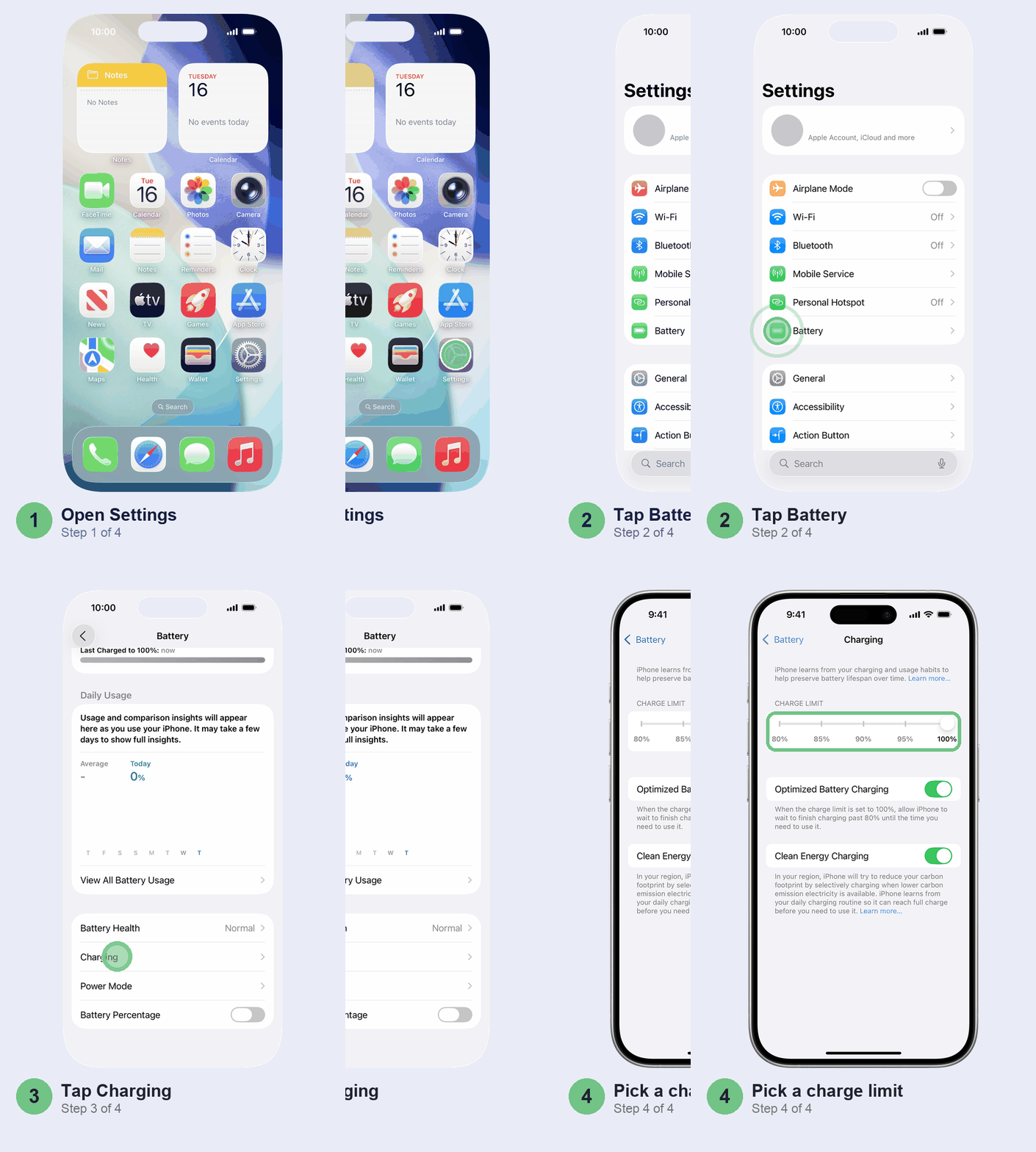
We’d set 90% or 95% if you charge overnight and rarely run the phone flat. Keep the limit at 100% and Optimised Battery Charging, which is on by default, can pause at 80% overnight and finish just before you usually unplug. It needs about two weeks to learn your routine. On an iPhone 14 or older, the Optimised Battery Charging switch sits under Battery Health & Charging.
The other big one in India is heat. Don’t leave the phone charging on a car dashboard in May, under a pillow, or in direct sun on a scooter mount.
Don’t bother with these
- Draining to 0% to “calibrate” it. Lost capacity is the battery’s chemistry ageing. No charging ritual brings it back.
- Replacing at 86% because the number dropped. Capacity falls slowly; judge it by whether you get through the day.
- Turning off performance management to make an old battery feel faster. You swap a slower phone for one that shuts down without warning.
- Fitting a ₹999 battery yourself. Apple warns that a damaged lithium-ion battery can overheat or catch fire. Leave it to trained hands.
When it’s not the battery
New battery and still dead by evening? Start with Battery in Settings: look for an app at the top of the usage list, and give the phone a few days if you’ve just updated iOS. Stops charging at 80%? That’s usually deliberate: a charge limit or Optimised Battery Charging, both under Charging in the Battery settings. Still stuck, or it drains while idle? Take it back and ask the service centre to run Apple’s diagnostics.
Quick questions
Is 77% iPhone battery health bad?
It’s below Apple’s 80% line, so the battery is properly worn. If you have AppleCare+, the replacement is free. Without it, replace it if the phone won’t last the day.
Is a 76% battery good?
No, but it isn’t dangerous either. Apple says a degraded battery isn’t a safety issue; you’ll just get less time between charges and possibly slowdowns or shutdowns. Plan a replacement.
How much will it cost to replace a battery in an iPhone?
At Apple in India, ₹7,900 for an iPhone SE up to ₹13,900 for an iPhone 18 Pro, with most models between ₹9,900 and ₹10,900 (the iPhone Duo is ₹24,900). Authorised Service Providers can be cheaper. A local shop charges ₹2,500 to ₹3,500 for an iPhone 13, usually with a non-genuine battery.
Will Apple replace an 80% battery?
Not for free. AppleCare+ covers it only once capacity is below 80%, and the standard warranty covers defects, not normal wear. At exactly 80% you can still pay for an out-of-warranty replacement.
Got your battery done recently? Tell us in the comments which model, where you went and what you paid, so other readers get a real price before they walk in.
Prices checked: 23 October 2026.
Last updated: October 2026