
Your new iPhone has no SIM tray, or you’re simply done with the fiddly plastic card. Either way, setting up eSIM on iPhone with Jio, Airtel or Vi is done from home and usually finished within a day. Know one catch before you start: once the switch completes, your number can’t send or receive SMS for 24 hours. That means no bank OTPs and no UPI setup, so pick a quiet day, not the morning rent is due.
Jio, Airtel or Vi eSIM on iPhone: the quick answer
Pick your route by situation, not by carrier. Start with the iPhone’s own Settings route: when it’s offered, it’s the fastest, and you skip the carrier app’s waiting.
- Same iPhone, physical SIM to eSIM: look for Convert to eSIM in Settings first. If it isn’t there, use MyJio, Airtel Thanks or the Vi app.
- New iPhone, old iPhone in your hand: use Transfer From Nearby iPhone. No app, no waiting for a QR code.
- New iPhone without the old one, or coming from Android: use your carrier’s app with the new iPhone’s EID.
- A brand-new second number: that’s a new connection with fresh KYC, not a conversion. Airtel, for one, asks you to visit a store.
Through the carrier app, budget about 15 minutes on Vi, up to a couple of hours on Airtel and at least two hours on Jio, which adds a cooling period. Jio and Vi say they don’t charge for the switch. You’ll need an iPhone XS, XS Max, XR or newer, which covers every iPhone sold in years.
Before you start: four things that stop a failed attempt
Most stuck eSIM requests come down to one of these. Five minutes here saves you a cancelled request and a second wait.
1. Your email ID is registered with the carrier. Jio and Vi make it mandatory, because the QR code and the Jio verification code arrive by email. On Jio, a missing email shows up on the iPhone as “Unable to Transfer Phone Number” with Error Code 999. Add it in MyJio by searching “Update my Email ID”, then start again.
2. You’re on Wi-Fi. The eSIM profile downloads over the internet, and your mobile data can drop mid-switch. Don’t rely on it.
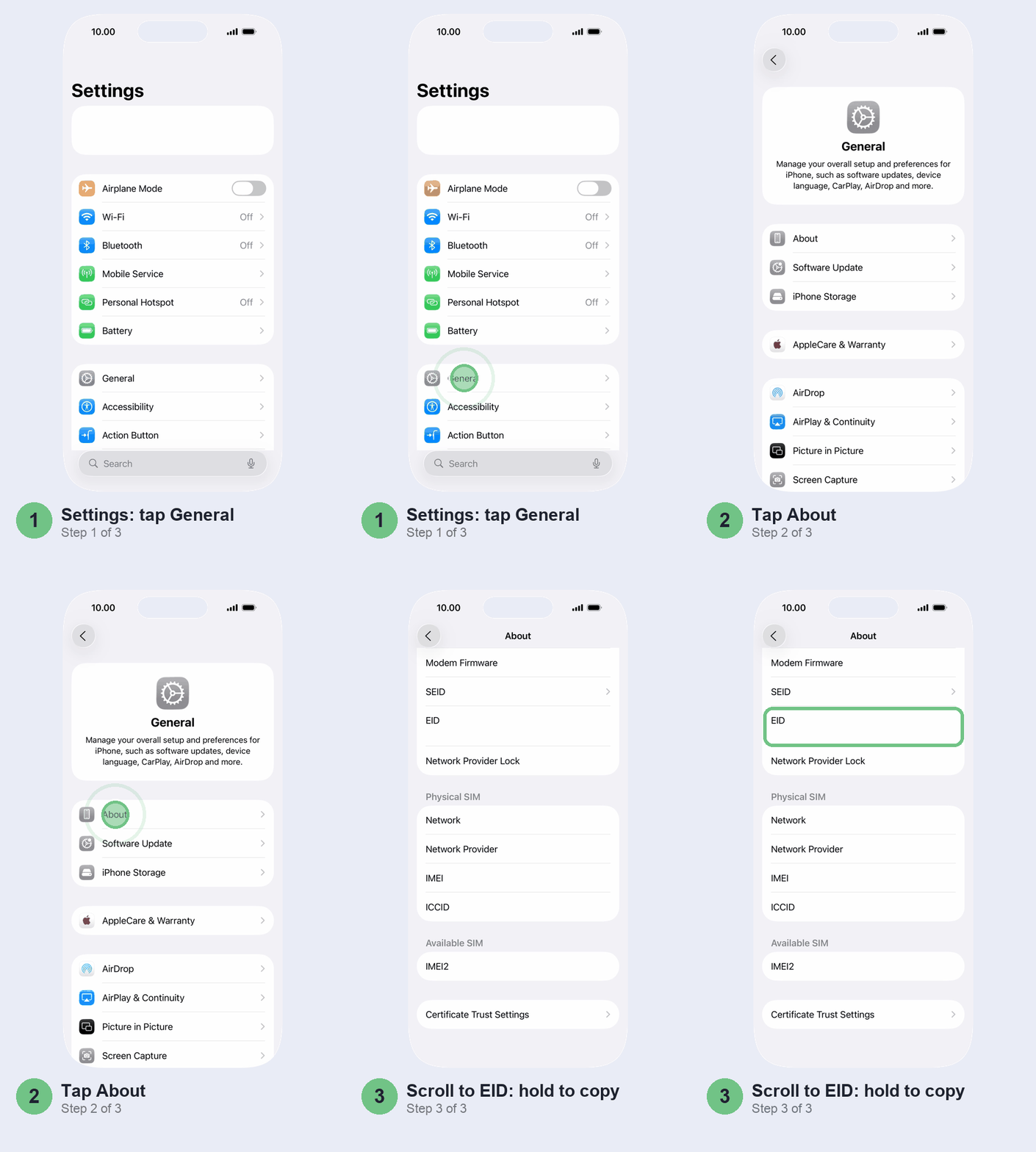
3. You have the EID. It’s the 32-digit number that tells the carrier which iPhone should get your eSIM, and every carrier app asks for it. Open Settings > General > About and scroll down to EID; touch and hold the number to copy it rather than typing it. Dialling *#06# shows it too. Bought the iPhone abroad? On the same screen, check Network Provider Lock. If it names a carrier, only that carrier’s SIMs will work until it unlocks the phone, so sort that out first.
4. You can live without SMS for a day. After any SIM change, Indian carriers bar incoming and outgoing SMS for 24 hours, OTPs included. Vi adds that iMessage and FaceTime stay off for those 24 hours too. Card payments that need an OTP will fail, and if your UPI app re-checks your SIM, it won’t verify until the day is up. Our guides to an iPhone not receiving OTP SMS and UPI apps not working on iPhone cover what to do after.
Convert a physical SIM to eSIM on your iPhone
This is the quickest route, so try it first. When your carrier supports it for your number, you never open a carrier app.
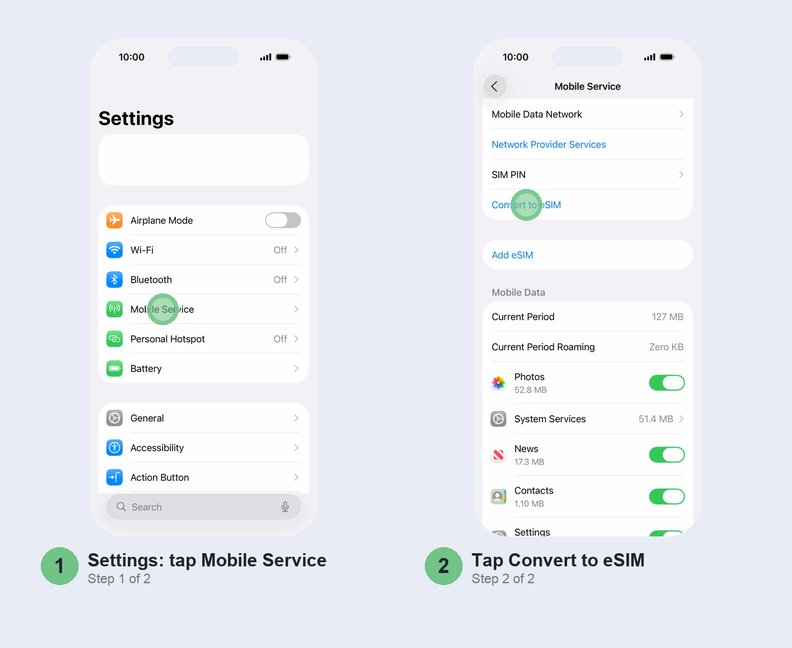
- Open Settings > Mobile Service. On a dual SIM iPhone, tap the number you want to convert.
- Tap Convert to eSIM and confirm. Not there? Tap Add eSIM, pick the number with the physical SIM, and look for it on the next screen. Vi asks you to double-click the side button to authorise it.
- Wait for your eSIM to activate. Your physical SIM stops working the moment it does.
- Take the old card out and restart the iPhone.
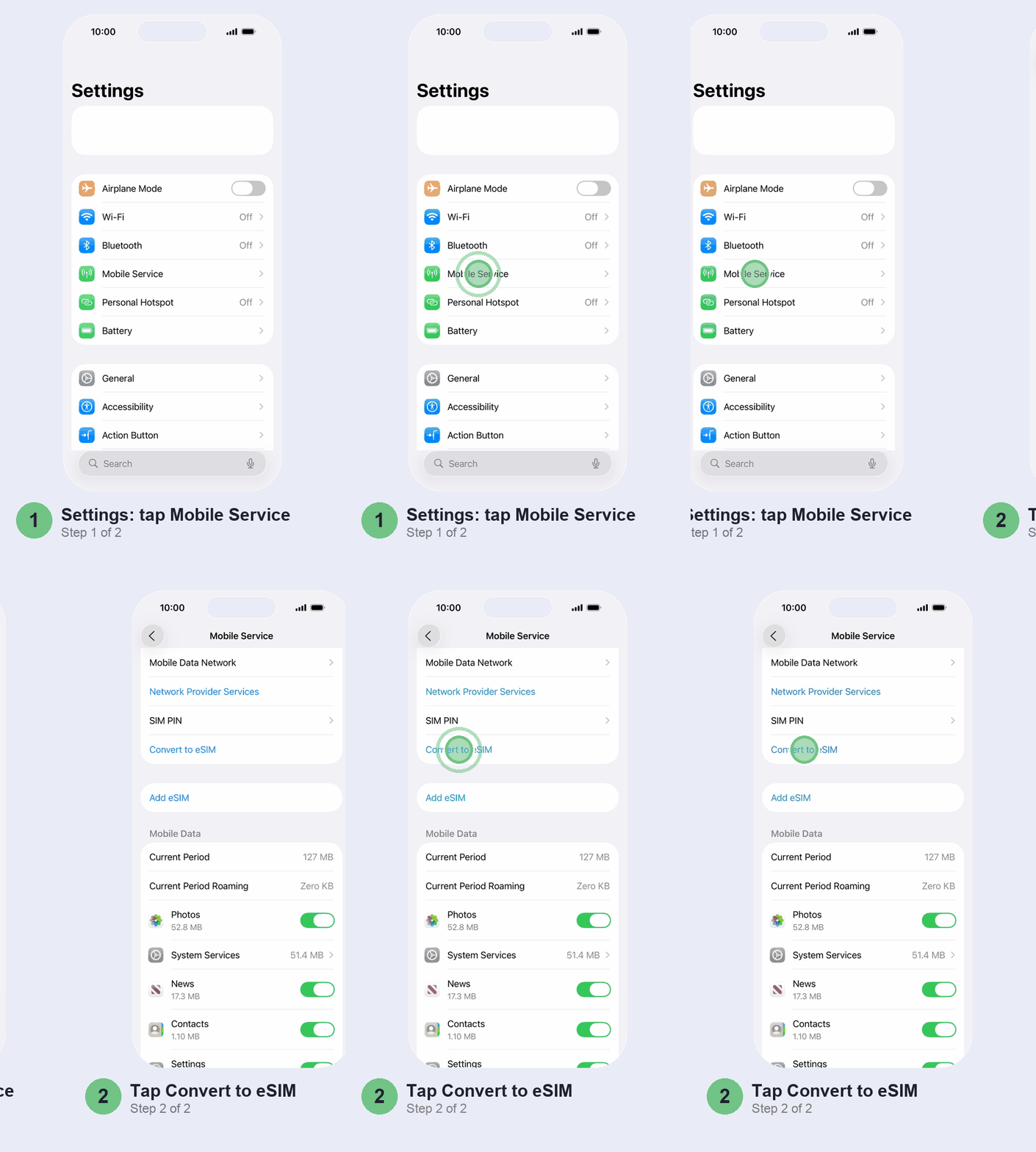
Not in either place? Then your carrier hasn’t enabled it for that number. Don’t hunt for it: skip to the carrier app steps below, which reach the same result.
Transfer eSIM to a new iPhone with Transfer From Nearby iPhone
Upgrading and have the old phone with you? This is the one to use, and it works for Jio, Airtel and Vi.
Get the two phones ready first. Both should be signed in to the same Apple Account, unlocked with a passcode, with Bluetooth on and sitting next to each other. Update both to the latest iOS: Vi asks for iOS 26.6, and Airtel also wants the old iPhone restarted first. Jio wants the new iPhone on Wi-Fi or a hotspot from a different phone, not one running off the number you’re moving.
- New iPhone offering to transfer your number during setup? Say yes. With iOS 26 or later it can bring both numbers across at once.
- Already set up? On the new iPhone, open Settings > Mobile Service > Add eSIM and tap Transfer From Nearby iPhone, or pick your number if it’s listed.
- On the old iPhone, tap Continue, enter the code the new iPhone shows, then tap Transfer Number. Vi asks for a side-button double-click here as well.
- Wait for the plan to activate. Your number stops working on the old phone as soon as it does.
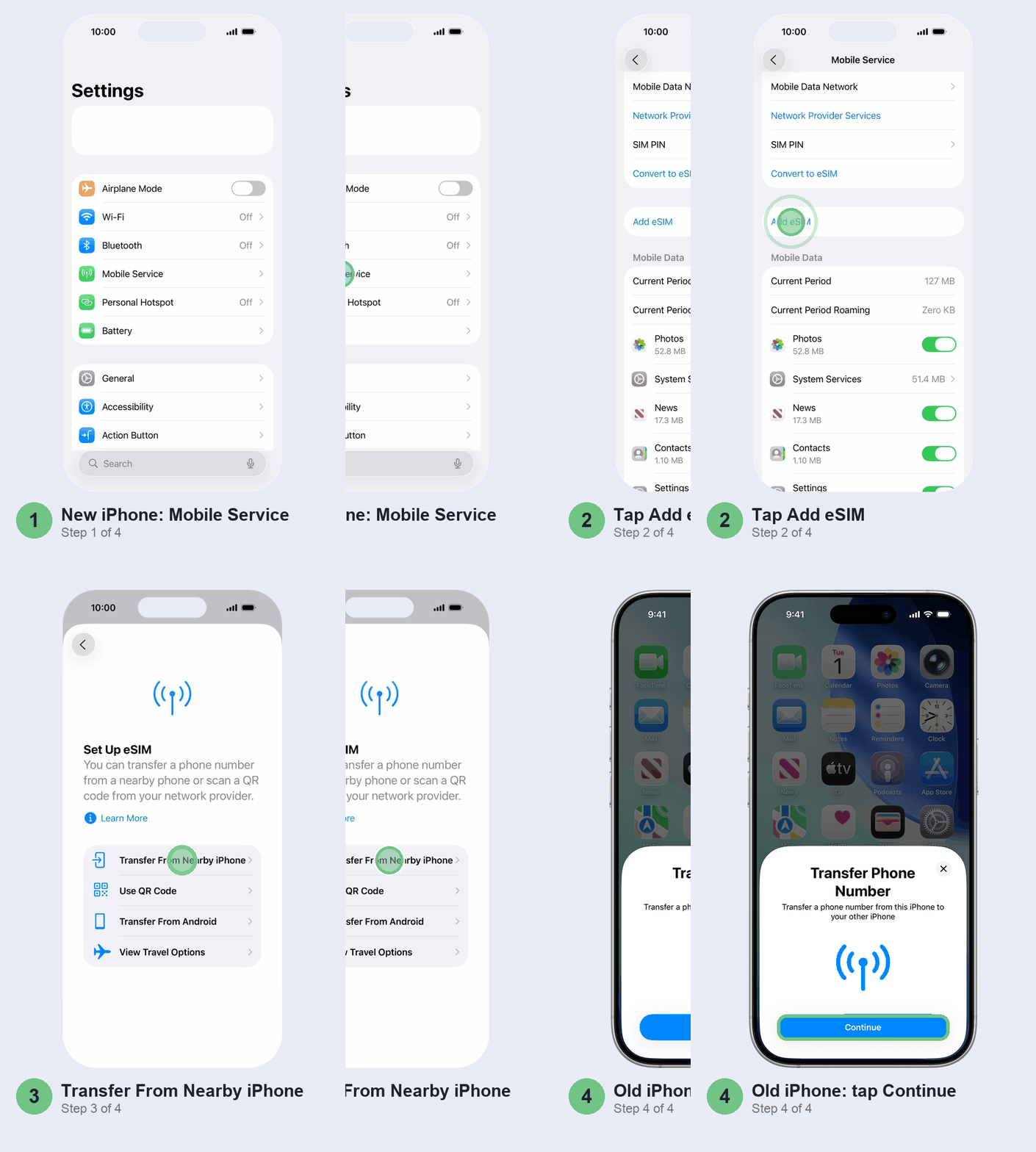
See a “Finish Setting Up” banner about your network provider’s plan afterwards? The carrier wants one more step on its website. Tap it and finish there. Apple’s eSIM setup page has the full list of methods if yours differs.
New iPhone but no old one? Get its EID first
Sold the old phone, or coming from Android? You’ll use the carrier app’s “another device” option, and that needs the new iPhone’s EID before the new iPhone has service.
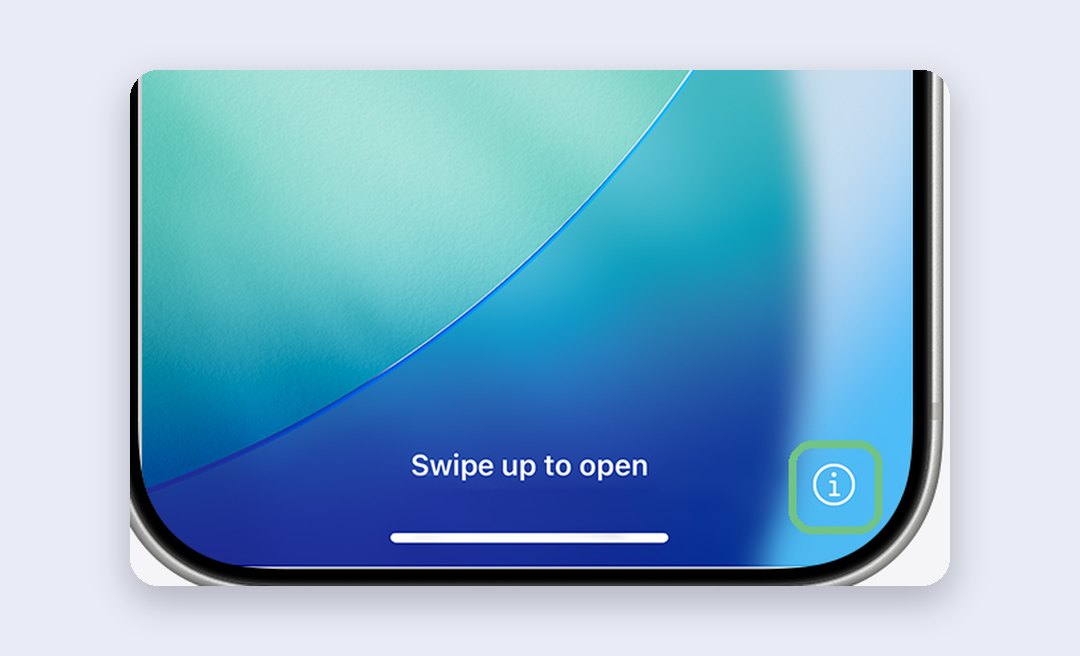
Here’s the shortcut: you don’t have to finish setup to find it. Turn the new iPhone on and, on the Hello screen, tap the small (i) at the bottom right. The EID is in the list it opens. Then request the eSIM from the carrier app on whichever phone has your number, choosing the other-device option.
From Android, Jio and Airtel both send you through their apps. iOS 26 adds a Transfer From Android option for some carriers, but neither mentions it, so use it if it appears and don’t wait for it. Lost the phone along with the number? That’s a replacement SIM or eSIM from your carrier first; Airtel, for one, handles lost eSIM phones in its stores.
Jio, Airtel and Vi: the carrier app route
When Settings doesn’t offer you a conversion, your carrier’s app does the same job with an extra wait.
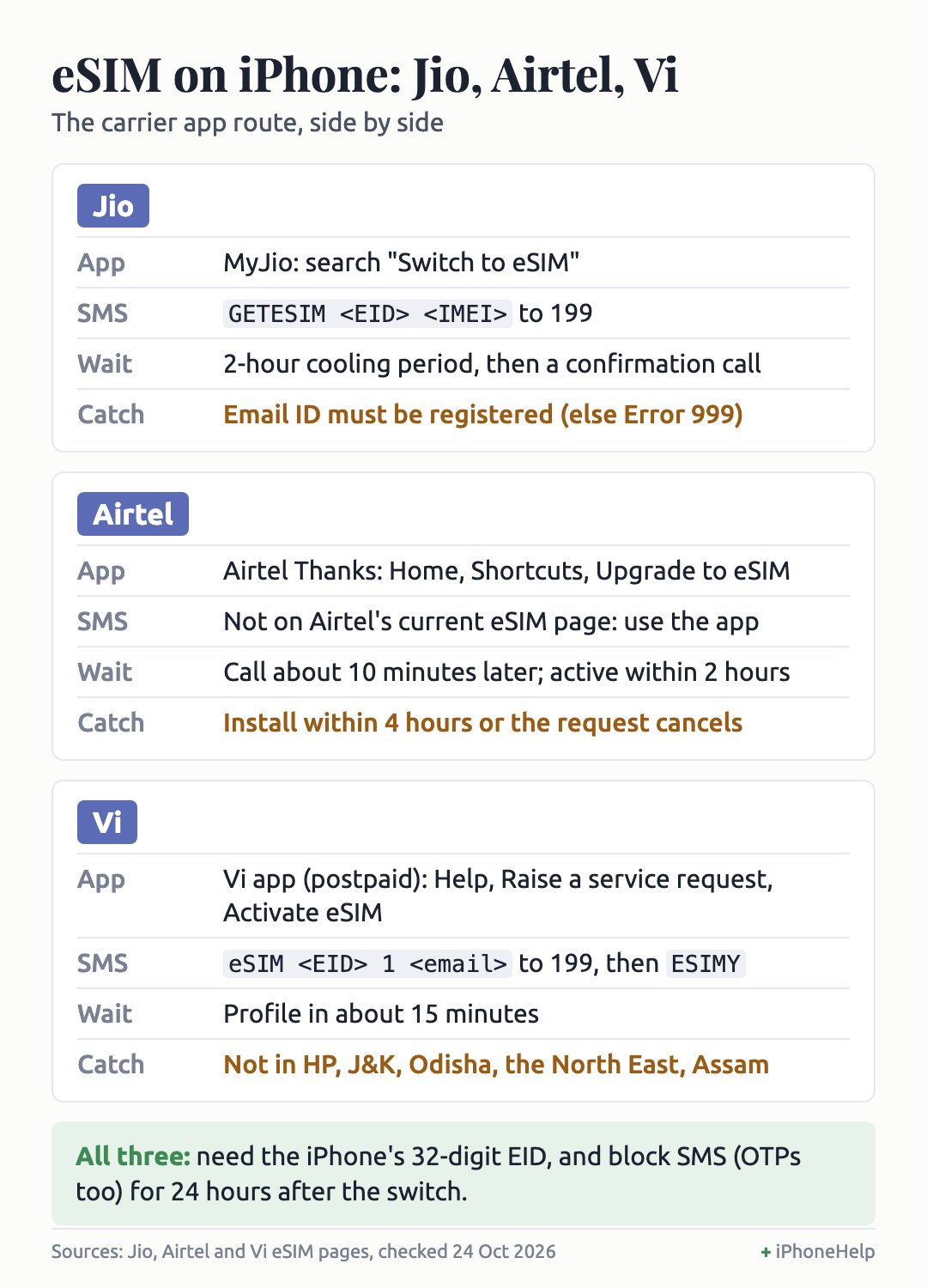
Jio eSIM on iPhone: MyJio app or SMS
- Open MyJio, type “Switch to eSIM” in its search and tap the result.
- Verify your email ID with the code Jio emails you, then enter the EID.
- Enter the OTP sent to your Jio number.
- Wait out the 2-hour cooling period Jio applies under DoT rules. Then answer the automated call from +91 22 3507 2222 and press the number it asks for. Missed it? Text RECALL to 199 for another call.
- The eSIM arrives as a notification on the iPhone, or as a QR code from notification@jio.com.
No app, and not roaming abroad? Text this to 199 from your Jio number, with spaces between the three parts (*#06# shows both numbers):
GETESIM <EID> <IMEI>
Jio replies with a 19-digit SIM number. Send SIMCHG <19-digit number> to 199. After the 2-hour wait, reply 1 to the consent SMS and take the confirmation call.
Airtel eSIM on iPhone: Airtel Thanks app
- In the Airtel Thanks app, logged in with the number you’re converting, go to Home, scroll to Shortcuts and tap Upgrade to eSIM (it’s also under Manage services).
- Choose this device or another device, and enter the 32-digit EID.
- Enter the OTP, then confirm on the call Airtel makes about 10 minutes later.
- Install the eSIM on the iPhone within 4 hours, or the request cancels itself. Your physical SIM keeps working until then.
Airtel says the eSIM activates within 2 hours of the download. Older guides mention an SMS to 121; skip it, since Airtel’s current eSIM page lists only the app.
Vi eSIM on iPhone: Vi app or SMS
Check this first: Vi eSIM isn’t offered yet in Himachal Pradesh, Jammu and Kashmir, Odisha, the North East and Assam.
- In the Vi app, go to Help > Raise a service request > Activate eSIM. Vi’s own guides say this route is for postpaid.
- Choose iOS, then same device or another device, and enter the EID.
- Enter the OTP, then text ESIMY to 199 within 15 minutes to confirm.
- After about 15 minutes, pick the VI INDIA plan under Add eSIM in Mobile Service.
Prepaid users, use SMS. Send this to 199 (the 1 means iOS):
eSIM <EID> 1 <your email ID>
Reply ESIMY within 15 minutes. When a number beginning 012471 rings, pick up and press 1. The QR code comes by email from esim@vodafoneidea.com.
Finish the eSIM setup on your iPhone
Whichever carrier app you used, you finish on the iPhone. Usually a notification appears saying “Finish Setting Up Mobile Service” or that a mobile plan is ready to be installed. Tap it, then tap Continue.
No notification? Open Settings > Mobile Service > Add eSIM and pick your carrier’s plan if it’s listed. Not listed? Tap Use QR Code (it may sit under Other Options) and point the camera at the emailed code on another screen. Reading the email on the same iPhone? Touch and hold the QR code in Mail and tap Add eSIM instead.
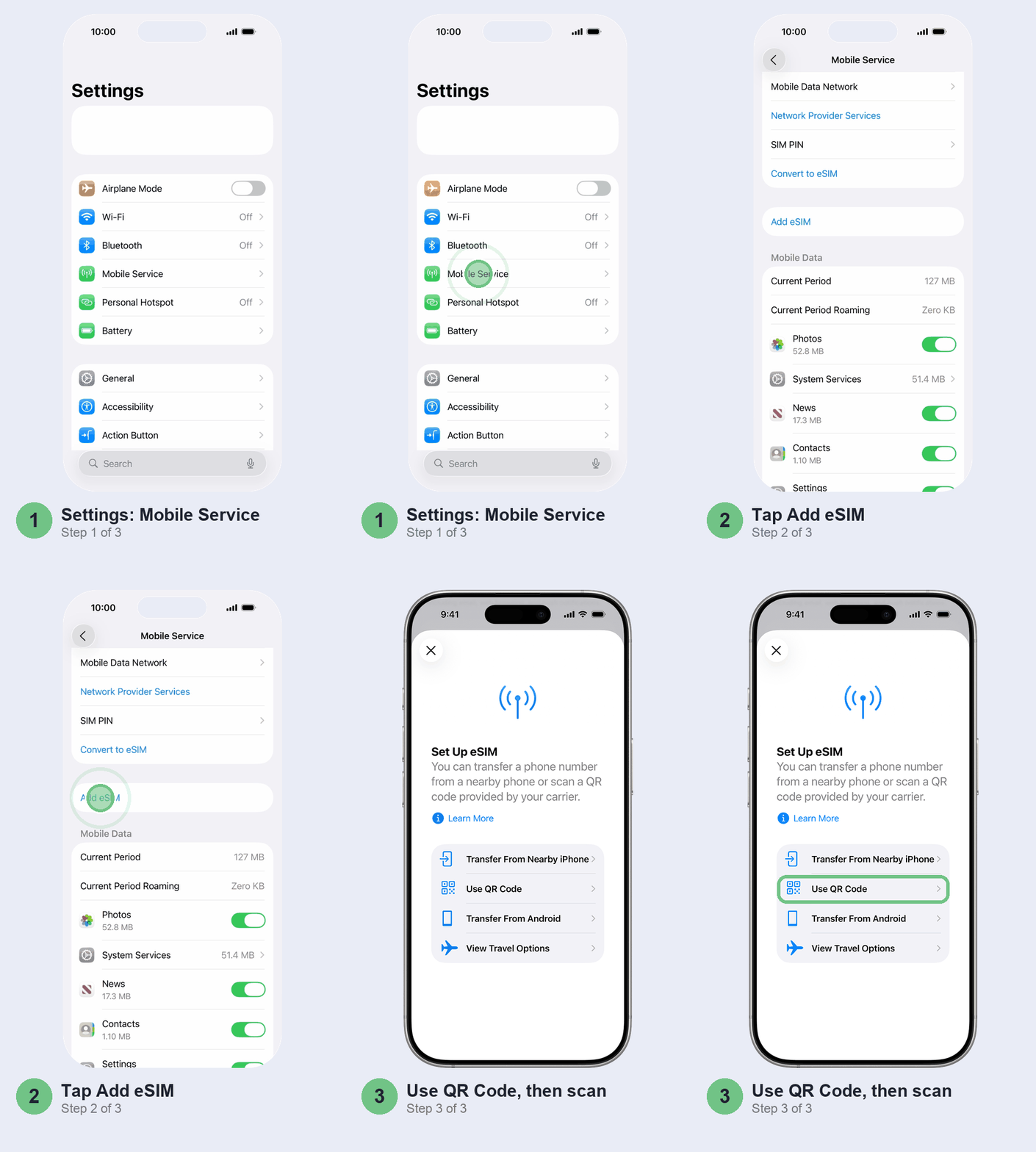
Once it’s active, take out the physical SIM, restart the iPhone and make a test call. In Settings > Mobile Service, the new line should sit under eSIMs with its switch on.
When eSIM setup gets stuck
- Error 999 on a Jio number: no email ID on your Jio account. Add it in MyJio and start again.
- Airtel request vanished: it was auto-cancelled after 4 hours without an install. Raise a new one when you can finish it.
- The profile won’t download: a wrong EID is the usual cause, and Vi warns it fails the activation outright. Copy your EID again rather than typing it, and request again.
- Installed, but No Service: take your physical SIM out and restart. Then go back to General > About in Settings and wait a few seconds; if a carrier settings update appears, install it.
Don’t bother with these
- Deleting the eSIM to “reset” it. Airtel and Vi both warn that deleting it in Settings removes your service. With Airtel, getting it back means a store visit with ID.
- Third-party eSIM apps. Travel eSIM apps sell data plans abroad. They can’t move your Jio, Airtel or Vi number.
- A store visit for a simple conversion. For your existing number on a working phone, the app or Settings is quicker. Go to a store for a lost phone or a new connection.
- Sharing your EID or eSIM QR code. Airtel and Vi both warn that either can hand someone your number. Give them only to the carrier’s own app or store.
Quick questions
Does Airtel provide eSIM for iPhone?
Yes, and you can convert an existing number yourself through the Upgrade to eSIM shortcut in the Airtel Thanks app, on any iPhone from the XS and XR onwards. Only a new Airtel eSIM connection needs a store visit.
How do I get a Jio eSIM for iPhone?
Search “Switch to eSIM” in MyJio, enter your EID, verify, and wait out the 2-hour cooling period and the confirmation call. Or check Settings for Convert to eSIM first; it’s quicker when it’s there.
Is eSIM available on Vi?
Yes. Try Convert to eSIM in Settings first. If it’s missing, postpaid users can use the Vi app and prepaid users the SMS to 199. It isn’t available yet in Himachal Pradesh, Jammu and Kashmir, Odisha, the North East and Assam.
Is eSIM free on Jio?
Yes. Jio says there’s no charge to upgrade, and Vi says the same. Airtel’s eSIM page doesn’t mention a fee for converting an existing number.
Can I transfer my Jio eSIM to a new iPhone without the old phone?
Yes, as long as your Jio number still works in some phone. Get the new iPhone’s EID from the (i) on its Hello screen, then request the eSIM in MyJio on that phone with the other-device option. If the number went with a lost phone, you need Jio’s help to get it back first.
What are the disadvantages of converting to eSIM?
The 24-hour SMS block after every switch is the big one. You also can’t pop the SIM into a spare phone in a hurry, and a lost phone means a trip to the carrier to get the number back.
Can I convert a MyJio eSIM to an Airtel eSIM?
Not directly: moving your number from Jio to Airtel is a port, not a conversion. Airtel can put a ported-in number on eSIM: you get the eSIM notification within a day, and it starts working once your port goes through.
Which eSIM is better, Jio or Airtel?
Neither, as an eSIM. It’s the same network on a digital card, so pick whichever has the better signal where you live and work. We’d decide that before switching, not after.
Steps checked against the Jio, Airtel and Vi eSIM pages on 24 October 2026.
Prefer to watch? Apple’s own video walks through Transfer From Nearby iPhone, carrier activation and QR codes.
Which route worked for you, and on which carrier? Tell us in the comments, especially if you’re on Vi or moved from Android, and we’ll add what we learn to this guide.
Last updated: October 2026