The broadband’s down, your laptop needs to get online, and your iPhone won’t help. The laptop can’t find the hotspot, or it joins and nothing loads, or the Personal Hotspot option is greyed out or has vanished from Settings altogether. Each of those has a different cause, so work out which one you’ve got before you start resetting things.
Quick answer: iPhone hotspot not working? Open Settings > Personal Hotspot, switch on Allow Others to Join, say yes when it offers to turn on Wi-Fi and Bluetooth, and keep that screen open until your laptop connects. Connected but no internet? Your data pack is probably used up for the day. Laptop or TV can’t see it? Turn on Maximise Compatibility on the same screen. Hotspot greyed out or missing? Check Mobile Data is on, then your carrier settings.
iPhone hotspot not working? Start on the Personal Hotspot screen
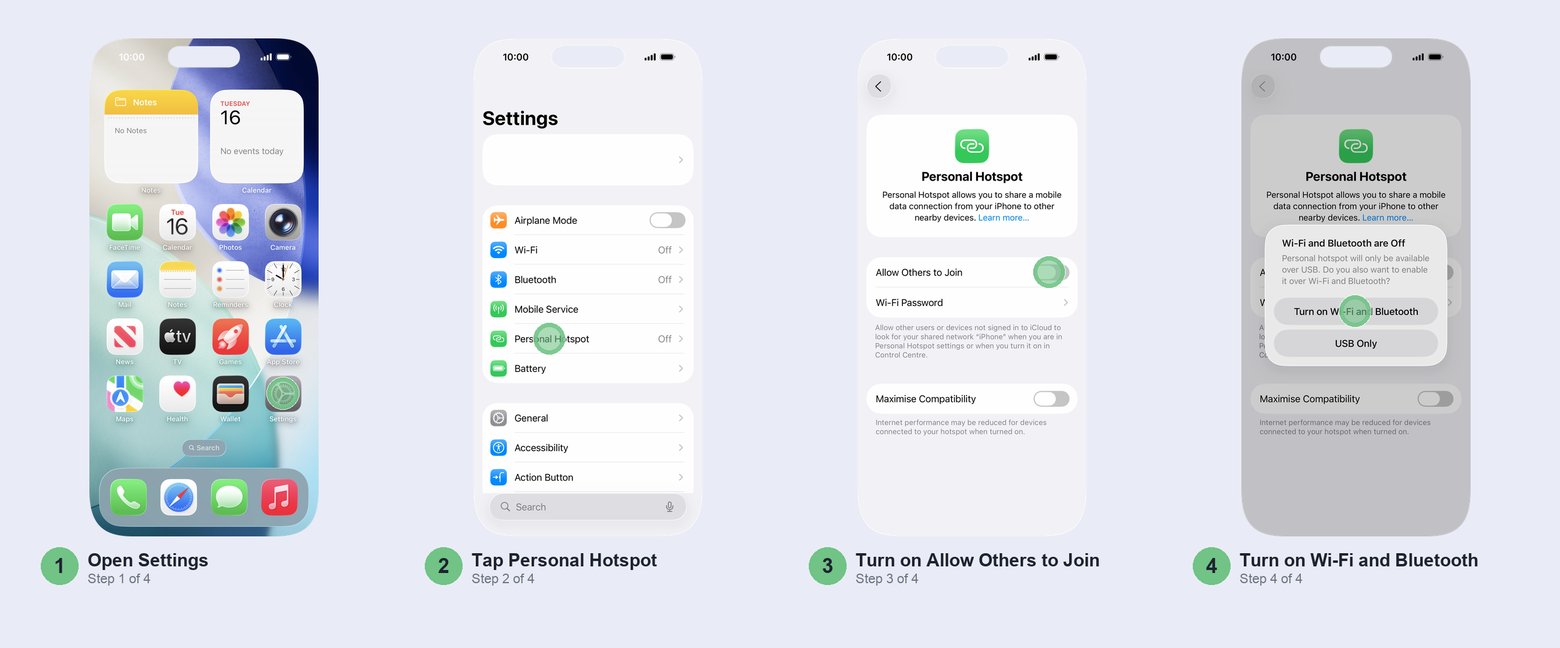
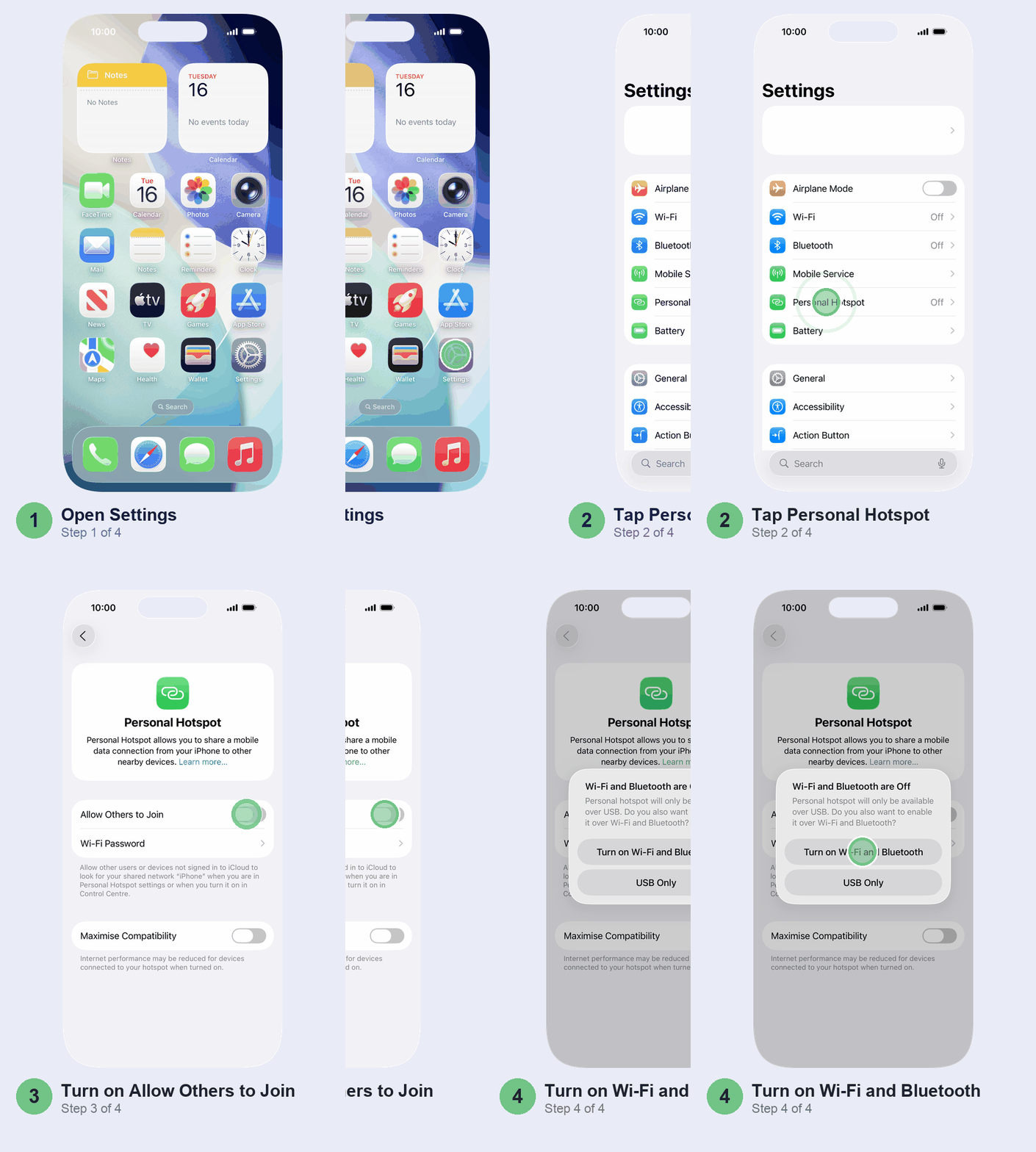
This is the fix that works most often, and it takes half a minute. Open Settings > Personal Hotspot and switch on Allow Others to Join. If Wi-Fi or Bluetooth is off, a pop-up asks whether to turn them on. Tap Turn on Wi-Fi and Bluetooth. Pick USB Only and your laptop won’t see the hotspot over Wi-Fi at all, and it’s an easy tap to make by mistake.
Now leave that screen open while you connect the other device: that’s when your iPhone is easiest to find. Keep the two within about 10 metres.
On the laptop or phone that’s joining:
- Turn its Wi-Fi off and on again.
- Pick the network with your iPhone’s name. It’s the name in Settings > General > About > Name, so if your family has three phones all called “iPhone”, rename yours first.
- Type the password exactly as it shows under Wi-Fi Password on your iPhone. Changing it? Make it eight characters or more, and skip accented letters and emoji.
- Still says it can’t connect, especially on Windows after a password change? Tell the laptop to forget the network, then join again from scratch.
Joining from another Apple device signed in to your Apple Account? It should connect without the password. Family members’ devices can too, once you’ve added them under Personal Hotspot > Family Sharing.
Hotspot seems to switch itself off after a while? That’s on purpose: your iPhone drops connected devices when nobody’s using them, to save battery. Open the Personal Hotspot screen again and they’ll find it.
Connected but no internet? Check your data pack first
If the laptop shows it’s connected and pages won’t load, the hotspot is fine. The problem is the data behind it. Your iPhone can only share its mobile data, never the Wi-Fi it’s connected to, so test that first: switch off Wi-Fi on the iPhone and open a page in Safari. If that crawls too, the hotspot was never the issue.
In India the usual culprit is the daily data quota. On most daily-data prepaid packs, once you’ve used the day’s allowance, the speed drops to about 64 Kbps. That’s enough for a WhatsApp message and nowhere near enough for a laptop. Open the MyJio, Airtel Thanks or Vi app and check what’s left today, and add a data booster if you need to get through a work call. While you’re there, check your plan’s terms: some plans don’t include hotspot use at all.
Then open Settings > Mobile Service: the Mobile Data switch at the top should be green.
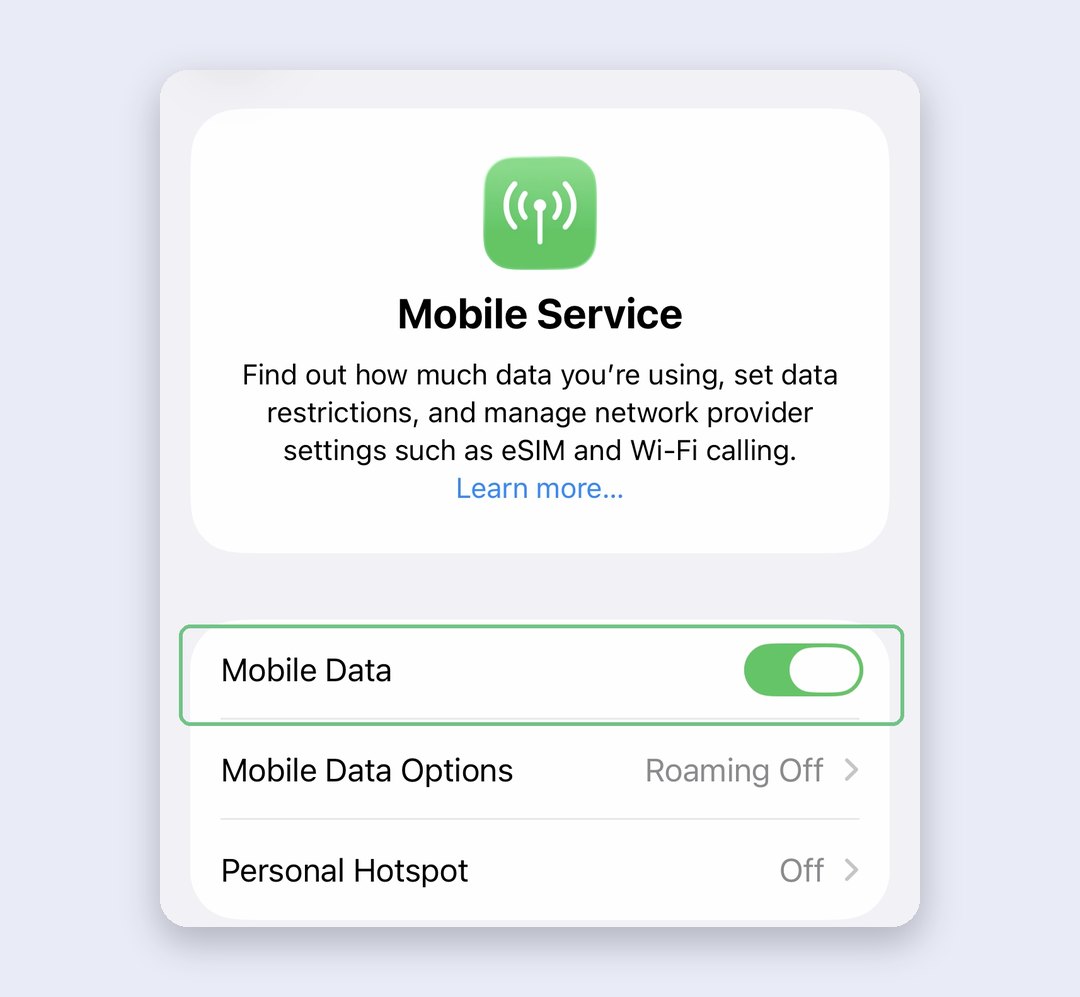
Got two SIMs? The hotspot shares the line you’ve picked for mobile data. If your data pack is on Jio and mobile data is set to your Airtel work number, the laptop gets Airtel’s data, or none. Tap Mobile Data on that same Mobile Service screen and pick the number with the data pack. Setting up a second line as an eSIM? Our eSIM guide for Jio, Airtel and Vi covers it.
One more thing: a VPN that blocks local networking can get in the way. Turn it off for a minute and try again.
Laptop, TV or Android can’t see it? Turn on Maximise Compatibility
On iPhone 12 and later, the hotspot runs in a faster mode that some older laptops, smart TVs, set-top boxes and budget Android phones can’t see. Back on the Personal Hotspot screen, switch on Maximise Compatibility. Then ask the other device to scan for networks again.
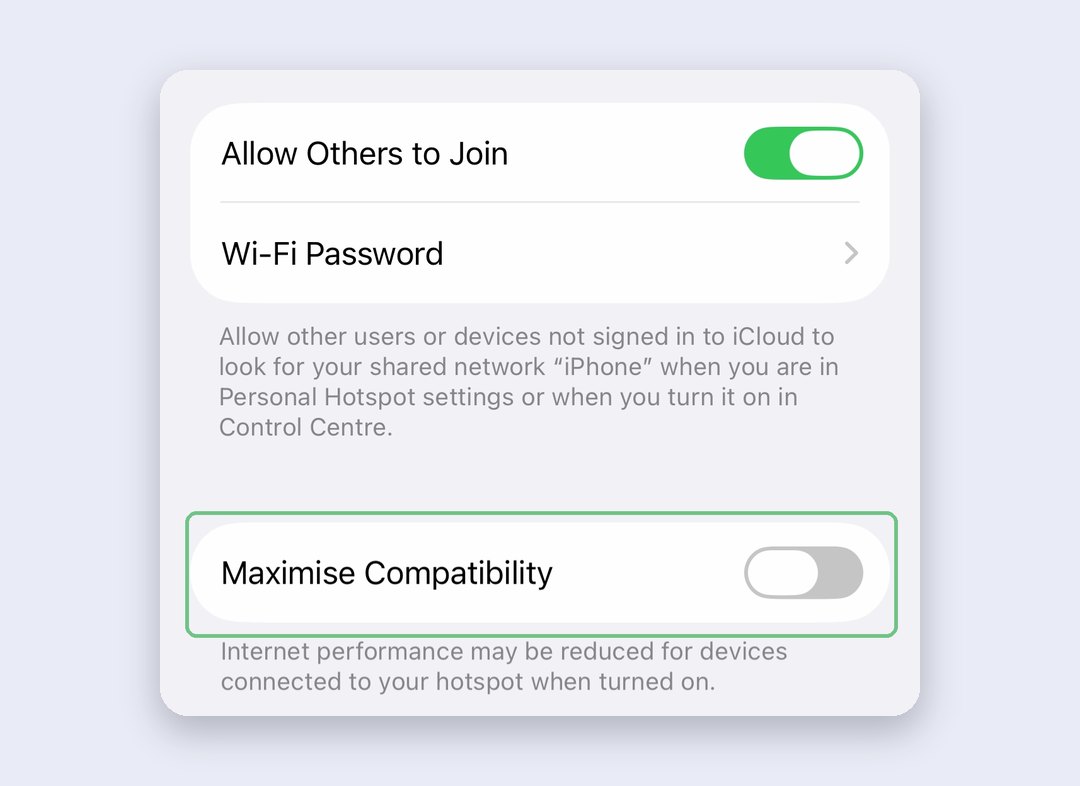
The catch: Apple says internet performance and Wi-Fi security may drop for everything connected. It’s one switch for all devices, so we’d turn it on only when something can’t see the hotspot, and off again afterwards.
Still invisible? Restart both the iPhone and the device you’re connecting, then install any iOS update that’s waiting. Boring, but it’s Apple’s own second step, and it takes a minute.
Personal Hotspot greyed out or missing? Check mobile data and the hotspot APN
When the Personal Hotspot row is greyed out, or gone from the main Settings list, your iPhone thinks it isn’t allowed to share data. On a company iPhone, stop here and ask your IT team: device management can switch the hotspot off. On your own phone, work through these in order and test after each one.
- Mobile Data off. The hotspot row dims whenever Mobile Data is off in Settings > Mobile Service. Switch it back on.
- Carrier settings. A new SIM, an eSIM move or an iOS update can leave old carrier settings behind. While you’re online, look in Settings > General > About and wait a few seconds. If a carrier settings update is waiting, a pop-up offers it, and it installs in under a minute. No pop-up usually means there’s nothing to install.
- The hotspot APN. This is the fix people on Jio keep finding in forum threads. It only applies if your carrier lets you see these settings, and Apple’s advice is to leave APNs alone unless your carrier tells you otherwise: a wrong one can cut your mobile data or run up charges. So change one field only. Go to Settings > Mobile Service > Mobile Data Network (with two SIMs, tap your data line first). Note the APN in the Mobile Data section at the top, then scroll down to the Personal Hotspot section. If its APN field is blank, type in the same APN as the Mobile Data section, leave the username and password empty, and go back.
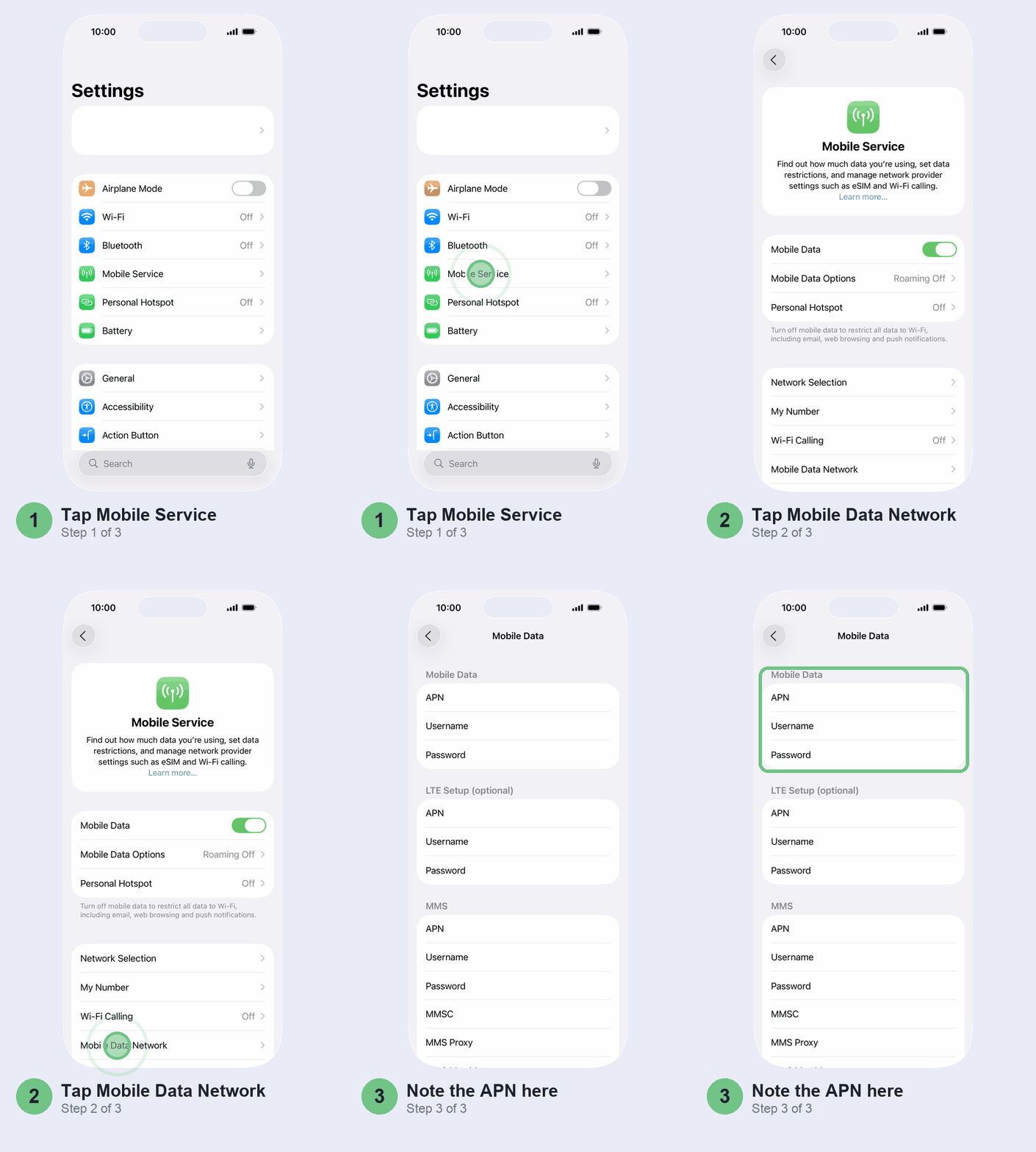
Don’t copy APN values from a video made for a different carrier. If you get in a mess, tap Reset Settings on the same screen to restore your carrier’s defaults. An iOS update also resets them, so you may need to fill in the hotspot APN again after the next update.
No Mobile Data Network option at all? Your carrier doesn’t let you see these settings, which is common. Skip to the network reset below, then call your carrier.
Reset network settings, last
When nothing above works, this clears whatever network setting has gone wrong. It also wipes every saved Wi-Fi network and password, your VPN settings and any APN you typed in, so dig out your home Wi-Fi password before you start.
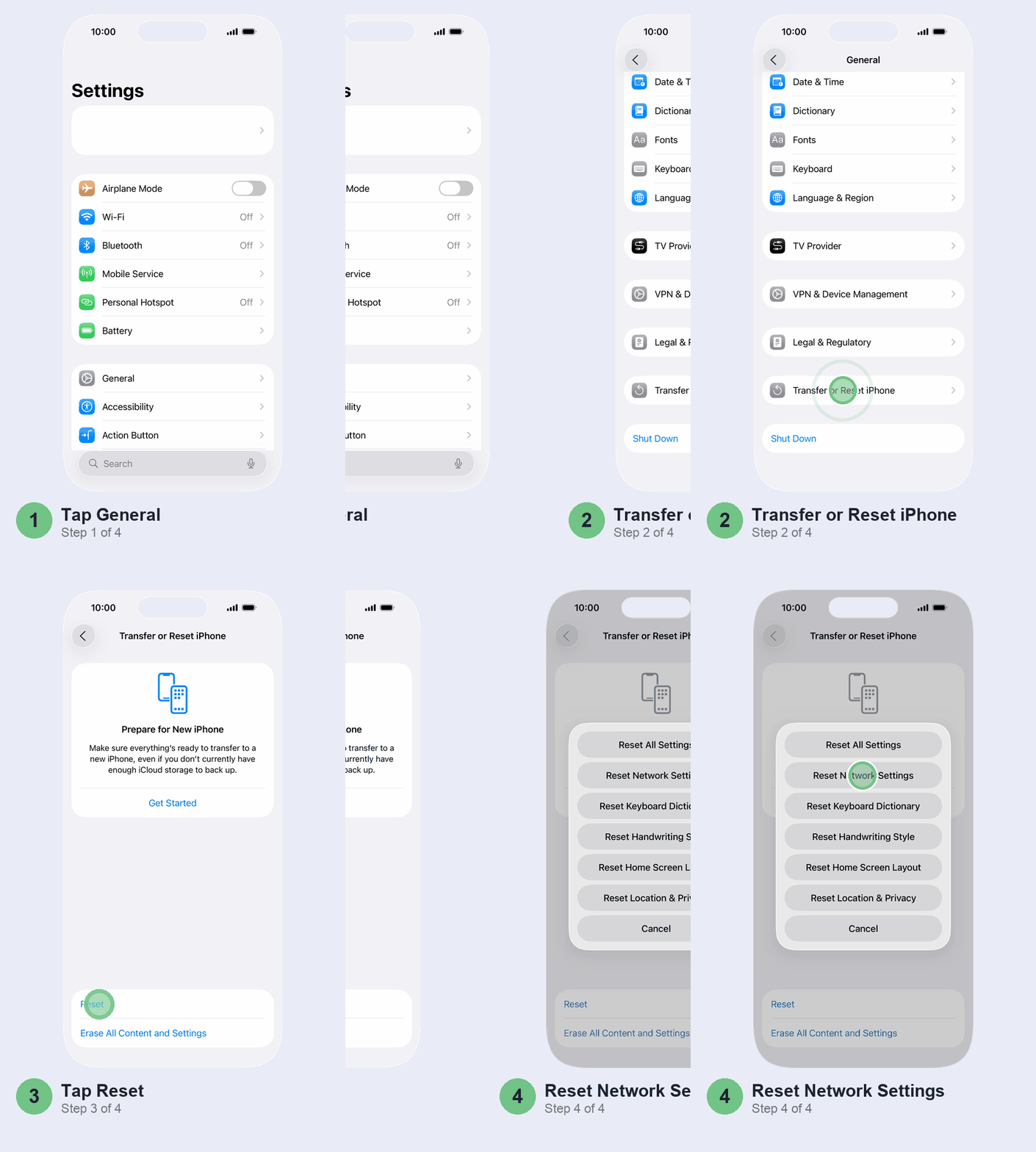
Pick carefully on the way. Erase All Content and Settings, on the Transfer or Reset iPhone screen, wipes the whole phone, and Reset All Settings, at the top of the Reset list, resets every setting. Neither fixes a hotspot any better.
Open Settings > General > Transfer or Reset iPhone > Reset and tap Reset Network Settings, then confirm.
Don’t bother
- Hotspot or “Wi-Fi booster” apps from the App Store. None of them can change how your iPhone shares data. At best they’re a shortcut to Settings.
- Erasing your iPhone. A network reset touches everything a full erase would fix here, without the restore.
- Bluetooth tethering as a workaround. It works for a Mac or Windows laptop, but it’s fiddlier to pair. Use it only when the laptop’s Wi-Fi is broken.
When it’s not you
If Mobile Data is on, carrier settings are current, the network reset is done and Personal Hotspot still won’t appear, the block is usually on the carrier’s side: the plan doesn’t include it or it hasn’t been switched on for your number. Call Jio, Airtel or Vi customer care, tell them the iPhone model and that the hotspot row is missing or greyed out, and ask them to check hotspot on your number and resend the settings.
Connecting a Mac by USB cable and it won’t pick up the hotspot? Apple’s Personal Hotspot troubleshooting page has the Mac network-service steps.
Wi-Fi or Bluetooth on your iPhone greyed out, or won’t switch on at all? That points to hardware, not a setting. Book it in at an Apple Store or an Apple Authorised Service Provider.
And if the hotspot works but your battery drops fast while it’s on, that’s expected: your iPhone is running mobile data and Wi-Fi for two devices at once. Keep it on the charger during long sessions, and see our iOS 27 battery drain fixes if the battery’s poor even when the hotspot’s off.
Quick questions
Why is my iPhone hotspot not working anymore?
After an update or a SIM change, the usual causes are Allow Others to Join being off, a used-up data pack, or stale carrier settings. Check the Personal Hotspot screen first, then Mobile Data, then the About screen in General settings for a carrier update.
Why does my iPhone not have a hotspot anymore?
The row disappears when Mobile Data is off, when carrier settings are missing, or when the hotspot APN is blank. If none of those fix it, your plan may not include hotspot, so ask your carrier.
Why is my iPhone unable to share its hotspot?
Your iPhone can only share mobile data, not a Wi-Fi connection. If you’re on Wi-Fi and mobile data is off or exhausted, there’s nothing to share.
Why is the Jio hotspot not working on iPhone?
Check your remaining daily data in the MyJio app first. If the hotspot option itself is missing, update carrier settings and check the Personal Hotspot APN under Mobile Data Network.
Why isn’t my Personal Hotspot visible on my laptop?
Keep the Personal Hotspot screen open on your iPhone, make sure Wi-Fi is on, and turn on Maximise Compatibility for older laptops and TVs. Restart both devices if it still won’t show.
Why does my hotspot keep disconnecting?
The iPhone drops connected devices when nobody’s using the hotspot, to save battery. Open the Personal Hotspot screen to make it visible again, or use a USB cable for long sessions.
Why does Personal Hotspot show Off on iPhone?
The Settings row says Off until you switch on Allow Others to Join. If you can’t switch it on, or the row is greyed out, check Mobile Data and carrier settings as above.
How many devices can connect to my iPhone hotspot?
There’s no single number: it depends on your carrier and your iPhone model. A laptop plus a phone is rarely a problem.
Prefer to watch? Apple’s own two-minute video shows how to set up the hotspot and join it from another device, on an older version of iOS.
What fixed it for you: the pop-up, a finished data pack or the APN? Tell us in the comments with your carrier and iPhone model, and we’ll add what works to this guide.
Checked against Apple’s iOS 27 User Guide and Apple Support (India).
Last updated: October 2026