The box is sealed, the price is a good deal below Flipkart’s, and the seller swears it’s an original India unit. Or you’ve found a two-year-old Pro on OLX with a “new battery”. Before your money changes hands, you can check if an iPhone is genuine in about five minutes, and the phone itself will tell you most of what the seller won’t. All you need is the phone switched on in your hand and a browser on your own phone.
How to check if an iPhone is genuine: the quick answer
Start with three checks. Together they catch most problems, on any iPhone from the last several years:
- The serial number on Apple’s coverage page. A real iPhone’s serial shows up there with its warranty status. If Apple doesn’t recognise yours, stop.
- The first letter of the model number. By long-standing convention, M means it left Apple as a new retail phone. F means refurbished, N a replacement unit and P an engraved one.
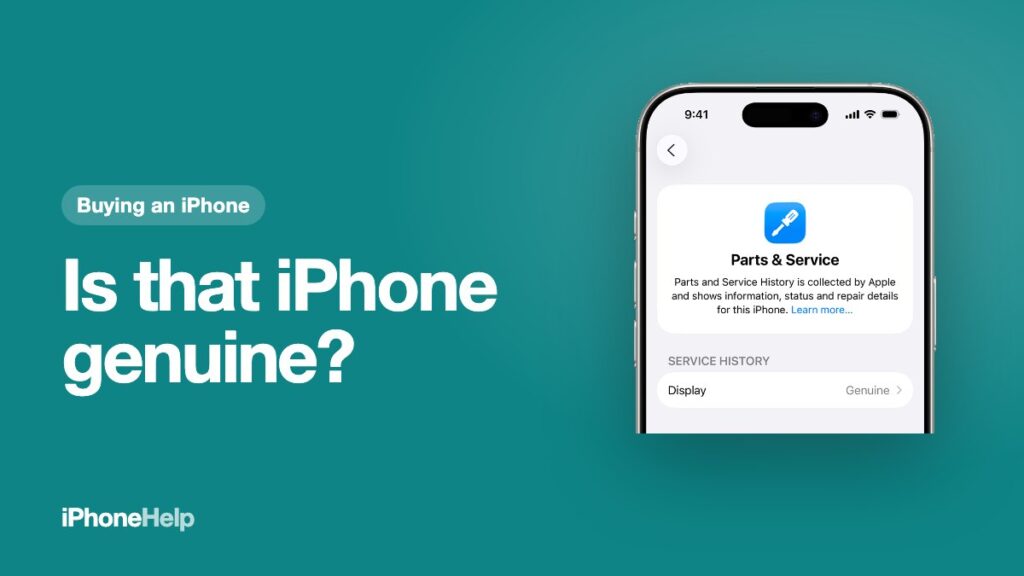
- Parts and Service History. It lists any replaced screen, battery or camera, and tells you whether the part is genuine.
Buying second-hand? Do the Activation Lock check before anything else, then make sure the IMEI is clean on the government’s Sanchar Saathi check. Bought abroad or from an importer? You also need to check the warranty country, the SIM tray and the network lock. Each check is below, in the order we’d do them.
Open the About screen first
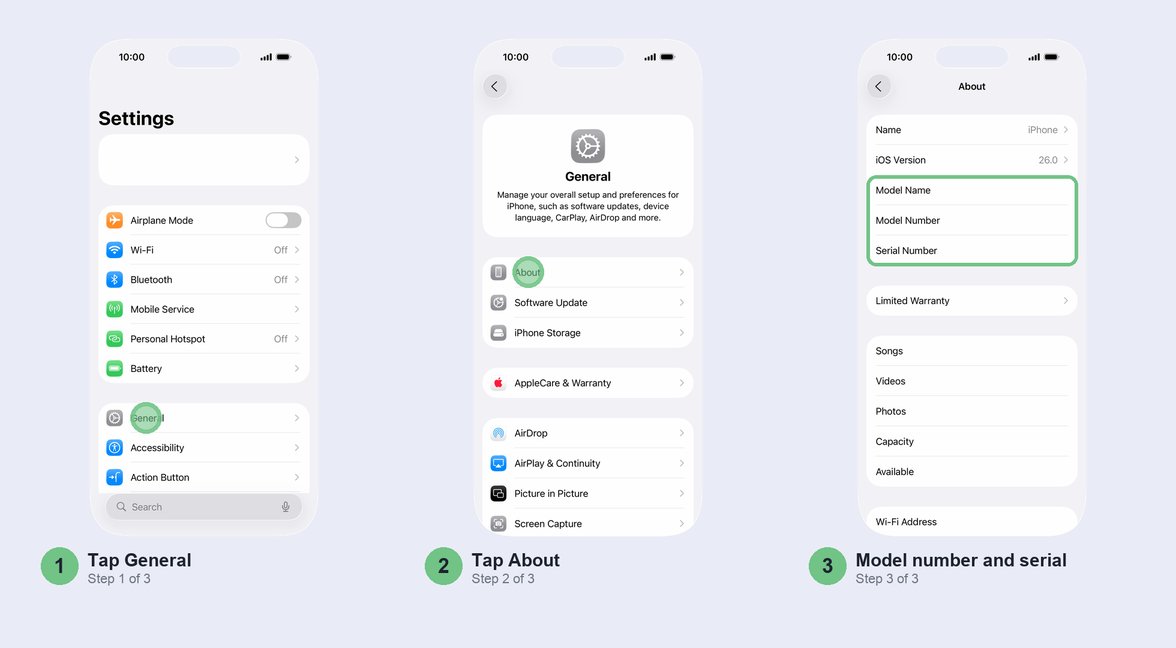
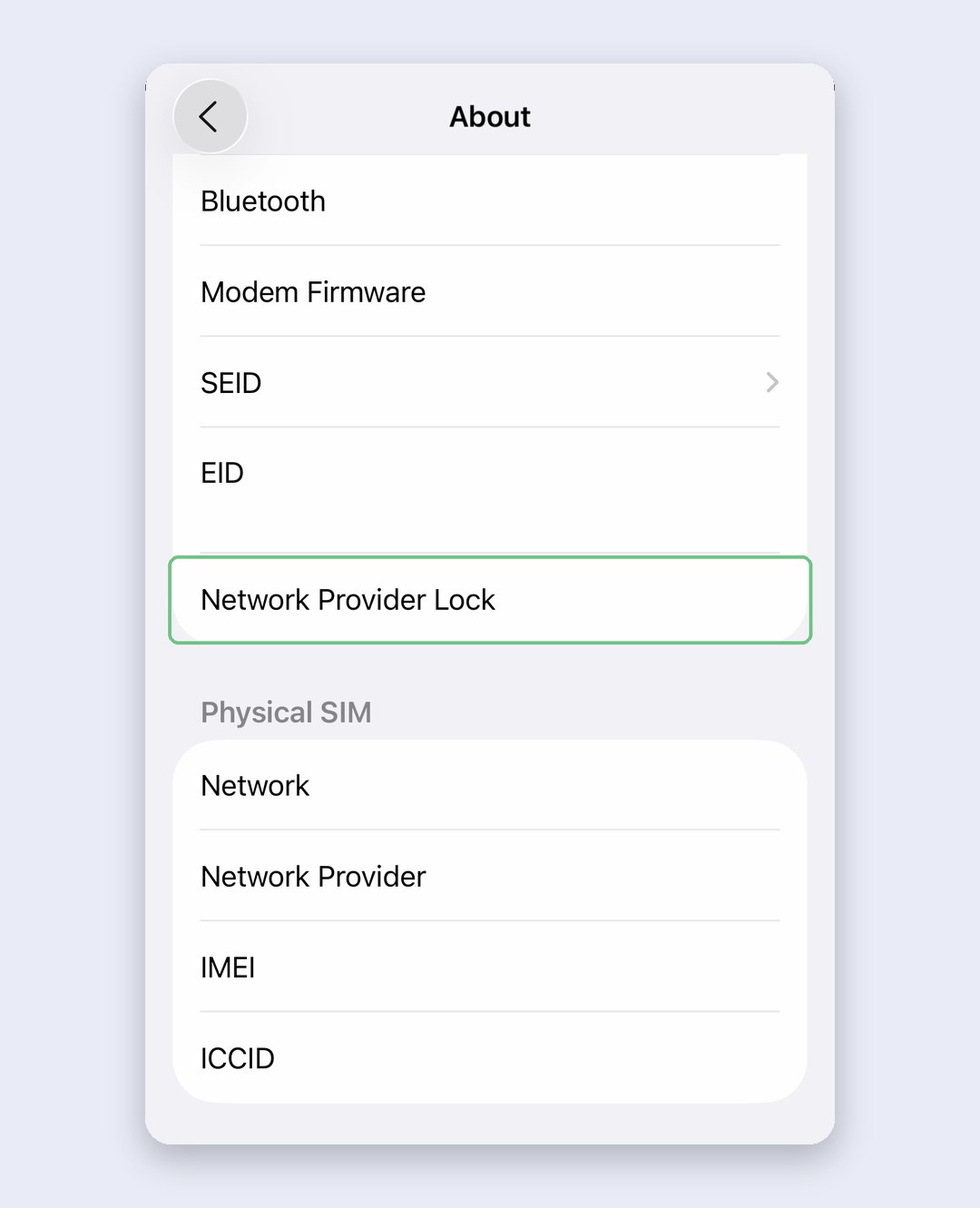
You’ll come back to one screen again and again: Settings > General > About. Near the top you’ll find Model Name, Model Number and Serial Number. Further down are your IMEI numbers and Network Provider Lock.
Start by matching numbers. The serial number on this screen should be the one printed on the box and on your bill. Scroll down and do the same for the IMEI; on older models you’ll find it printed on the SIM tray as well. Touch and hold any number to copy it, so you don’t have to type it into Apple’s page later.
If the numbers on the screen, the box and the bill don’t match, someone has swapped the box or the phone. Either way, you aren’t holding the phone the paperwork describes. We’d walk away rather than argue.
Check the warranty against Apple’s records
This is the check that settles “real or fake”, so don’t skip it. Open checkcoverage.apple.com on your own phone, paste the serial number and read what comes back. A clone or a phone with a tampered serial won’t show up as the iPhone the seller described. Apple’s page names the model that serial belongs to, so if it says iPhone 15 and you’re holding a “16 Pro”, someone copied a real serial. Sealed box? Check the serial printed on the box before you break the seal, then make sure the phone’s own serial matches once it’s on.
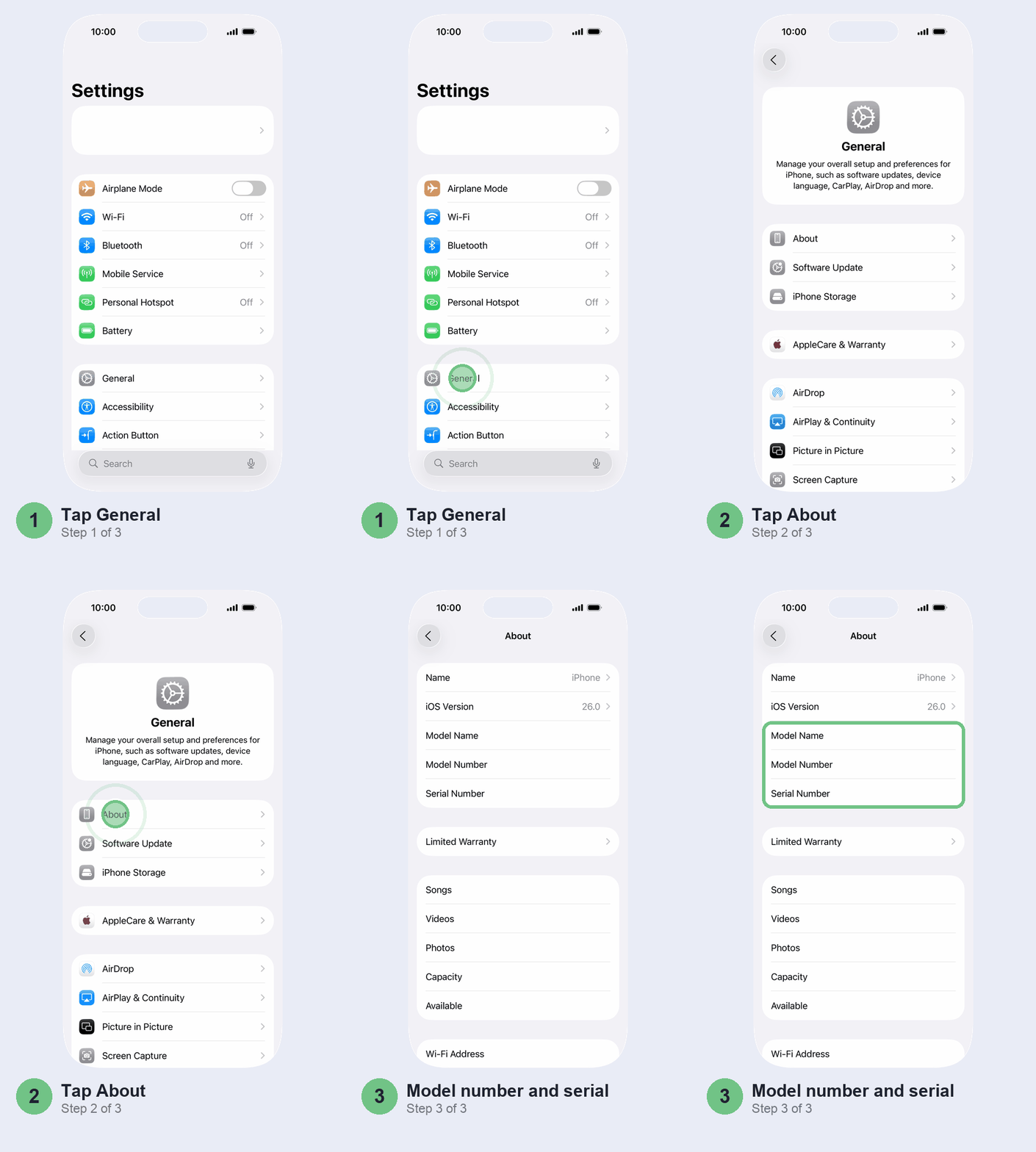
You can see the same thing on the phone itself: Settings > General > AppleCare & Warranty, then tap the iPhone. If the phone has AppleCare+, it shows up here too, and the seller can transfer it to you.
Now read the date. Apple’s limited warranty runs one year from the original retail purchase. So if a “brand new” phone shows coverage ending only a few months from today, its clock started long before you met the seller. It isn’t new, whatever the seal says. And if you’re buying new in India, keep the GST bill: Apple can ask you for proof of purchase before a warranty repair.
Read the model number: new, refurbished or replacement
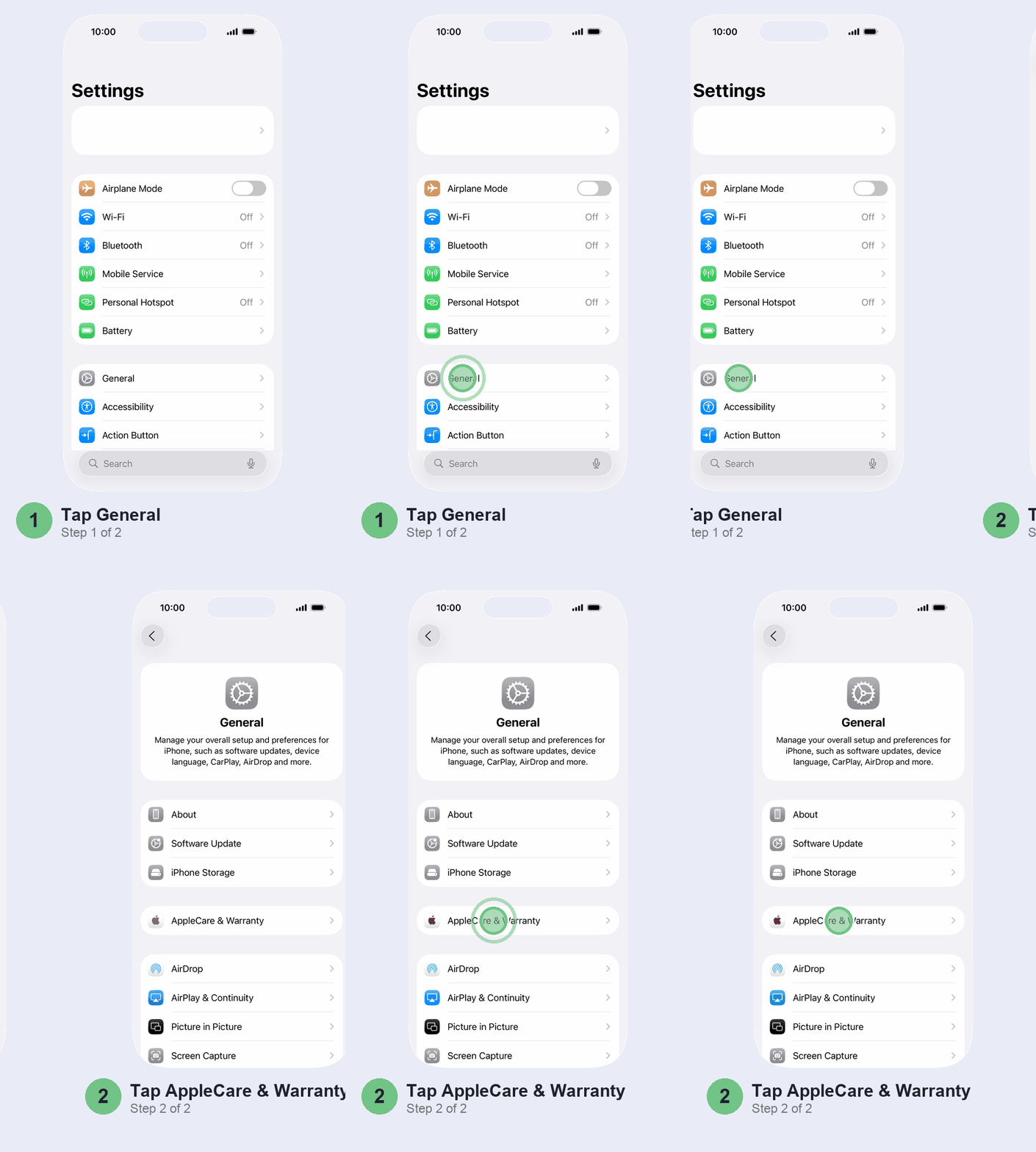
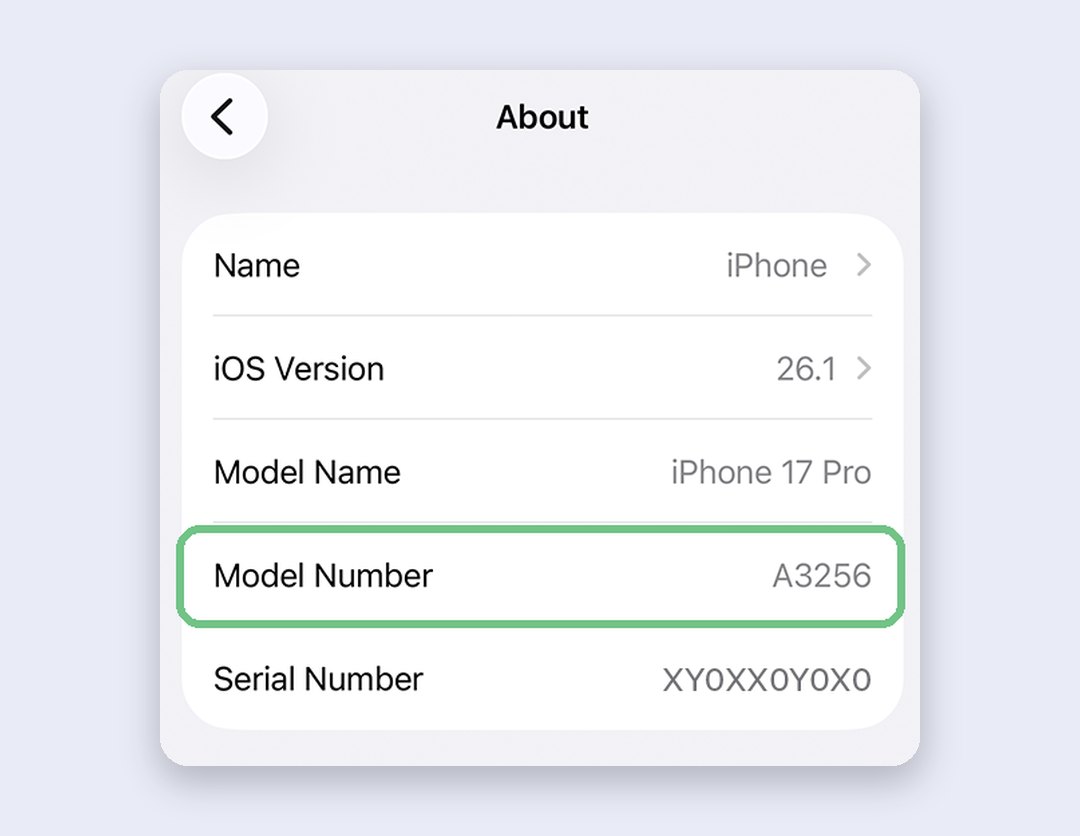
Back on the About screen, the Model Number row shows a part number such as MXXXXHN/A. Tap it and you’ll see the A number instead (A3256, say); tap again to go back.
The first letter of the part number tells you how the phone left Apple:
- M: sold new, through normal retail.
- F: refurbished.
- N: a replacement unit Apple handed out under a repair.
- P: personalised, with an engraving ordered at purchase.
Apple doesn’t spell this out on its support pages; the code comes from years of owners comparing notes in the Apple Community. It has been consistent for years, but treat it as a strong hint, not a certificate.
The two letters before the slash name the market the phone was meant for. HN is India, LL the US, ZP Hong Kong, and AA, AB or AE the UAE and nearby Gulf and Middle East markets. It’s the quickest way to test a seller’s “India unit” claim.
Two limits. The letter shows you how the phone shipped, not what’s happened since: an M phone can have a cheap replacement screen, which is what the next check is for. And if you want to decode the A number, Apple’s Identify your iPhone model page lists which number went to which countries. The A3256 in the picture, for instance, is the US iPhone 17 Pro.
Look for replaced parts in Parts and Service History
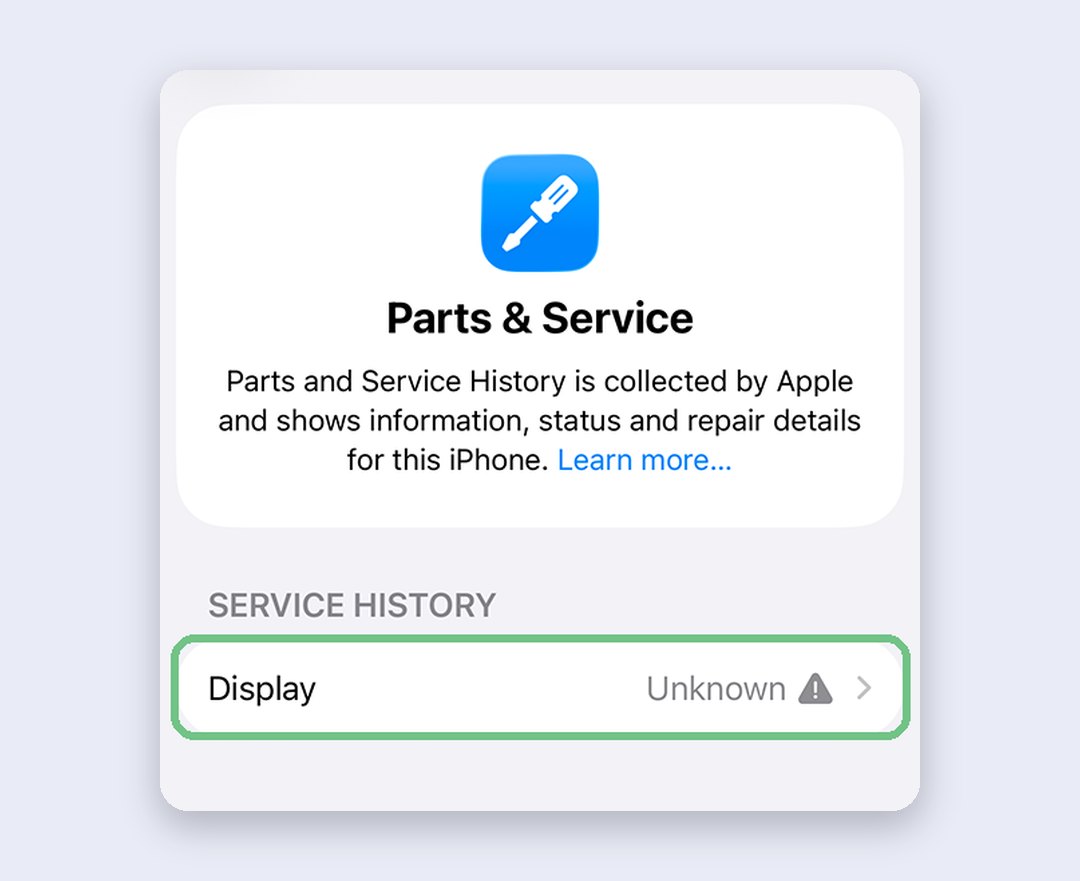
Scroll down the About screen. If your iPhone has ever had a part replaced, a Parts and Service History section shows up; on a phone that’s never been repaired, there’s nothing there at all. For a phone sold to you as new, that blank space is the answer you want.
Each listed part carries a label:
- Genuine: an Apple part, fitted with Apple’s process. Fine.
- Used: a genuine part that came out of another iPhone. Works, but quality can be inconsistent.
- Unknown: not a genuine part, not working properly, or never linked to this phone after the repair.
- Unverified: the logic board came from another iPhone. Apple Pay may not work.
- Finish Repair: a genuine part that hasn’t been calibrated yet. Face ID or Touch ID won’t unlock the phone until someone finishes the repair.
What you’ll see depends on the model. From iPhone 12 on, it tracks the battery, display, logic board and front and rear cameras. iPhone 11 covers the battery and display, and iPhone XR, XS and SE (2nd and 3rd generation) only the battery.
Of all the labels, Unknown next to Display is the one to take most seriously. Apple lists what a non-genuine screen can do to you: missed touches, wrong colours and brightness, extra battery drain. If you’re buying a Face ID iPhone, test Face ID before paying; our Face ID troubleshooting guide explains why repairs break it.
Check the battery too: in Settings, tap Battery, then Battery Health (Battery Health & Charging on iPhone 14 and older). Maximum Capacity under 80%, or Service next to Battery Health, means you should budget for a new one. On iPhone 15 and later the same screen shows the cycle count and the date of first use, and a “new” phone first used months ago isn’t new. Our battery replacement price guide has Apple’s India prices by model.
Buying second-hand: Activation Lock and the IMEI
Do this before you pay a rupee, because a phone locked to someone else’s Apple Account is close to useless to you.
- Switch the phone on. If you see iPhone Locked to Owner, it’s protected by Activation Lock. Don’t buy it.
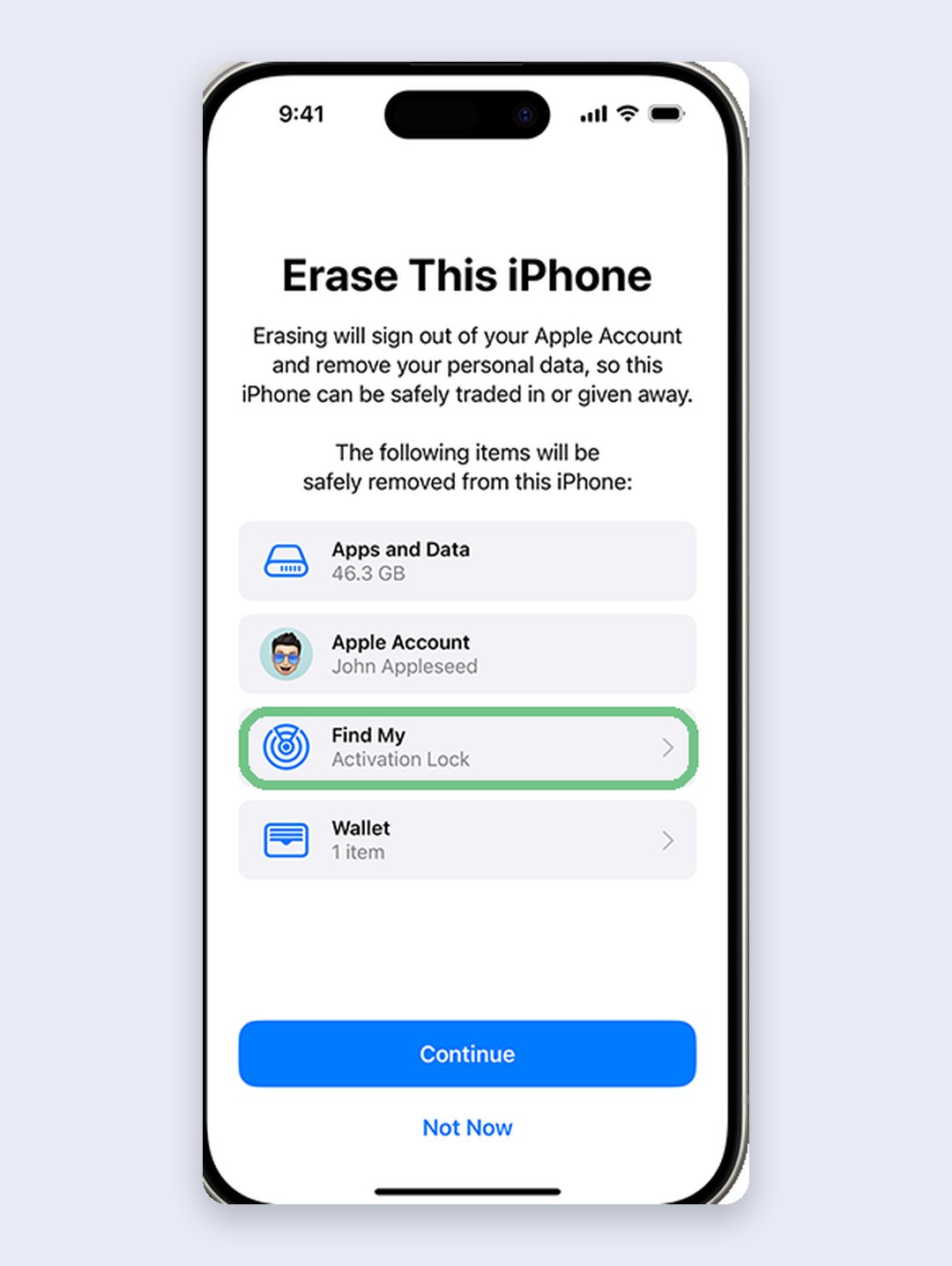
- If you get the passcode screen or the Home Screen instead, the phone hasn’t been erased. Erasing wipes everything on it, so the seller should back up first and will need their Apple Account password. Then ask them to erase it in front of you with Erase All Content and Settings, found under General, then Transfer or Reset iPhone. Erasing signs out of their Apple Account and turns off Activation Lock.
- Start the setup. If it asks for the previous owner’s Apple Account, the phone is still linked to them. The seller has to enter their password, or remove the phone from their account in a browser.
- When you reach the Hello screen and setup carries on without asking for anyone else’s account, the phone is ready for you.
Then check the IMEI against India’s blocked-phone list. Send an SMS with KYM, a space and the 15-digit IMEI to 14422, or use Know Genuineness of Your Mobile Handset on the Sanchar Saathi website or app (it verifies you by OTP). Owners can block a lost or stolen phone through Sanchar Saathi, so if the reply shows the IMEI as blocked, blacklisted or a duplicate, or names a different phone, walk away. Your iPhone lists two IMEIs on the About screen; check both.
Bought abroad or from a grey-market seller
Phones brought in from Dubai, the US or Singapore can save you money, and a genuine import passes every check above. The catch is what you can and can’t do with it in India.
The warranty may not travel. Apple’s iPhone warranty lets Apple limit warranty service to the country where the phone was first sold. Coverage that looks active on Apple’s page doesn’t promise you a free repair at an Indian service centre. Price that risk in.
There may be no SIM tray. US iPhone 14, 15 and 16 models have no SIM tray. From the iPhone 17 family, US, UAE, Saudi, Qatar, Kuwait, Oman, Bahrain, Japan, Canada and Mexico models have none either, and iPhone Air and iPhone Duo have none anywhere. Indian models keep a nano-SIM tray. An eSIM-only phone works fine with Jio, Airtel and Vi (here’s how to set up eSIM), but you can’t swap a card in at a moment’s notice.
It may be locked to a foreign carrier. On the About screen, Network Provider Lock should read No SIM restrictions. If it shows anything else, only the original carrier’s SIMs will work, and only that carrier can unlock it. Apple can’t. If the phone has a SIM tray, put your own SIM in and make a call before you pay.
Refurbished in India: what the label means
Apple doesn’t sell Certified Refurbished iPhones in India: its Indian online store has no refurbished section, while its US and UK stores do. So when you see “refurbished” or “renewed” on Amazon, Flipkart, Cashify or in a local shop, the refurbishment is the seller’s, not Apple’s.
Expect those phones to show M in the model number, because they were sold new once. An F on a phone sold here probably points to an Apple refurbished unit that was imported. Either way, judge a refurbished phone the way you’d judge a used one: Parts and Service History, battery health, Activation Lock and the IMEI. Then get the seller’s own warranty in writing, because Apple’s covers you only for whatever is left on the serial.
The on-the-spot checklist
Run it top to bottom while the seller waits:
- Activation Lock: no iPhone Locked to Owner, and setup doesn’t ask for anyone else’s Apple Account.
- Serial and IMEI on the About screen match the box and the bill.
- Apple’s coverage page knows the serial, names the right model and shows a sensible date.
- Part number starts with the letter you were promised, and ends HN/A if it’s sold as an India unit.
- Parts and Service History is empty, or shows Genuine.
- Battery Health is above 80%, with no Service message.
- Both IMEIs come back clean on Sanchar Saathi.
- Network Provider Lock says No SIM restrictions, and your SIM makes a call.
Fail one and you can still negotiate. Fail 1, 2 or 3 and we’d walk away.
Don’t bother with these
- Paid serial or IMEI lookup sites. Apple’s coverage page and Sanchar Saathi are free, and they’re the actual records.
- Judging by the box, stickers or shrink-wrap. Boxes get resealed and swapped. The serial and the About screen are what count.
- Reading HN as “made in India”. It’s the market code, not the factory. A phone can say HN and still have been assembled elsewhere.
Quick questions
How do I check if an iPhone is genuine?
Copy the serial number from Settings, General, About and check it on checkcoverage.apple.com. Make sure it matches the box and bill, then look at Parts and Service History for replaced parts.
What do the letters M, F, N and P at the start of an iPhone model number mean?
They’re the first letter of the part number on the About screen. By long-standing convention, M is a new retail unit, F refurbished, N a replacement unit and P personalised with an engraving.
Which country is AA in an iPhone model number?
AA is the United Arab Emirates. The two letters before the slash give the market: HN is India, LL the US and ZP Hong Kong, while AB and AE cover the UAE and other Gulf markets.
Does an iPhone bought in Dubai or the US have warranty in India?
Don’t count on it. Apple can restrict iPhone warranty service to the country where the phone was first sold, so expect to pay for repairs here.
How do I check if a second-hand iPhone is stolen?
SMS KYM and the 15-digit IMEI to 14422, or use Sanchar Saathi’s IMEI check. Also make sure the phone isn’t showing iPhone Locked to Owner.
Will a non-genuine screen stop my iPhone working?
Usually not. It keeps working and shows the display as Unknown, but touch, brightness, colour and battery life can suffer, a bad screen job can stop Face ID, and on iPhone 18 Pro models the camera can be disabled.
Checked against Apple’s iOS 27 User Guide and Apple Support (India) on 7 November 2026.
Which check caught a problem for you, or did a phone pass everything and still turn out dodgy? Tell us in the comments, with the model and where you bought it, so the next buyer knows what to look for.
Last updated: November 2026