iCloud storage full on the free 5 GB plan? The red badge sits at the top of Settings, your iPhone hasn’t backed up in weeks, and the few hundred photos you already deleted didn’t move the number.
On 5 GB the space usually goes to two things: a backup of a phone you no longer have, and Photos. Clear the first, decide about the second, and if you still need room, ₹75 a month for 50 GB is the least painful fix of the lot.
iCloud storage full: the quick answer
Work down this list and stop when the warning goes away:
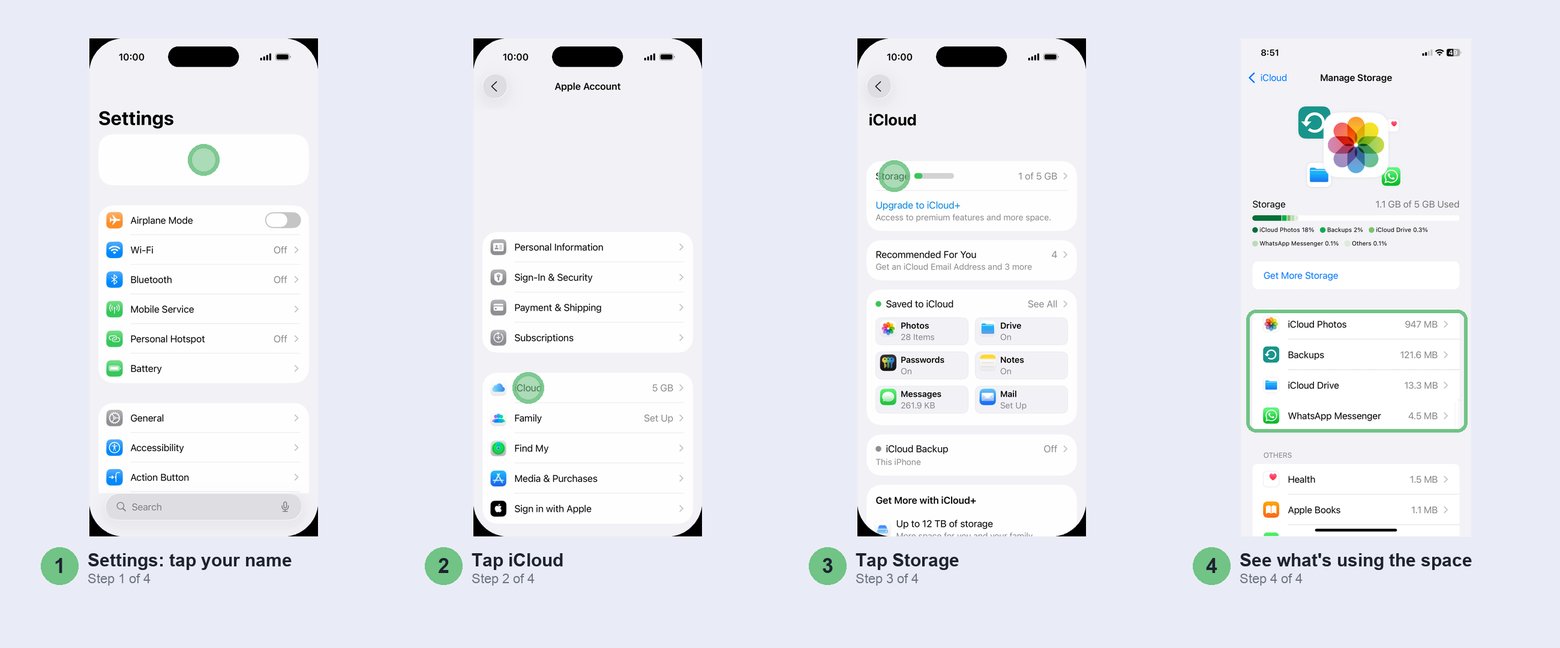
- See what’s using it: Settings, your name, iCloud, Storage.
- Delete old backups: a sold or swapped phone’s backup stays for 180 days on its own. This is the one that usually works.
- Photos: find out whether they live in iCloud Photos or inside your backup, then trim the right one.
- WhatsApp: leave videos out of its chat backup. On Indian iPhones that backup gets big fast.
- Messages and Mail: clear big attachments if they show up near the top.
- Still short? Pay for 50 GB or 200 GB rather than deleting memories to save ₹75 a month.
While iCloud is full, your iPhone can’t back up to iCloud, new photos don’t upload to iCloud Photos, iCloud Drive stops syncing, and @icloud.com mail can’t be sent or received.
Check what’s filling your iCloud
Two minutes here saves you deleting the wrong thing. Open Settings > [your name] > iCloud > Storage. On some iPhones the row is called Manage Account Storage.
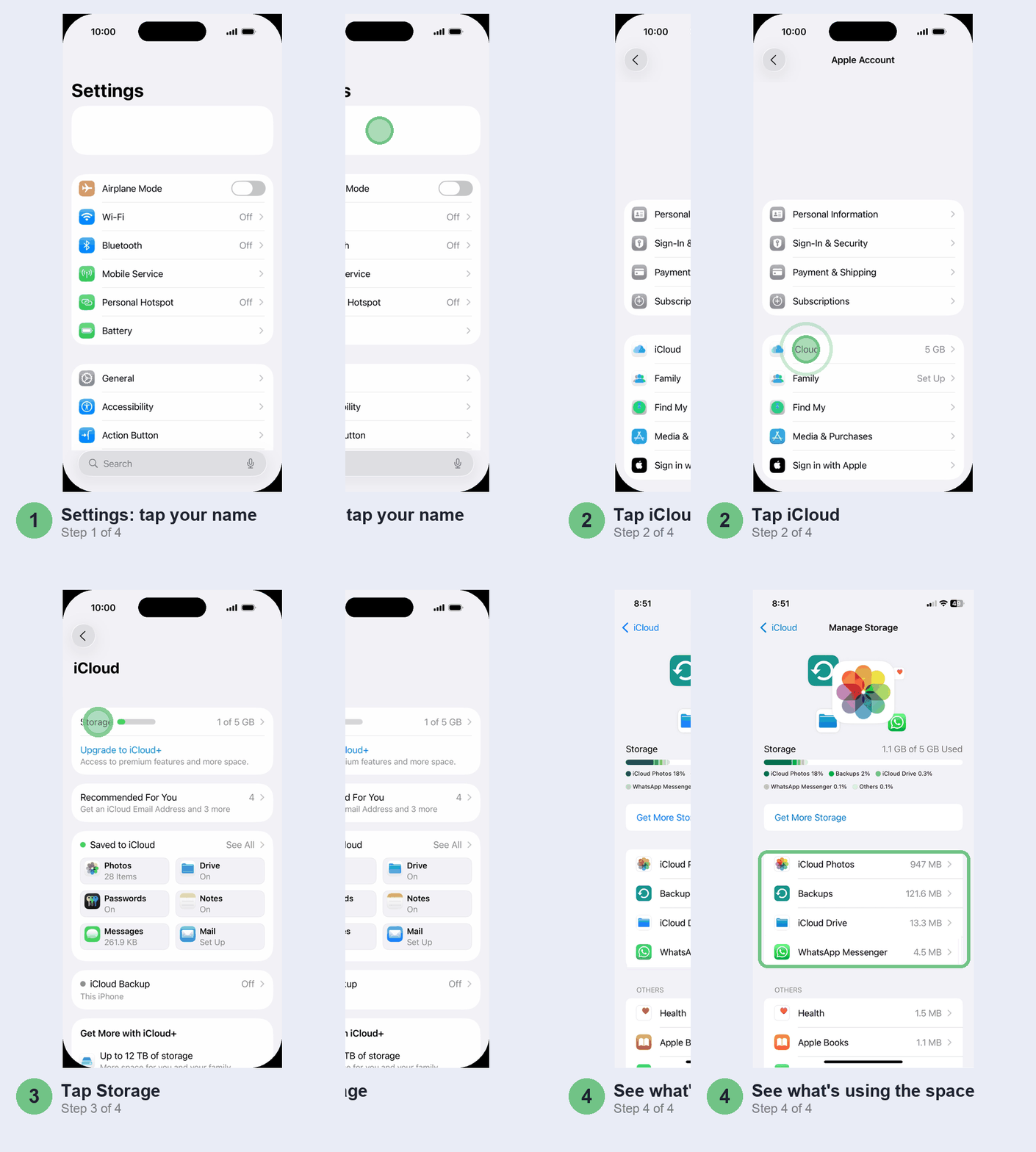
The coloured bar splits your space into Photos, Backups, iCloud Drive, Messages and the rest, and the list below gives each one’s size. Start with whatever is biggest. If it’s a backup or Photos, read the next two sections. If WhatsApp has a big number, skip to its section.
Recommended For You on the main iCloud screen is worth a glance too. It sometimes flags a stale backup or a few huge files for you, which saves some digging.
Delete backups of phones you no longer use
This is the classic 5 GB eater. You switched phones, the old one’s backup stayed behind, and iCloud keeps it for 180 days after a device stops backing up. Meanwhile your new phone can’t fit its own backup.
Check the device name and date before you tap anything. Deleting the backup of the iPhone in your hand also turns off iCloud Backup for it, which is the opposite of what you want, and a backup that’s being used to restore a phone can’t be deleted at all.
From the Storage list, tap Backups and pick the old device by name. Tap Turn Off and Delete from iCloud and confirm. If that phone is sold, given away or already moved to your new one, its backup has nothing you need.
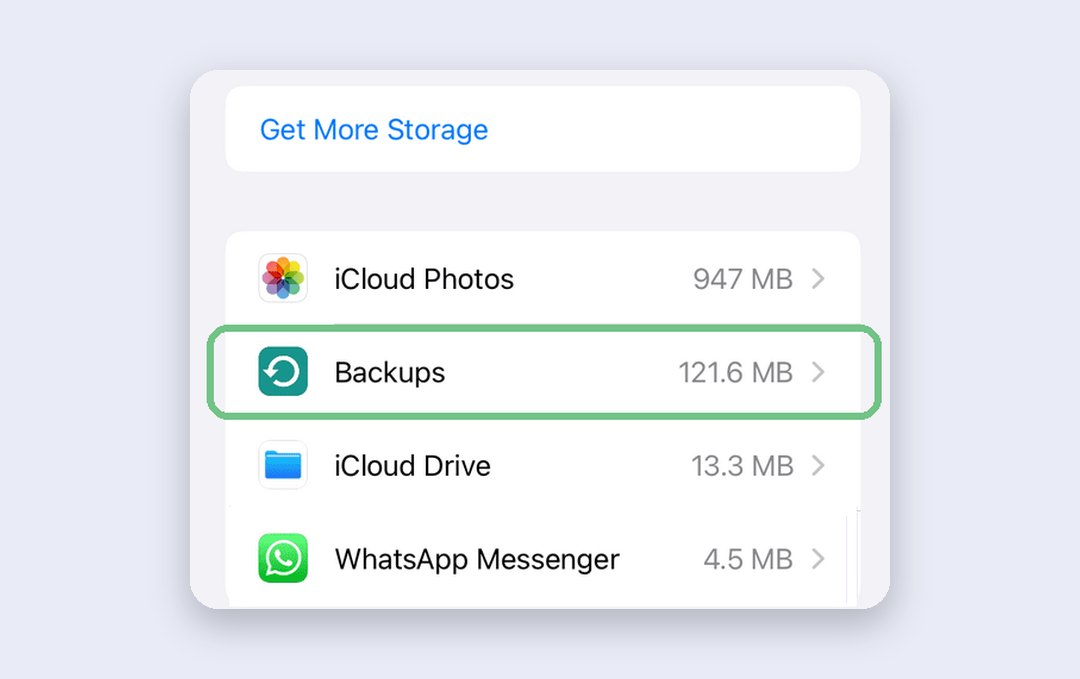
Backup for this iPhone still too big? Tap it and look at the list of apps. Turning one off with Turn Off deletes that app’s data from iCloud straight away, so only switch off apps that keep their data elsewhere, like games that sync to their own servers.
Sort out Photos before you delete anything
Photos is usually the biggest single item, and there are two different ways it can use your iCloud. On the iCloud screen, tap Photos and look at Sync this iPhone.
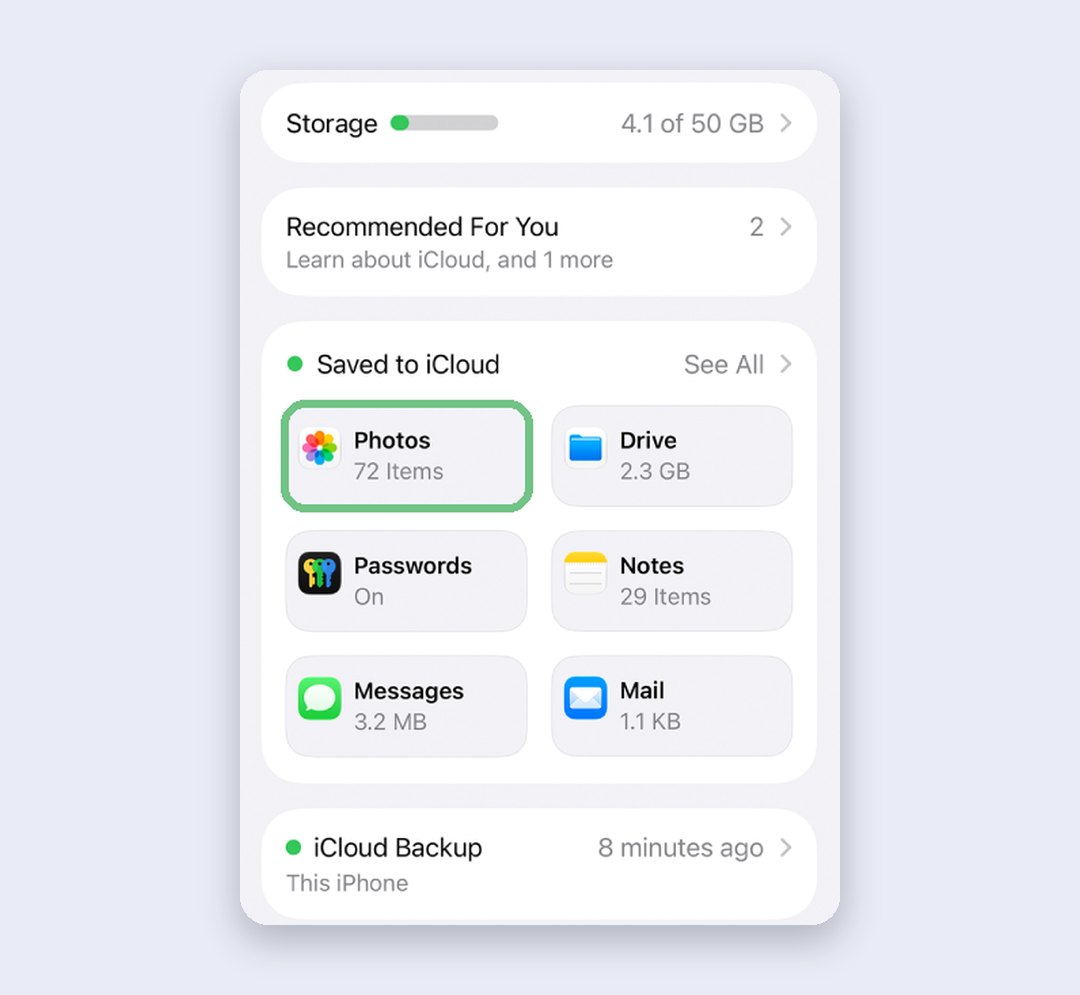
Sync this iPhone is on (iCloud Photos). Your library lives in iCloud, and deleting a photo on your iPhone deletes it everywhere you’re signed in. Copy anything you want to keep to a computer or drive first. Careful once you’re over the limit: deletions no longer wait in Recently Deleted, so there’s no 30-day undo.
Sync this iPhone is off. Your photo library is inside your iCloud Backup instead, so deleting photos only shrinks the next backup. To see how much they take, open Backups, tap this iPhone and look at Photo Library. Copy your photos to a computer first, then turn Photo Library off in that list if you’d rather not back them up to iCloud. This is the usual answer to “why is my iCloud still full after deleting photos”.
A rule of thumb: if your photos alone are close to 5 GB, no amount of tidying will keep you on the free plan. Skip ahead to the prices.
Shrink WhatsApp’s iCloud backup
On Indian iPhones this one is easy to miss. WhatsApp’s chat backup sits in your iCloud too, and with every forwarded video from every group included, it grows fast.
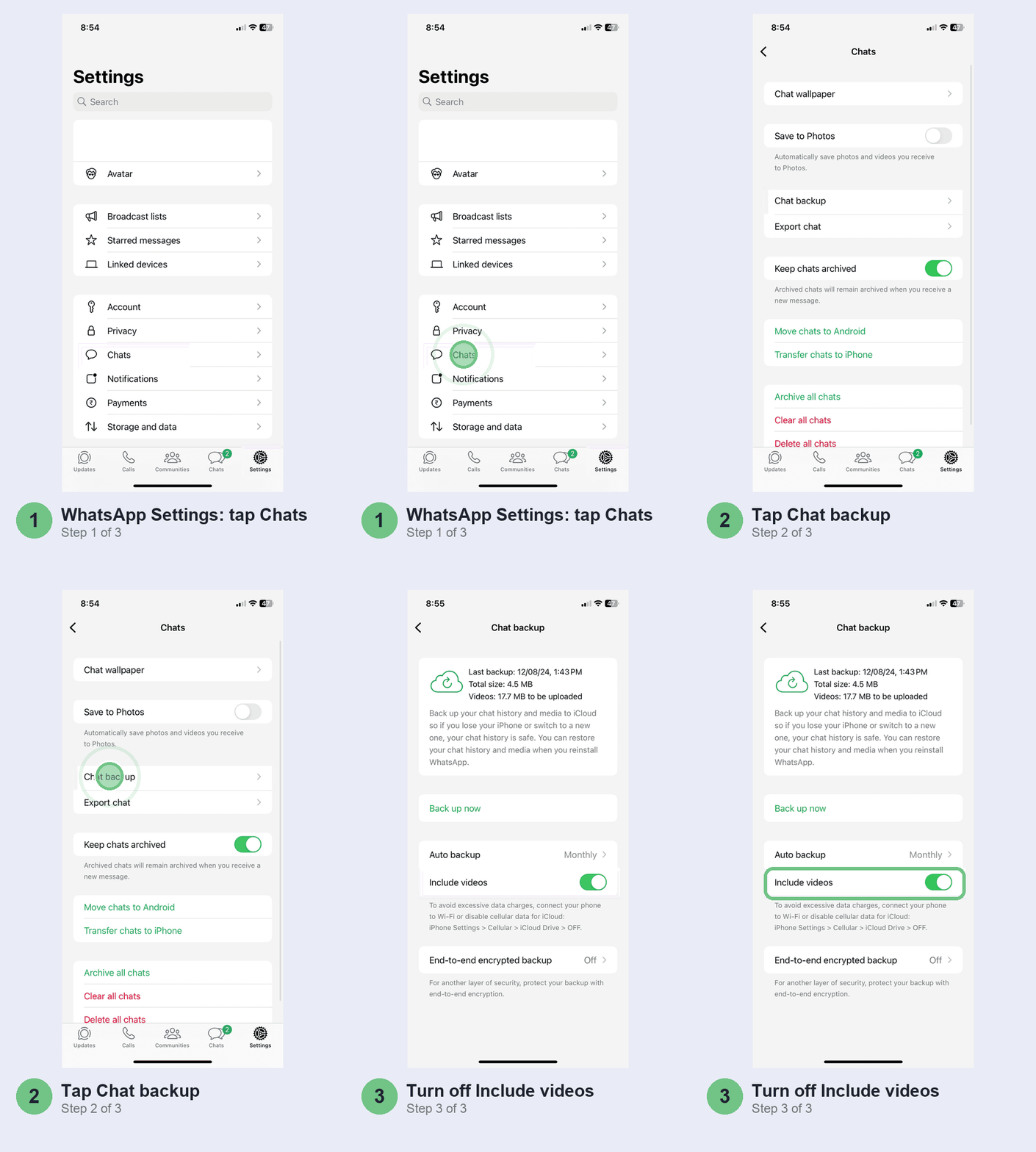
Save any videos you want to keep to Photos or a computer first, because the next backup will leave them out. Then in WhatsApp, tap Settings > Chats > Chat backup, turn off Include videos in chats, and tap Back up now so the smaller backup replaces the old one.
If your WhatsApp shows a Backup provider option, you can keep chat backups in WhatsApp’s own cloud storage instead of iCloud. WhatsApp says it’s still being tested, so you may not see it yet. If you do switch, turn WhatsApp off under Backups, this iPhone, so your iCloud isn’t holding a second copy.
Clear big attachments in Messages
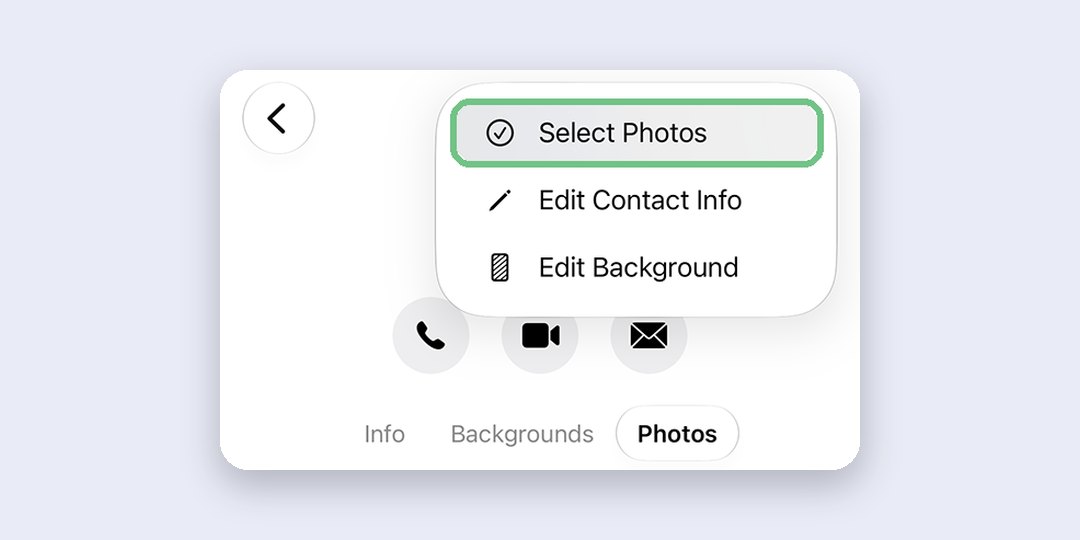
If Messages is near the top of the list, it’s the photos and videos people sent you, stored in iCloud. Open the conversation, tap the name at the top, tap Photos, then Edit > Select Photos. Pick what you don’t need, tap Delete, then Delete Attachment.
Mail on an @icloud.com address counts too. In Mail, open your iCloud inbox, tap the More button at the top, then Cleanup Recommendations > iCloud Mail Cleanup. It rounds up old promotions and bank alerts so you can delete them in one go, and keeps doing it until you turn it off.
Still showing full after all this? Give it a few hours. The Storage number can take a while to catch up.
Should you just pay for iCloud+?
If you’ve done the above and you’re still near the limit, yes. Apple’s India prices, per month, checked in November 2026:
| Plan | Price per month |
|---|---|
| 5 GB | Free |
| 50 GB | ₹75 |
| 200 GB | ₹219 |
| 2 TB | ₹749 |
| 6 TB | ₹2,999 |
| 12 TB | ₹5,900 |
Our call: 50 GB for one person whose photos fit with room to spare. 200 GB the moment two or more people in the house need space, because Family Sharing lets five other people use the same iCloud+ plan at no extra cost, and one ₹219 plan beats three ₹75 ones. 2 TB only makes sense if you shoot a lot of 4K video.
To upgrade, change or cancel later, go to the iCloud screen, tap Storage, then Manage Plan. It’s billed to your Apple Account like an App Store purchase; if the payment fails, our App Store payment fix covers the usual reasons.
Don’t want a monthly bill at all? Back up to a computer instead and turn iCloud Backup off. Our guide to backing up an iPhone to a Windows PC or Mac walks through it.
Don’t bother with these
- Emptying Recently Deleted to free iCloud space. Those items don’t count towards iCloud storage.
- Cleaner apps. They can’t touch iCloud backups or iCloud Photos. Everything useful starts from the Storage screen, for free.
Apple’s iCloud storage page has the deleting options for every app if you need one we haven’t covered.
iCloud full vs iPhone storage full
They’re two different buckets. iCloud storage is Apple’s online space (5 GB free); iPhone storage is the 128 GB, 256 GB or more inside your phone. A 256 GB iPhone can still have a full 5 GB iCloud. If the warning says iPhone Storage, you want our iPhone storage full guide instead.
Quick questions
What happens if my iCloud storage is full?
Your iPhone stops backing up to iCloud, new photos don’t upload, your files stop syncing between devices, and @icloud.com mail can’t go in or out. It all starts again once you free space or upgrade.
Why is my iCloud storage still full after deleting photos?
Usually because iCloud Photos was off, so your photos sit inside your iCloud Backup and only shrink at the next backup. An old phone’s backup or WhatsApp’s chat backup can also be the real culprit.
How do I delete iCloud storage from an iPhone?
Settings, your name, iCloud, Storage. Tap the biggest item: Backups for an old phone’s backup, or an app to delete its data. Photos are deleted in the Photos app.
How do I access my iCloud?
On the iPhone, it’s Settings, your name, iCloud. On a computer, sign in at icloud.com to see your photos, files and mail in a browser.
How do I download everything from iCloud?
Sign in to icloud.com on a computer and download from Photos and iCloud Drive. Do it before you delete anything you might want later.
How does iCloud storage work?
Every Apple Account gets 5 GB free, and your backups, iCloud Photos, iCloud Drive, Messages and Mail all draw from it. When it runs out you either free space or move to a paid iCloud+ plan.
Is 50 GB of iCloud enough?
For one person, usually, unless you shoot a lot of video. For a family, a shared 200 GB plan is better value.
What was eating your iCloud: an old phone’s backup, Photos or WhatsApp? Tell us in the comments, and which plan you settled on.
Prefer to watch? Apple’s own short video shows how to check and upgrade your iCloud storage.
Checked against Apple’s iOS 27 User Guide and Apple Support (India).
Last updated: November 2026