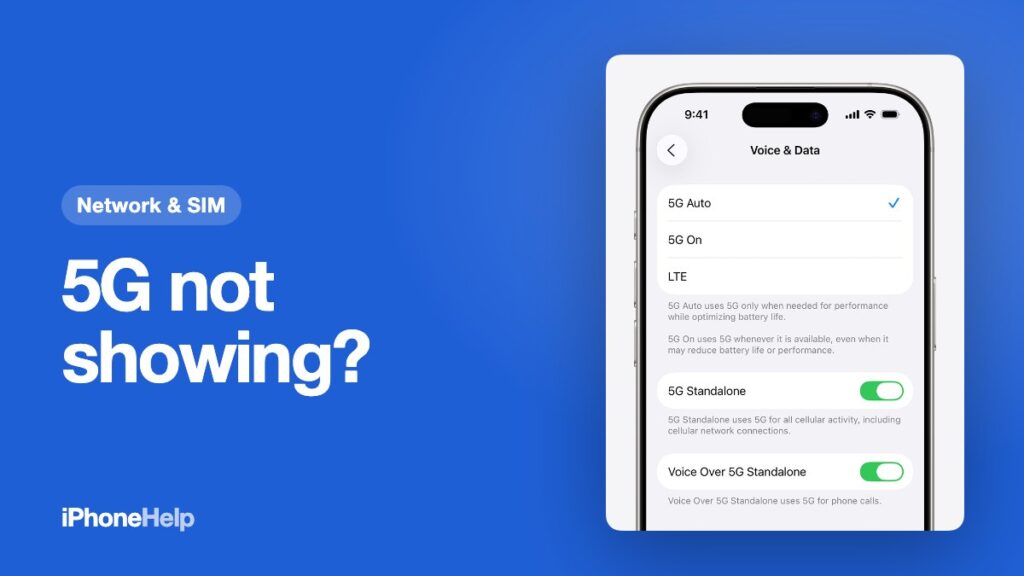
Your friend’s Android phone shows 5G in the same room, and your iPhone sits on 4G or LTE. Or the 5G option isn’t in Settings at all. If you searched “iPhone 5G not working”, here’s the good news: the phone itself is rarely at fault. Usually one setting is on the wrong choice, or your carrier runs its 5G in a way your iPhone hasn’t been told about yet. Jio and Airtel don’t even build 5G the same way, which is why the fix for one often does nothing for the other.
Quick answer:
- Any carrier: set Voice & Data to 5G Auto for the right SIM. This is the fix that works most often.
- Battery icon yellow? Low Power Mode switches 5G off. Turn it off.
- Jio: also turn on 5G Standalone on the same screen. Switch greyed out? Usually an old SIM, and Jio swaps it.
- Airtel: your 4G SIM already works on 5G. It’s coverage or your plan. Vi: check your city is on Vi’s 5G list.
- iPhone 11 or older? No 5G, whatever you change.
First, a one-minute check: phone, plan, place
5G needs the right phone, the right plan and a 5G signal where you’re standing. Miss any one and no setting will help.
- Your iPhone. Apple supports 5G on the iPhone 12 and every model since, and the 2022 iPhone SE has it too. An iPhone 11 or older never gets it, whatever you change, so don’t waste an evening on settings. Not sure which you’ve got? If the Voice & Data screen in the next section shows 5G choices, your phone does 5G.
- Your plan. Not every recharge includes 5G, and your carrier decides which do. The MyJio, Airtel Thanks or Vi app tells you in ten seconds; a forum thread from 2023 won’t.
- Your place. 5G coverage is patchy indoors and in smaller towns. If it shows on the balcony but not in the bedroom, your iPhone is working.
On Jio, iOS also has to be 16.4 or later. Any iPhone updated in the last couple of years is well past that; if yours has skipped a year of updates, start with the update at the end of this guide.
iPhone 5G not working? Set Voice & Data to 5G Auto
This is where most “5G not working” problems end. If Voice & Data is on LTE, your iPhone stays off 5G even when it’s right there, and that’s easy to miss.
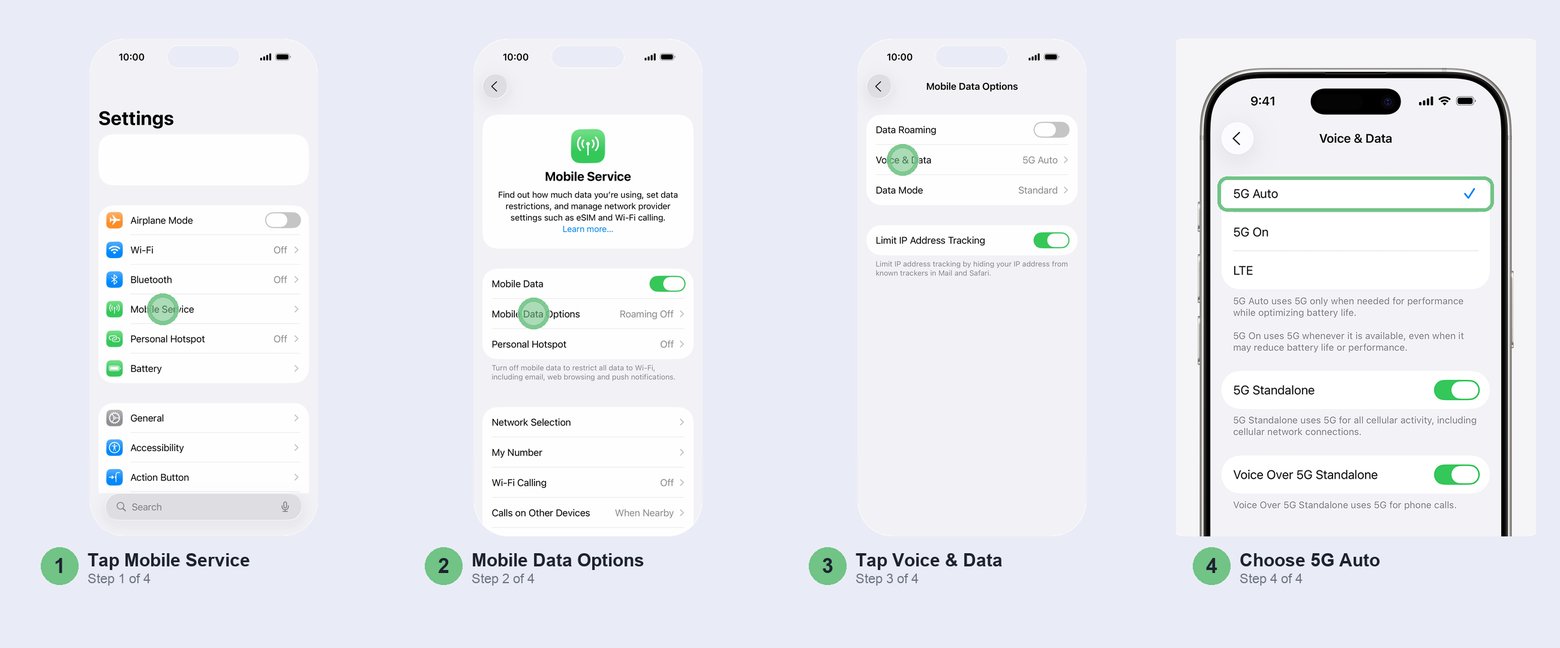
Got two SIMs? Each line keeps its own setting, so on the Mobile Service screen tap the number you want 5G on first, then find Voice & Data on that line’s page. With one SIM, open Settings > Mobile Service > Mobile Data Options and tap Voice & Data. Choose 5G Auto.
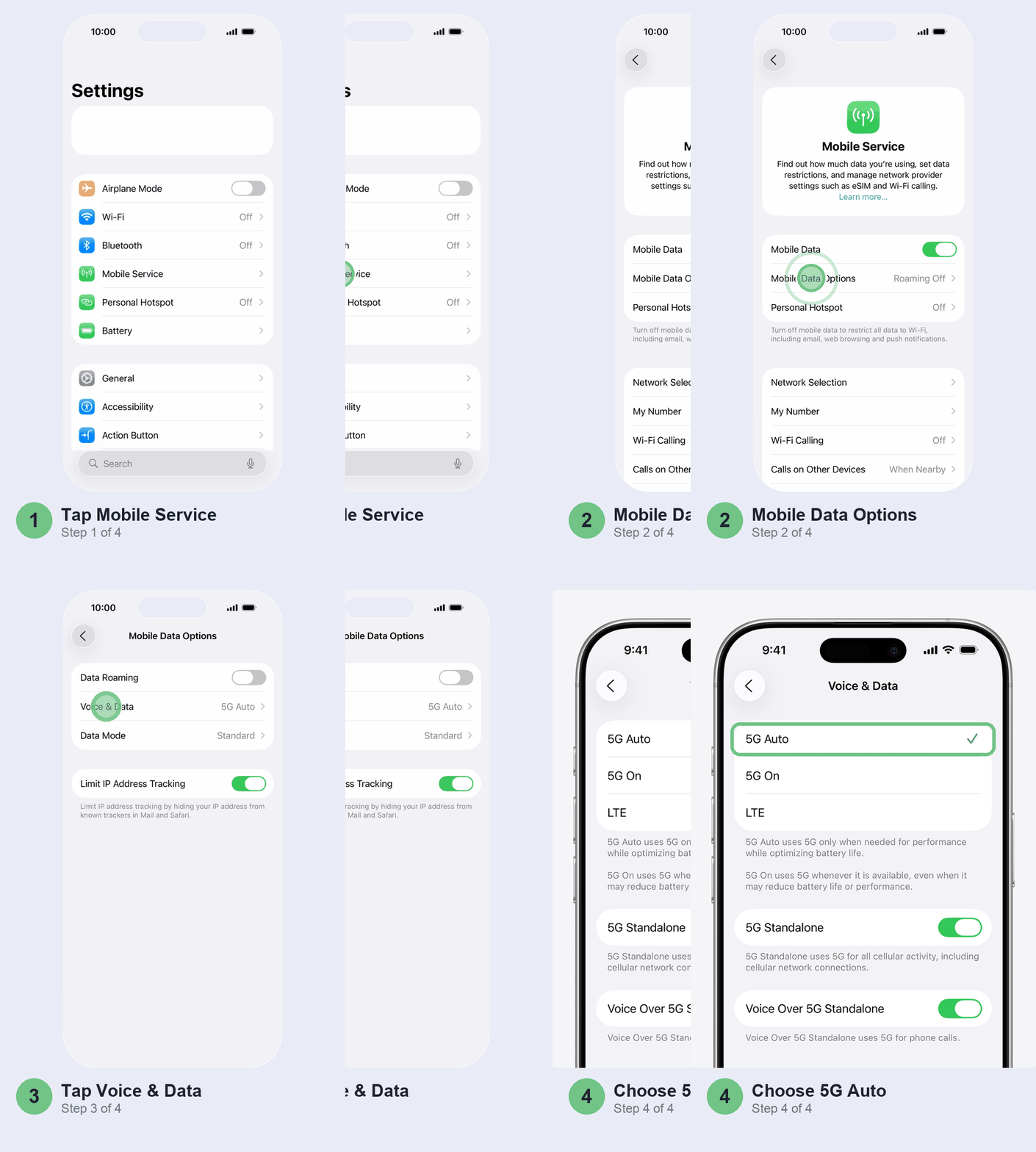
5G Auto or 5G On? We’d pick 5G Auto. It stays on 5G when 5G is actually faster and drops to LTE when it isn’t, which saves battery. 5G On sticks to 5G whenever it’s available, and Apple warns it can cost you battery life. Use 5G On only to test whether 5G shows up at all, then switch back.
After you change it, switch Airplane Mode on for ten seconds and off again. That makes the phone look for the network straight away instead of waiting, and it’s quicker than a restart. You’ll know it worked when 5G appears next to the signal bars; on 5G Auto it can drop to LTE when 5G isn’t adding speed, so play a video or run a speed test before you decide.
Battery icon yellow? Low Power Mode turns 5G off
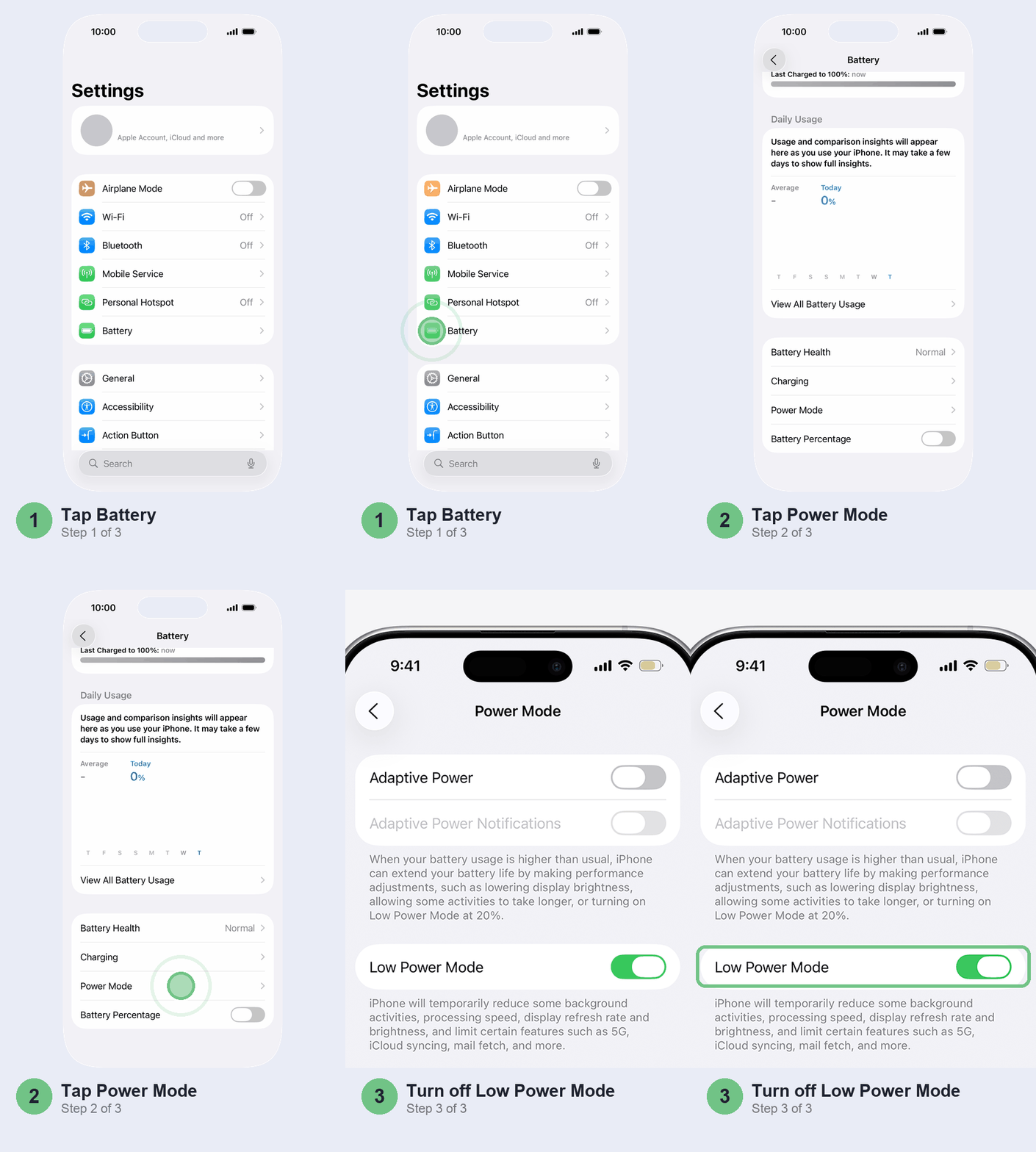
Check this before anything fiddly: it takes five seconds. Low Power Mode cuts 5G to save battery (an iPhone 12 or 13 still uses it for streaming and big downloads). The giveaway is a yellow battery icon in the status bar.
On an iPhone 15 or later, go to Settings > Battery > Power Mode and turn off Low Power Mode; on an iPhone 14 or earlier, the switch is right on the Battery screen. If your Power Mode screen has Adaptive Power, look at it too: when it’s on, it can turn Low Power Mode on by itself at 20% battery, which is why 5G can vanish in the evening and return once you charge.
Jio 5G not working on iPhone? Turn on 5G Standalone
Here’s the India bit that trips people up. Jio’s True 5G is Standalone 5G: a separate 5G network with its own core. Airtel launched its 5G as Non-Standalone, laid on top of its 4G network. That’s why a fix that works on Airtel can do nothing on Jio: Jio’s kind needs one extra switch.
On the same Voice & Data screen, under the 5G Auto, 5G On and LTE choices, look for 5G Standalone and turn it on.
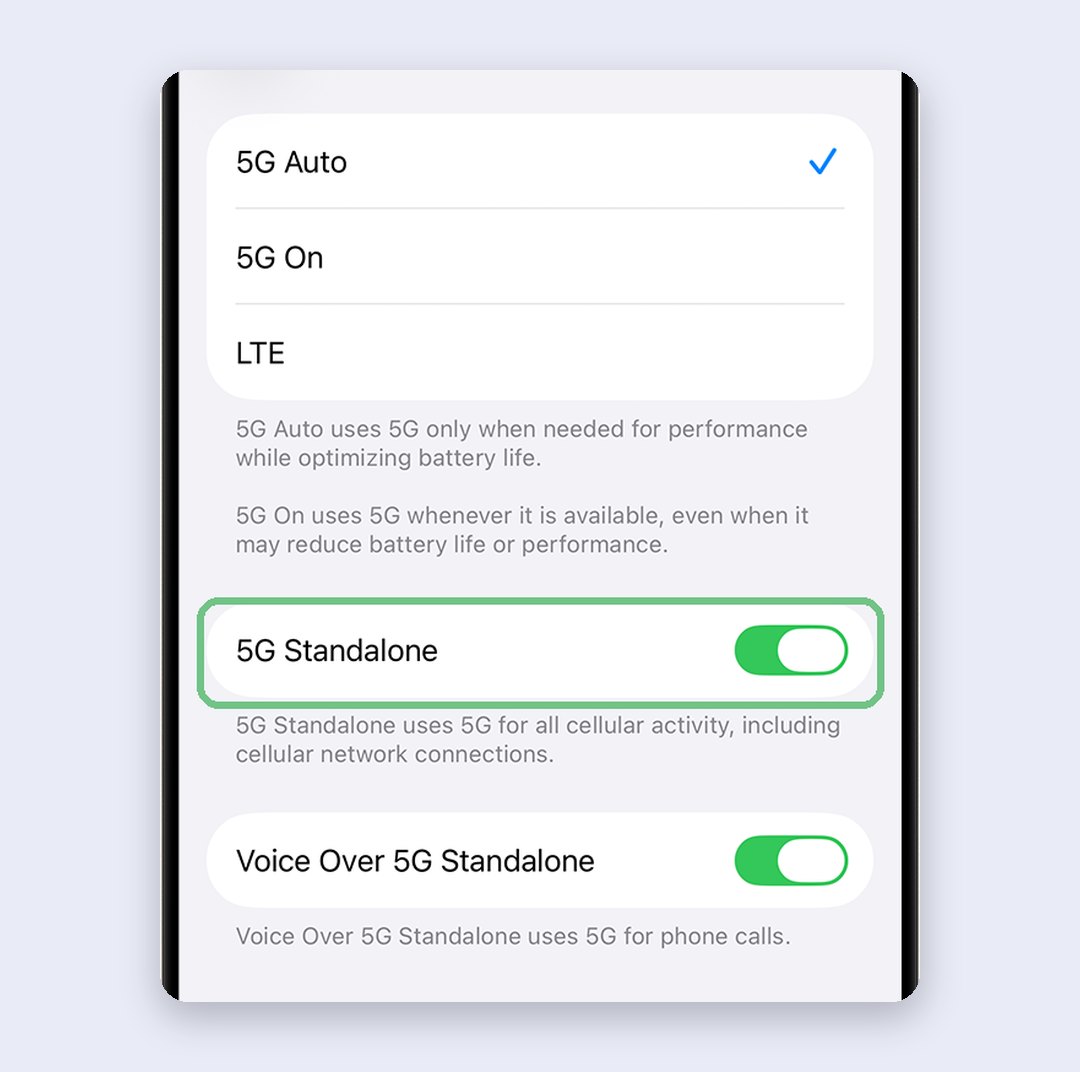
What if the switch isn’t there, or it’s greyed out? First, on an iPhone 12, Low Power Mode switches 5G Standalone off, so check the battery icon. After that, the usual cause is the SIM: some Jio users see a note that 5G Standalone is unavailable because of insufficient SIM security, which points at an old SIM card. Occasionally it clears by itself after Jio changes something on its side, but don’t wait weeks for that. Ask for a replacement SIM at a Jio store, or move the number to an eSIM, which also counts as a new SIM. Our eSIM guide for Jio, Airtel and Vi walks through the switch.
Airtel or Vi 5G not showing? Check coverage before the SIM
Airtel says its 4G SIM is already 5G ready, so on Airtel a SIM swap is rarely the fix. With Voice & Data on 5G Auto and the right line picked, what’s left is your plan and your area. Airtel’s 5G doesn’t depend on the 5G Standalone switch, so don’t worry about it.
Vi is still rolling 5G out city by city. Before you change anything on the phone, check Vi’s 5G page or the Vi app for your city. If your city isn’t on it, 4G is what your iPhone should show. If it is and you still get 4G, ask Vi whether your SIM needs setting up for 5G: Apple notes that some carriers have to do this for older SIMs.
Still stuck? Update iOS, then reset network settings
Before the reset, check Settings > General > Software Update and install whatever’s waiting. Carriers also send settings updates, and these can switch on things like 5G: your iPhone offers them on its own, and you can check under Settings > General > About. Say yes when it asks.
Still on 4G with everything above in place? Reset network settings. Know what you’re giving up first:
- It forgets every saved Wi-Fi network and password, your VPN setup and any mobile settings you changed. Note your Wi-Fi passwords. Photos, apps and chats stay.
- On a company-managed phone, ask IT first.
Go to Settings > General > Transfer or Reset iPhone > Reset and tap Reset Network Settings. Skip Reset All Settings and Erase All Content and Settings: neither does more for 5G.
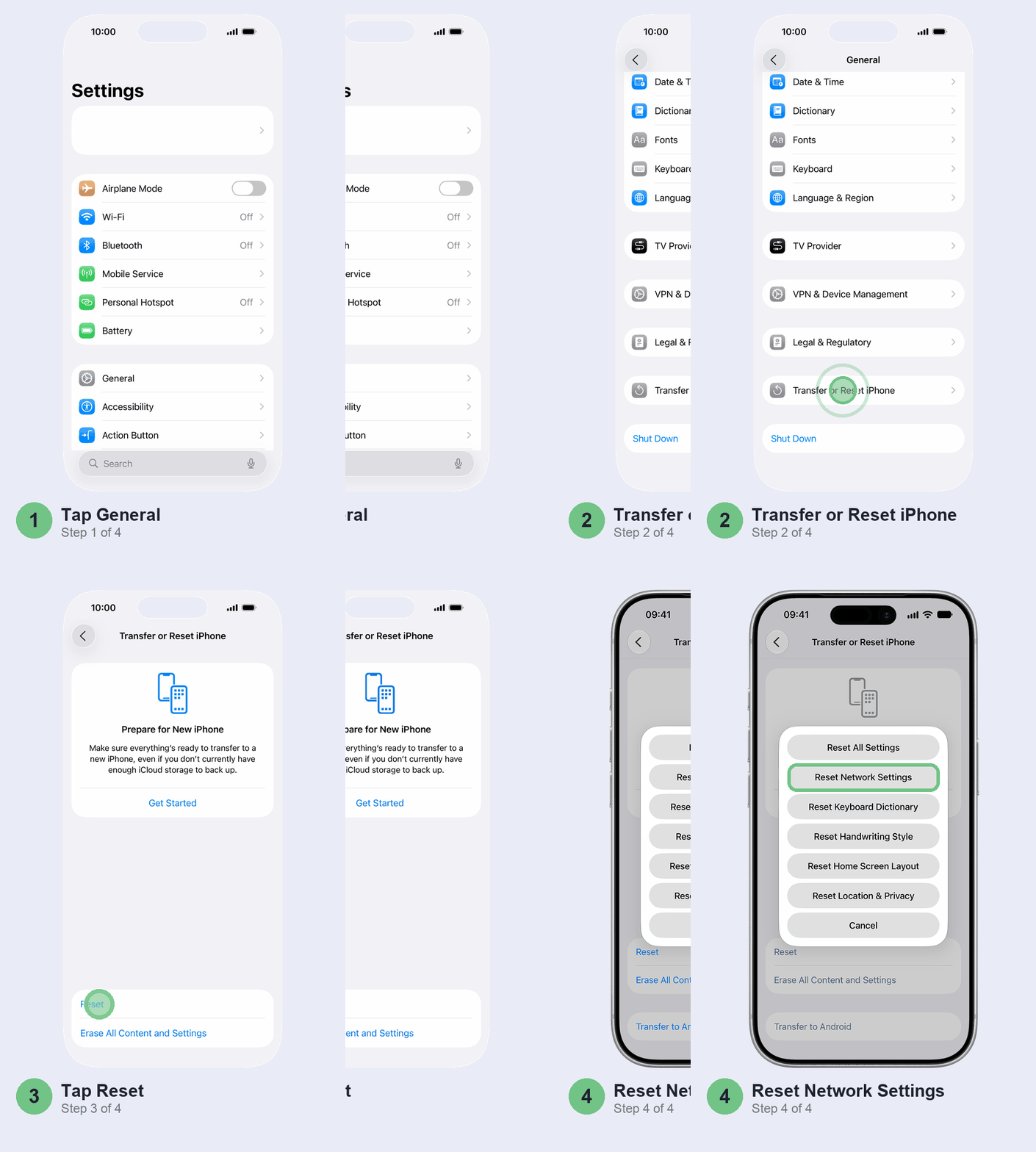
Afterwards, go back to Voice & Data and set 5G Auto again (and 5G Standalone on Jio), because the reset may undo them.
Don’t bother
- Resetting network settings again and again. One reset does all a reset can. If 5G didn’t come back, it’s the SIM, the plan or the area.
- “5G only” or “network booster” apps. No App Store app can force your iPhone onto 5G.
- Buying a new iPhone for 5G. If yours is an iPhone 12 or later, it already does 5G.
When it’s the carrier, not the iPhone
If Voice & Data is on 5G Auto, your plan includes 5G, other phones on the same carrier get 5G where you’re standing, and your iPhone still sits on 4G after the reset, take it to your carrier’s store. Ask for a SIM replacement and ask them to check that 5G is active on your number. Take the iPhone too, so they can test it with the new SIM there and then. Don’t book an Apple repair yet. Only if your iPhone can’t get 5G with a new SIM on any carrier is it worth showing Apple.
Quick questions
Why is 5G not showing on iPhone?
Usually Voice & Data is set to LTE, Low Power Mode is on, or you’re outside 5G coverage. On Jio, 5G Standalone also has to be on. Check those before anything else.
How do I turn on Jio 5G on an iPhone?
Go to Settings > Mobile Service, tap your Jio line if you have two SIMs, then Mobile Data Options > Voice & Data. Pick 5G Auto and turn on 5G Standalone.
Why does Airtel 5G work on iPhone but Jio doesn’t?
Jio’s 5G is Standalone and needs the 5G Standalone switch and a SIM that supports it. Airtel’s runs on its 4G network and works with the SIM you have. An old Jio SIM is often the culprit; Jio replaces it.
Which iPhones support 5G in India?
The iPhone 12 and every model since, plus the 2022 iPhone SE. Apple lists 5G support for Jio, Airtel and Vi.
Does 5G drain the iPhone battery faster?
It can, especially on 5G On with a weak signal. 5G Auto keeps most of the speed and drops to LTE when 5G isn’t helping. Our iOS 27 battery drain guide and overheating guide have more if your phone is warm and draining.
My 5G works but data is slow. What now?
Make sure the SIM with your data pack is the one set for mobile data; our dual SIM guide shows how. If you share data with a laptop, the hotspot guide covers the rest.
Which fix got your 5G back? Tell us your iPhone model and carrier in the comments, and we’ll add what works to this guide.
Checked against Apple’s iOS 27 User Guide and Apple Support (India).
Last updated: November 2026