It’s 11 in the morning and your iPhone rings: a “pre-approved personal loan”. You decline. Ten minutes later another unknown number rings, you decline that too, and it was the delivery agent standing at your gate with your parcel.
Blocking spam is easy. Blocking it without losing the delivery agent, the cab driver and the bank is the part most guides skip. Here’s how to block spam calls on iPhone in India the way we’d set it up, in the order worth doing it.
Block spam calls on iPhone in India: the quick answer
Turn on full DND with your carrier first. It’s free, and by TRAI’s rules it stops promotional calls, which must come from 140-series numbers. Banks and insurers have to use 1600 numbers for service and transaction calls, and TRAI doesn’t let anyone block those, so DND won’t cost you the bank.
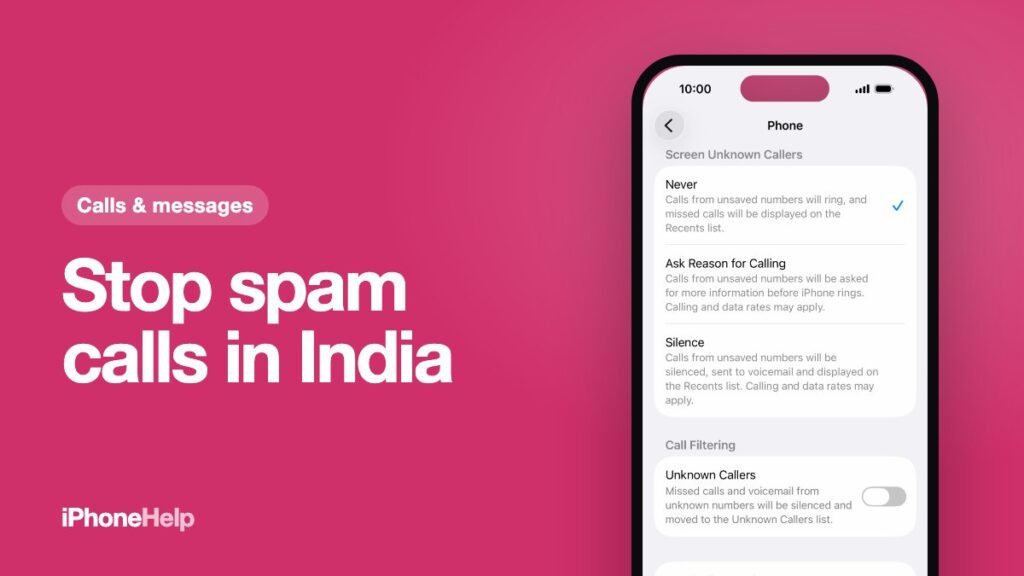
Then set your iPhone to Ask Reason for Calling. An unknown caller has to say who they are before your phone rings, so “Amazon delivery” gets through and the loan pitch usually hangs up. It works with English (India) on iOS 26 and later.
Block the repeat offenders and report the scams. Blocking takes a few taps. Fraud calls (fake KYC, fake police, “your SIM will be cut”) go to Sanchar Saathi’s Chakshu, where the government can act on the number.
Turn on full DND with Jio, Airtel or Vi
Most daily spam is telemarketing: loans, credit cards, insurance, property. Registered telemarketers have to respect India’s Do Not Disturb register, so opting out stops them before your iPhone even sees the call.
You have four ways in, all free:
- Call 1909 from the number you want covered and follow the voice menu. It works on every carrier, Airtel included, and it’s the least fiddly.
- Text 1909. The keyword varies by carrier: Jio’s help page says START 0, Vi’s says FULLY BLOCK.
- Your carrier’s app. In MyJio, tap your profile icon, then Settings, Service settings and Do not Disturb. Vi users can do it in the Vi app or at myvi.in/dnd.
- The TRAI DND app, TRAI’s own app on the App Store. It sets full or partial DND with an OTP, and it does a second job on iPhone that we’ll come to in a minute.
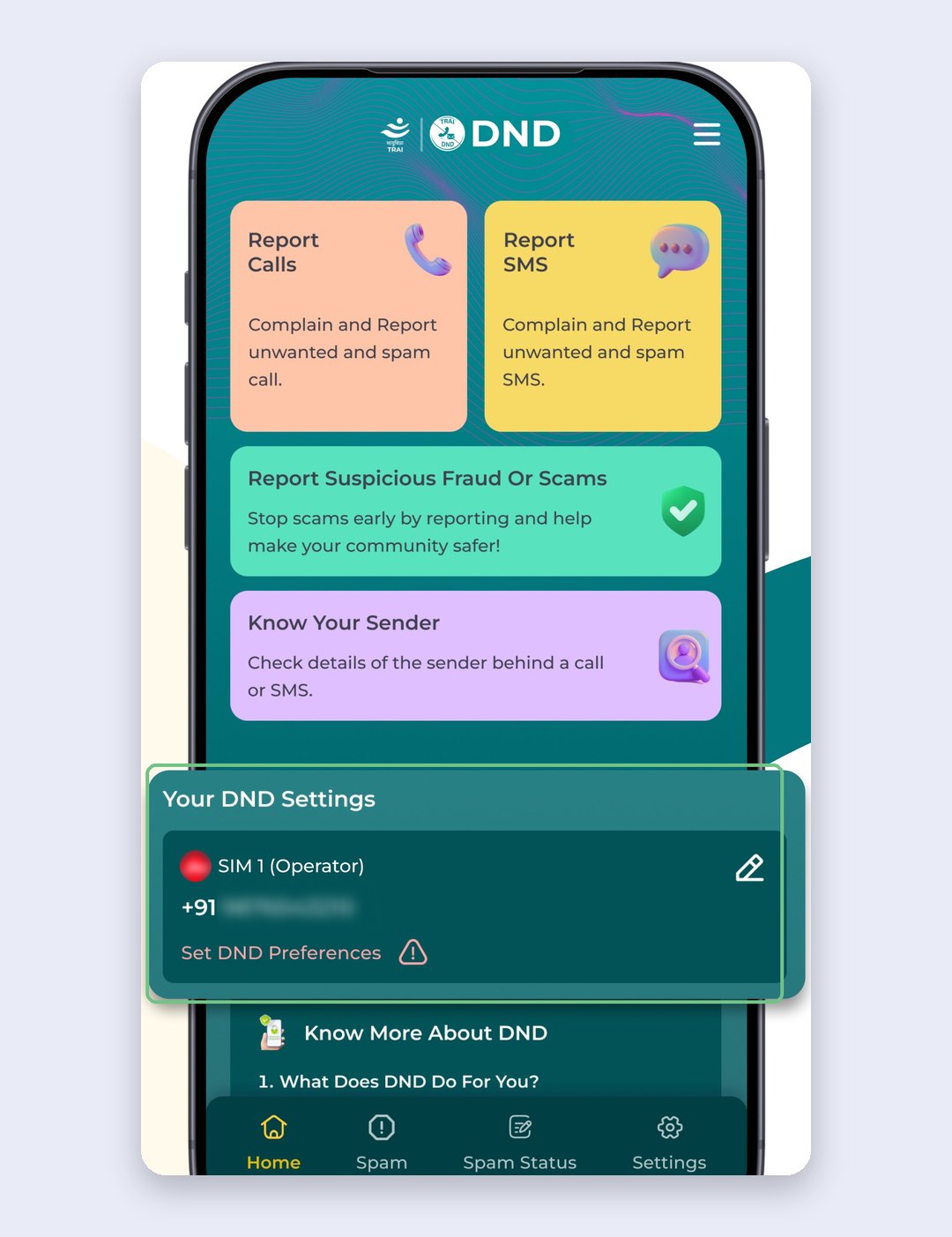
Pick full block. TRAI also lets you block by category (eight of them, from banking to property to food) if there’s one you’d rather keep. You’ll get a confirmation SMS with a reference number, and Jio says the change takes effect within 24 hours.
What DND won’t stop is a scammer on an ordinary 10-digit mobile number, because they were never a registered telemarketer. That’s what the iPhone settings below are for.
Searched “DND on iPhone Jio” and ended up in Focus settings? Different thing. The iPhone’s Do Not Disturb Focus silences almost everyone, including calls you want; TRAI DND only stops commercial callers.
Your network may already be flagging some calls. Airtel shows “Airtel Warning: SPAM” on suspected spam calls on any VoLTE phone, iPhone included, at no extra cost and with nothing to install. Vi says its network flags spam and fraud calls in real time too. See that label? Let it ring out.
Screen unknown callers instead of silencing them
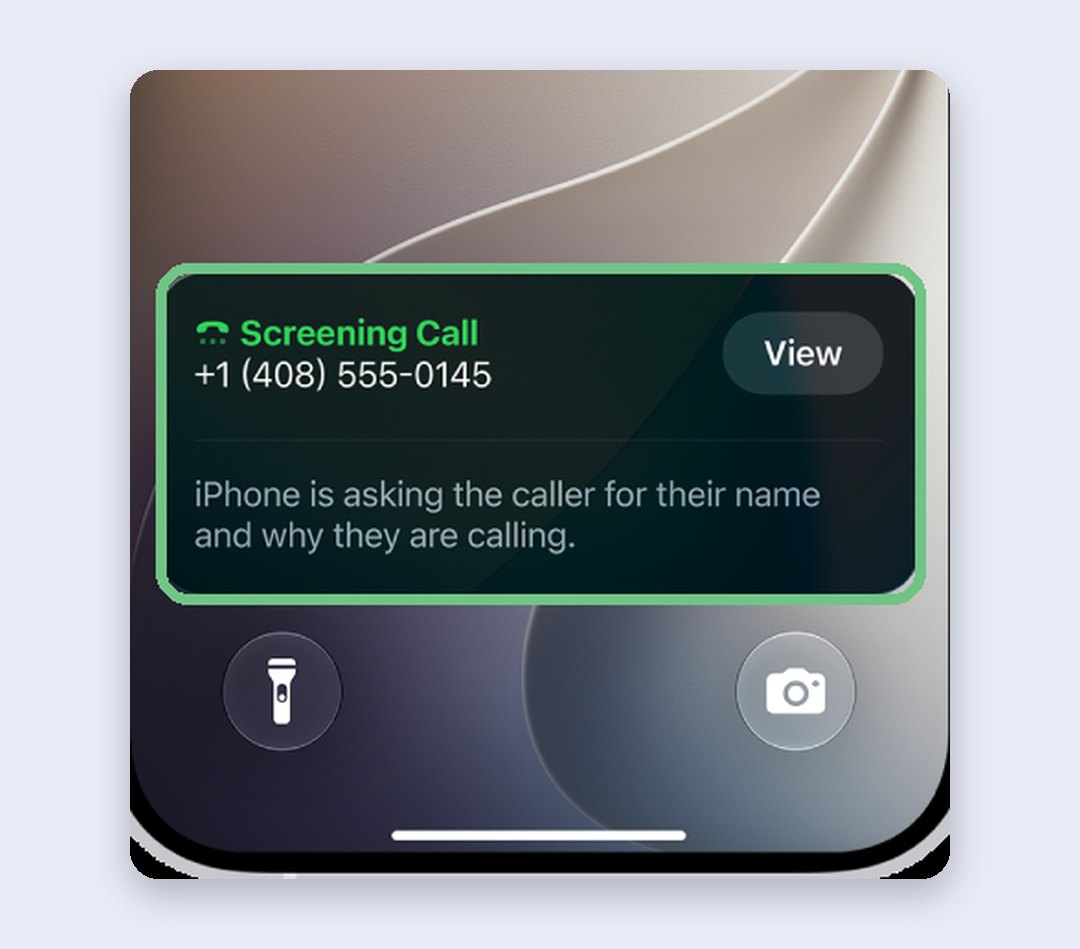
This is the setting that fixes the delivery problem, and it’s the one we’d use. With Ask Reason for Calling on, your iPhone answers a call from a number that isn’t in your contacts and asks the caller for their name and why they’re calling. Only then does it ring, with their answer on screen, so you can pick up or ignore it.
Two things to know first. It needs iOS 26 or later, which any iPhone 11 or newer can install. And it speaks English: Apple lists English (India) for Call Screening, not Hindi, and Siri talks to the caller in your iPhone’s language, so a caller who doesn’t speak English may just hang up.
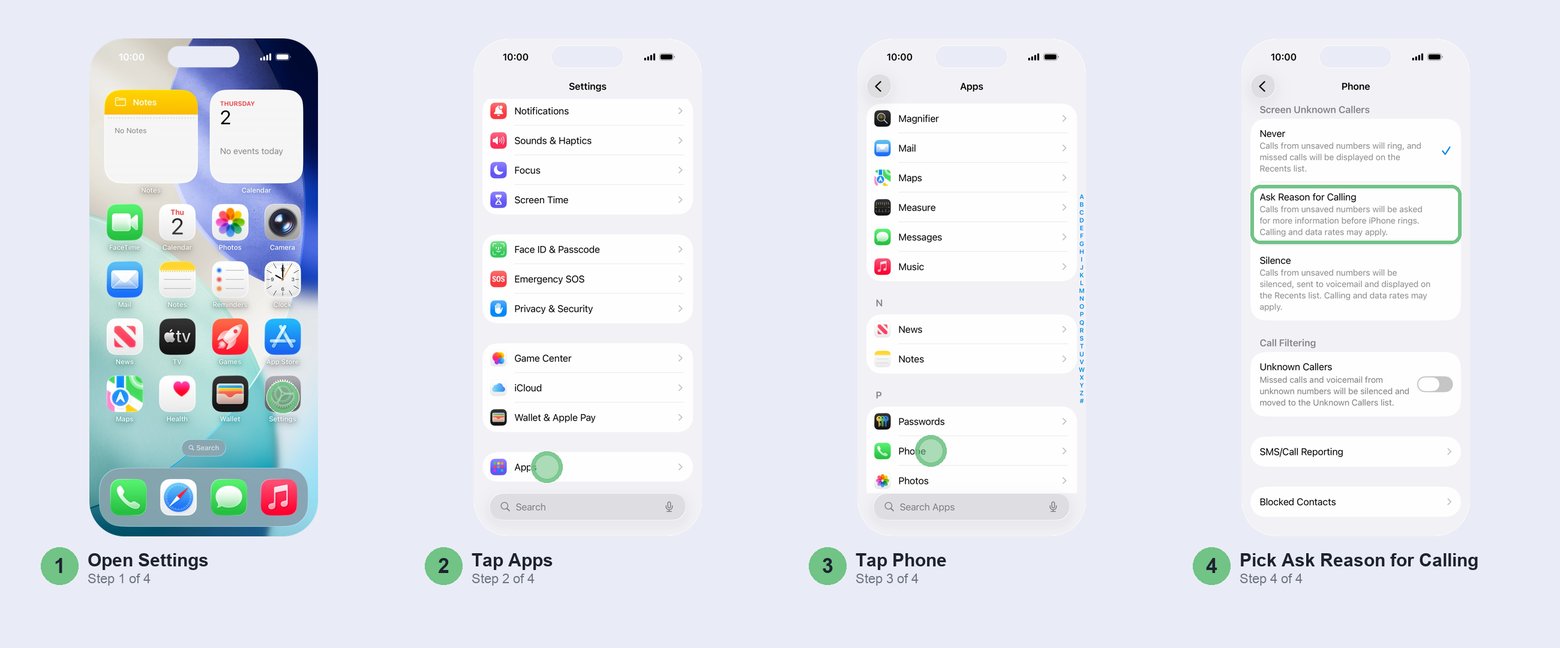
Open Settings > Apps > Phone, find Screen Unknown Callers and tap Ask Reason for Calling.
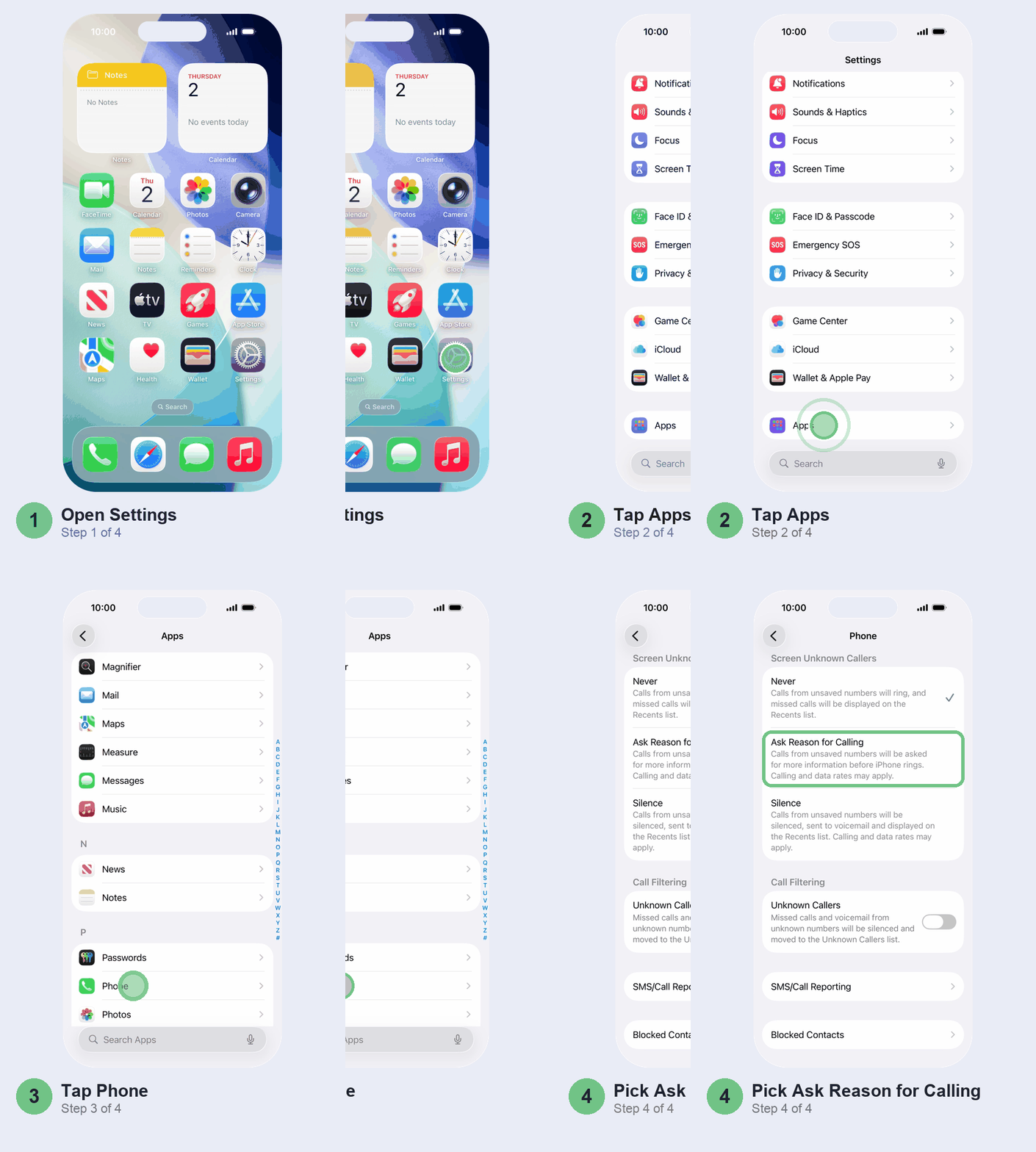
Delivery agents, drivers and the hospital front desk say who they are and get through. Robocalls can’t answer, and most telemarketers won’t bother. While screening runs, a Screening Call banner sits on your Lock Screen; tap View to follow along. Apple’s own page on unknown callers covers the other options.
Make it work for you:
- Save the numbers that matter. Anything in your contacts rings normally, so add your bank’s customer care and OTP call numbers, your kids’ school and your doctor. That way an automated bank call never sits in screening.
- Save the delivery agent’s number from the order SMS or app on delivery days, so an agent who doesn’t speak English rings through like any contact.
- Expect a gap when roaming. Screening is off while you’re roaming, and for 24 hours after you dial an emergency number.
On the same screen, under Call Filtering, turn on Unknown Callers if you’d like missed calls from unsaved numbers kept out of your main call list. Some carriers also add a Spam switch there; if yours does, turn it on to silence calls the carrier marks as spam or fraud.
Or silence them, but turn on Live Voicemail first
Silence is the blunter option on the same screen, and the one to use on an iPhone that can’t run iOS 26 (older versions have a simpler Silence Unknown Callers switch in the same place). Calls from unsaved numbers don’t ring at all; they go to voicemail and show up in your call list. On its own that’s how you miss a delivery: the agent’s call never rings, and they move on to the next parcel.
Live Voicemail closes that gap. Turn on Live Voicemail on the same Phone settings screen, and a silenced unknown caller goes straight to Live Voicemail without ringing first. Your iPhone shows what they’re saying as they speak, and you can tap Accept to pick up mid-message.
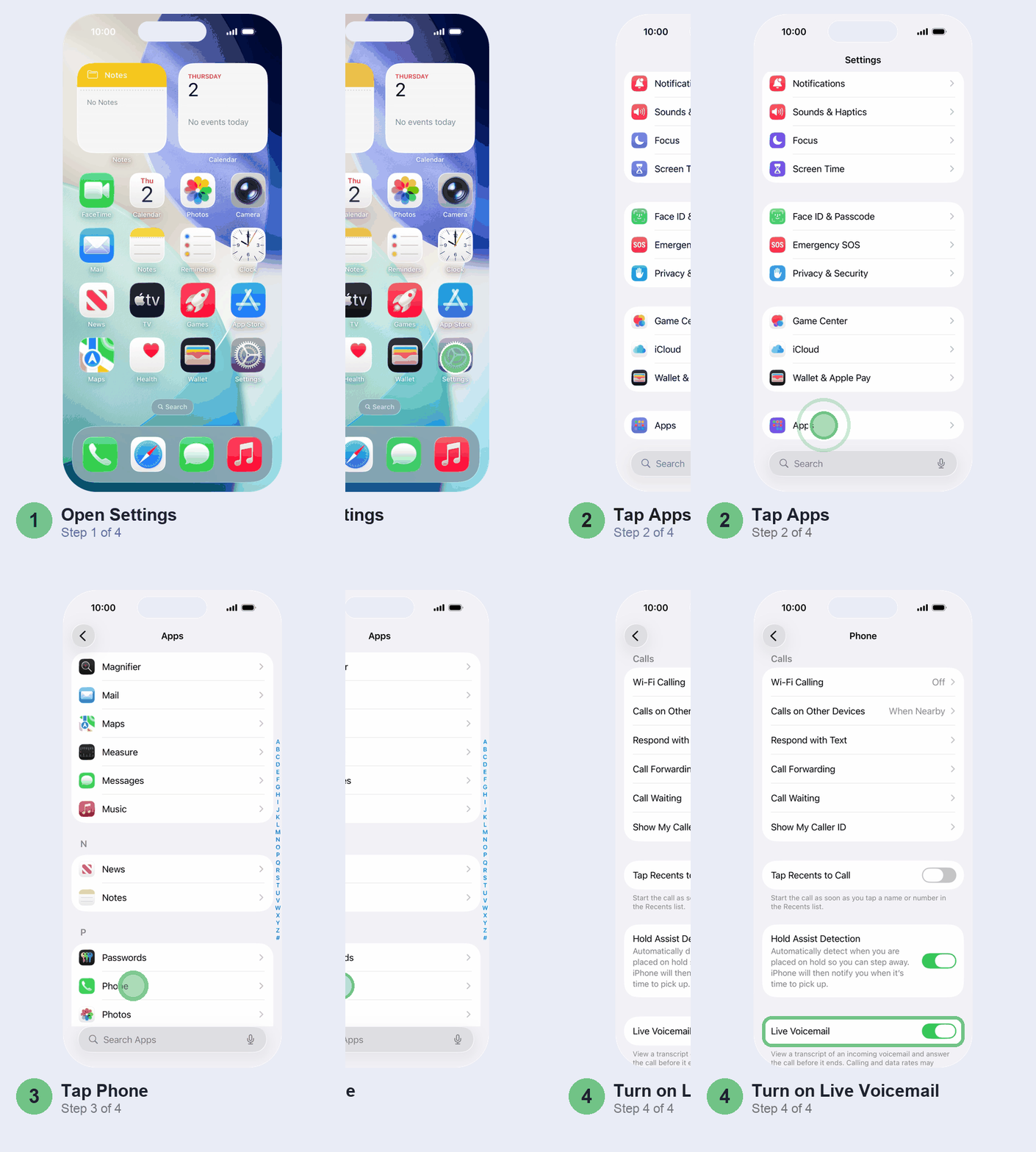
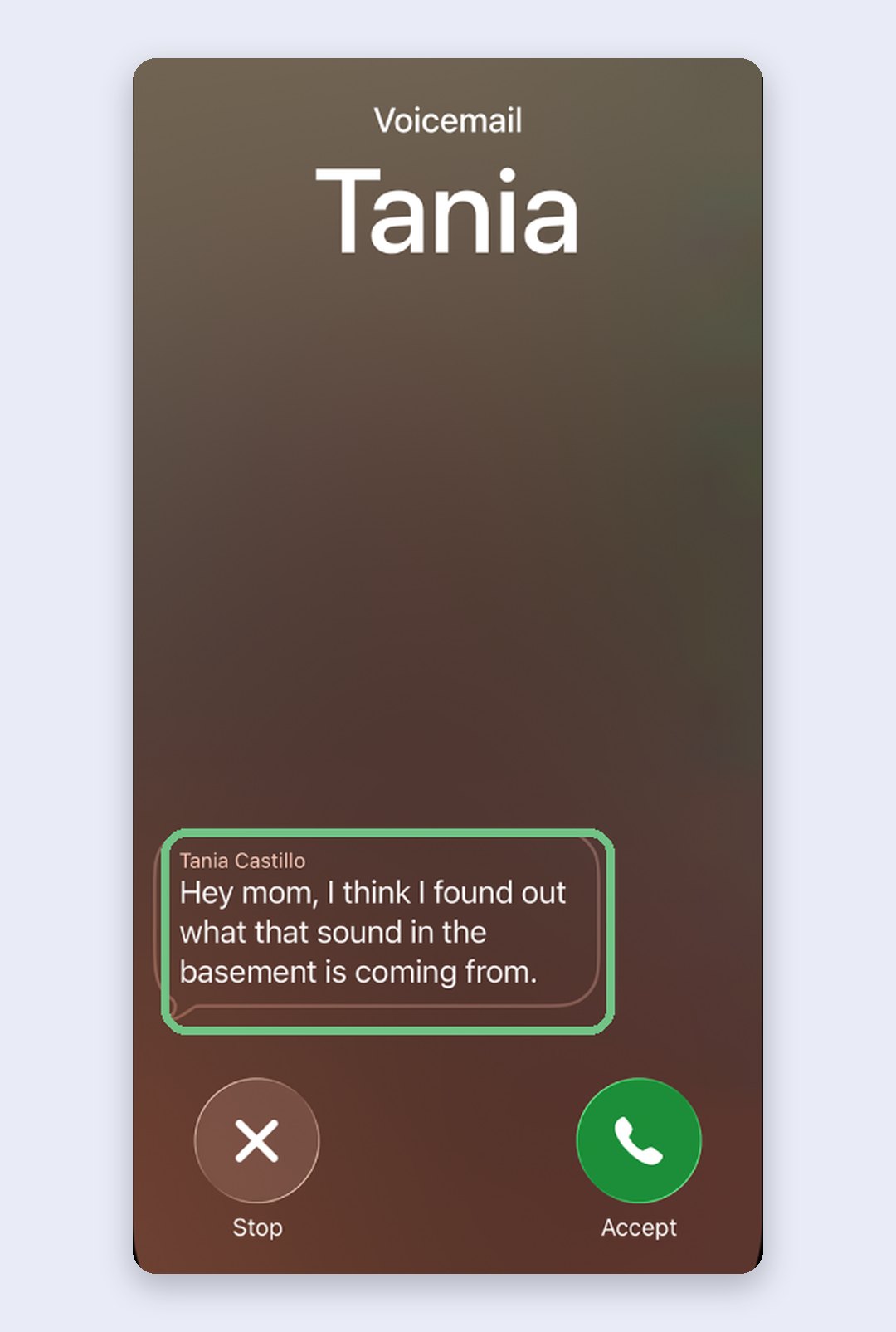
Apple lists English (India) for Live Voicemail, but it also says voicemail features depend on your carrier. If the switch isn’t there, a silenced call is just a missed call, which is one more reason to prefer screening. Calls your carrier identifies as spam skip Live Voicemail and are declined straight away. Silence plus Live Voicemail suits you if you’d rather glance at a transcript than hear a ring.
Report spam calls straight from your call list
Here’s the step most people skip. The TRAI DND app adds an SMS/Call Reporting extension to your iPhone, and once it’s on, reporting a spam call is a swipe in your call list instead of a typed complaint.
Install TRAI DND, open Settings > Apps > Phone > SMS/Call Reporting and select TRAI DND. Only one reporting app can be active at a time.
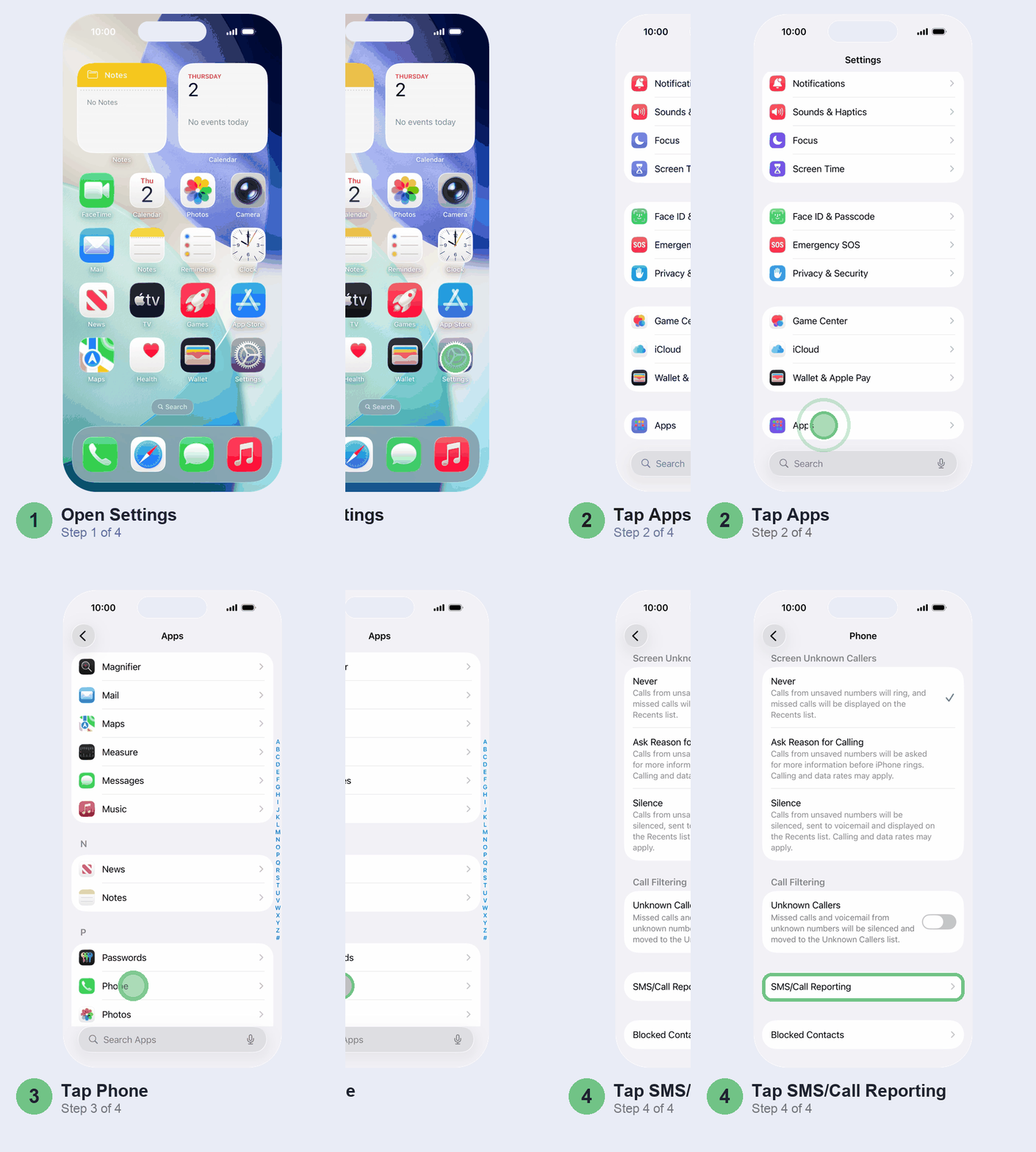
Now, when a spam call comes in, open the Phone app, swipe left on the call in Recents and tap Report. The app asks for a few details, then files the report.
Why bother? TRAI’s 2025 rules made complaints count. You don’t need DND registered first, you have seven days instead of three, and five complaints in ten days is enough for the carrier to act against the sender within five days.
Block the numbers that keep coming back
Some callers aren’t random: the same insurance agent, the same “collection” number, every day. Block them on the iPhone and they can’t ring you, message you or FaceTime you.
Open the Phone app and tap Calls (or Recents in the Classic layout). Tap the number; in Classic, tap the Info button beside it instead, because tapping the row calls them back. Then tap Block Caller (Block Contact for someone saved) and confirm.
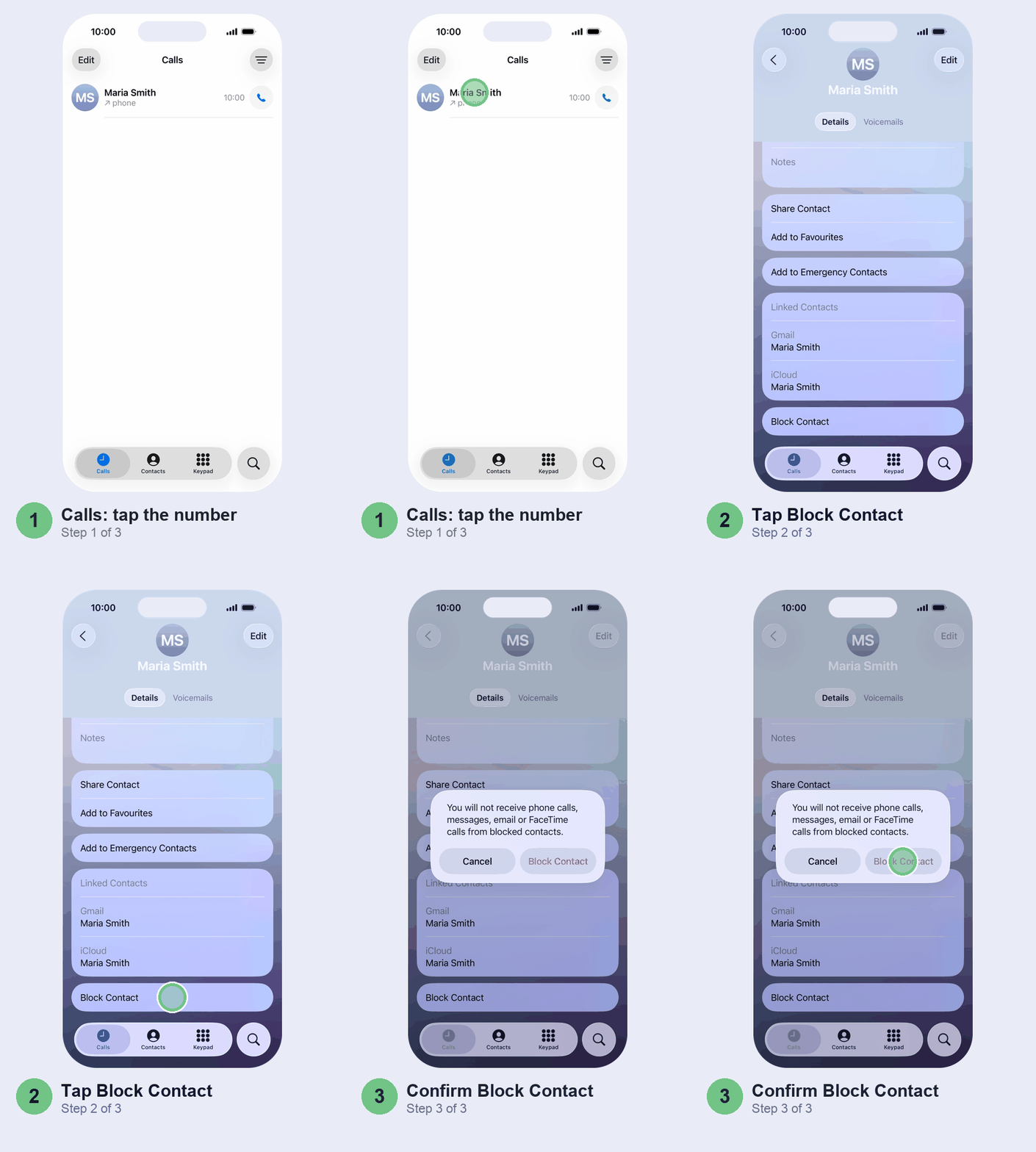
If your plan has voicemail, blocked callers can still drop one, which arrives silently, and nobody tells them they’re blocked. Blocked the wrong number? Unblock it in Settings > Privacy & Security > Blocked Contacts.
Truecaller on iPhone: pay for Premium or skip it
Truecaller is the first app many people install on a new iPhone. On iPhone, though, the useful parts are paid: spam identification, Caller ID and auto-blocking all need Premium. Premium costs ₹99 a month or ₹899 a year on the Indian App Store (checked October 2026). The free app lets you search a number by hand, with ads, and that’s about it. Its Caller ID needs iOS 18.2 or later.
Before you install, check the developer: the Indian App Store has lookalike “Truecaller” apps, and the real one is from True Software Scandinavia AB. The trade-off is privacy: by its own App Store label, Truecaller ties your name, number, email, rough location and searches to you, and can use your device data to track you across other apps.
If you do pay, turn on every Truecaller switch in Settings > Apps > Phone > Call Blocking & Identification, then switch on auto-blocking inside the app (Truecaller > Protect > Auto-block spam).
Our view: with DND, screening and your network’s labels doing the work, most people don’t need it. It’s worth ₹899 a year if you take lots of calls from unsaved numbers you need to identify, say for a small business.
Fraud call? Report it on Chakshu
A spam call wastes your time. A fraud call is after your money: fake KYC updates, a “CBI officer”, a courier “stuck in customs”, a threat to cut your SIM. Hang up, then report it, because DoT can check the number and have it re-verified or cut off.
Use the Sanchar Saathi app (from the Department of Telecommunications, on the App Store) or sancharsaathi.gov.in, open Chakshu and choose to report suspected fraud. Pick how it reached you (call, SMS or WhatsApp) and a category, add the number, date and time, and a screenshot if you have one. Do it within 30 days, the window DoT acts on.
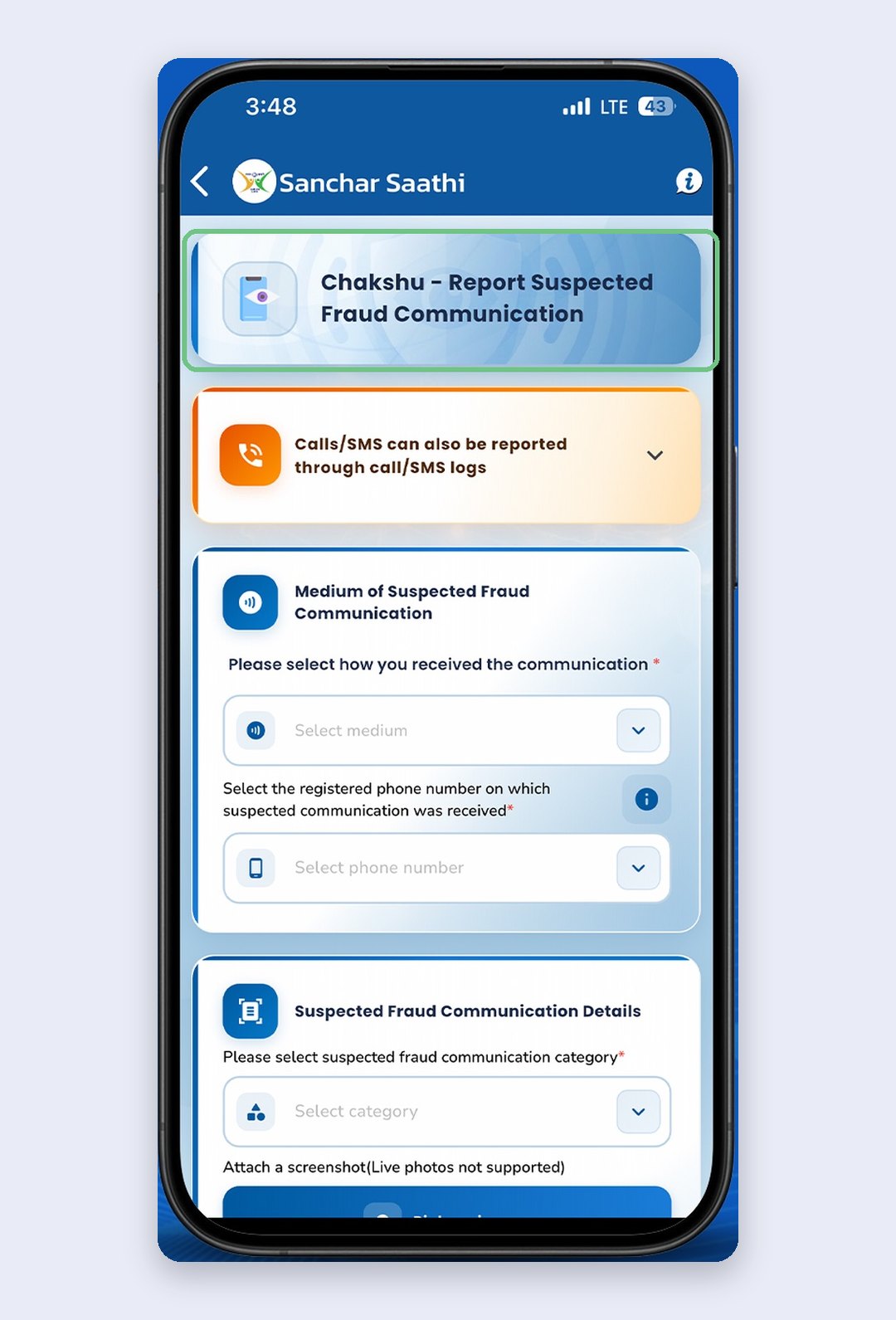
Chakshu is for suspected fraud, not for money you’ve already lost. If someone has taken money from you, call the cyber crime helpline 1930 or report it at cybercrime.gov.in straight away, and call your bank to freeze the account or card.
Spam texts are a separate fix. Our guide to an iPhone not receiving OTP SMS shows where your iPhone files filtered messages, so real OTPs don’t vanish with the junk.
Don’t bother with these
- Silence on its own. Pair it with Live Voicemail, or use screening.
- Free Truecaller for blocking. On iPhone the blocking is Premium, so the free app won’t stop a single call.
- Blocking telemarketers one by one. They switch numbers. Block repeat callers and let DND handle the rest.
Quick questions
How do I stop spam calls permanently on iPhone?
Nothing stops every call, but this gets close: full DND through 1909, Ask Reason for Calling in Settings > Apps > Phone, and blocking the numbers that keep calling. Report the rest through the TRAI DND app so the carrier can act.
Why isn’t the iPhone blocking spam calls?
It doesn’t block unknown numbers by default: turn on screening or Silence. Screening also pauses while you’re roaming and for 24 hours after an emergency call. And DND only stops registered telemarketers, not scammers on ordinary mobile numbers.
How do I block all 140 calls?
Turn on full DND. TRAI requires promotional calls to come from 140-series numbers, and if you’ve blocked a category through DND, you won’t get 140 calls from that category at all. Your iPhone can’t block a whole number series, so DND is the way to do it.
Is it safe to use Truecaller on iPhone?
It’s the genuine app if the developer is True Software Scandinavia AB. Privacy is the catch: it links your name, number, email, rough location and searches to you. If that bothers you, DND and Call Screening cover most of the job.
What happens if I silence unknown callers?
Calls from numbers not in your contacts don’t ring. They go to voicemail and appear in your call list. Turn on Live Voicemail so you see what they’re saying and can still answer, or use Ask Reason for Calling.
Why are my delivery calls getting blocked?
Usually because Silence is on under Screen Unknown Callers. Switch to Ask Reason for Calling so the agent can say who they are, or save the agent’s number while your order’s on the way.
Prefer to watch? Apple’s own short video shows Call Screening in action.
Which one cut your spam calls the most: DND, screening, or reporting? Tell us in the comments with your carrier, so other Jio, Airtel and Vi users know what works on their network.
Last updated: October 2026